
Transaction audit trail and free monthly backups that walk you into any audit prepared.
Free monthly backups, a complete activity history, and an online record you can access from anywhere. When the auditor calls, you're already done.
Full access for 14 days. The real product, your real deals, day one.
No credit card. No contract. We set it up with you — free.
G2 4.7/5 · Capterra 5/5 · 1,700+ brokerages
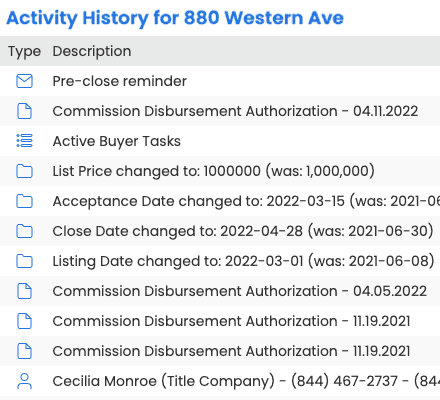
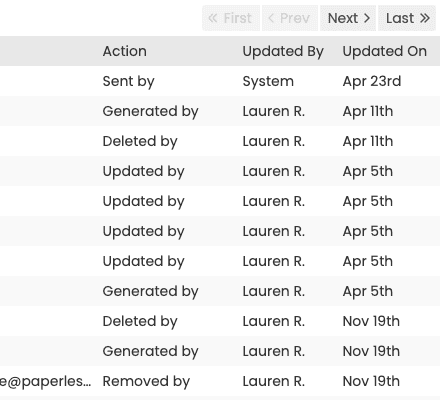
Every action, archived. Every file, recoverable.
Backups are vendor-neutral archives of your complete files, organised by transaction, readable without Paperless Pipeline. Download them any time. After you cancel, download your archive before your account closes.
- Free automated monthly backups
- Document review and required documents are covered on the document compliance page
- Self-serve download of historical archives
- Vendor-neutral archives in an open format you can keep locally
Everything for a deal, downloadable on demand.
Download a full backup of any transaction - all of its data - without waiting for the monthly run. Hand it to your auditor, or keep it for your own records.
- On-demand download of any individual transaction
- Free monthly backups of the whole account, organized by property address
- Complete review history and transaction activity history
- Vendor-neutral format you can open and keep anywhere
Controls your broker of record can sign off on.
Role-based access, a documented review workflow, and a full transaction activity history give your designated broker the controls regulators expect - without slowing the team down.
- Role-based access control across every object
- Document review workflow - admins mark each doc reviewed for accuracy and completeness
- Full transaction activity history - who did what, and when
- Designated broker dashboard for sign-off
Your account is usable on day one.
Most brokerages are fully operational in under a week, with free setup, free admin training, and free transaction import included on every plan.
Backups run themselves
Automatic monthly backups are generated for you — no scripts, no scheduled tasks for you to babysit.
Download on demand
Pull any historical archive in one click, and keep an off-site copy on your own systems.
On-demand transaction download
Download any transaction on demand — all of its data — without waiting for the monthly backup.
Sign-off dashboards
Designated brokers see exactly what was reviewed, by whom, and when.
Built for every role on the transaction.
Designated brokers
Walk into any audit prepared.
A complete document review and activity history on every transaction, plus on-demand downloads.
Compliance leads
Prove the right steps were followed.
A complete review and activity history shows who reviewed what, and when.
IT and security
Data you own and can take with you.
Free monthly backups in an open, vendor-neutral format, downloaded to your own storage.
Paperless Pipeline replaced my $35,000/year office manager for just $125/month. Over 14 years, I've saved more than $470,000, with flawless service and zero issues.
How Paperless Pipeline compares.
Backups and the audit trail are included on every plan. Plans start at $69/month, priced per transaction, not per user.
Questions, answered.
Still curious? Our team is one message away.
Are backups really free?
Yes - automatic monthly backups are included on every plan at no extra cost. Paperless Pipeline generates them for you each month, so there are no scripts to write and nothing to schedule or babysit. See what comes with each plan on our pricing page.
What format are the backups in?
Backups come in an open, vendor-neutral format you can read without Paperless Pipeline. Each monthly archive is organized by property address and contains your transactions' documents, so your records stay usable and portable even if you ever leave.
How often does Paperless Pipeline back up my data?
Automatically, once a month. The backup covers your company-wide transactions from the previous month - those created, closed, or expired - and lands ready for an admin to download and keep off-site for extra peace of mind.
Who can download the backups?
Master admins and users you grant the company-wide backup permission. It is meant for trusted admin staff and transaction coordinators, so you control exactly who can pull a full copy of your brokerage's records.
Can I download a single transaction without waiting for the monthly backup?
Yes - an admin can download any individual transaction on demand. This is ideal for handing a closed file to an agent or pulling one deal for review; Paperless Pipeline emails a download link within a few minutes, and the file contains all of that transaction's data.
What audit trail does Paperless Pipeline keep?
Paperless Pipeline records a complete Activity History on every transaction: every action logged, dated and attributed, so your broker has a clear, time-stamped trail of who did what. Document review and required documents are handled on the document compliance page.
How does Paperless Pipeline help us stay audit-ready?
By keeping your documents, review history, and key dates organized and accessible from anywhere. Brokers can mark documents reviewed, see what still needs attention, and pull a transaction's full history in seconds, so an audit becomes a download rather than a scramble. Explore the wider toolset on our features page.
What happens to my data if we cancel?
Your data is removed when you cancel, so download your backups before you go. Because backups are in an open, vendor-neutral format, the copy you keep stays fully usable on your own systems. If you are weighing a switch, our pricing page lays out what each plan includes.
Can a broker control who reviews and signs off on documents?
Yes - document review is permission-based, so only the right admins can mark a document reviewed. Pairing review permissions with per-location access gives your designated broker a clean way to confirm every file was checked, with the review recorded in the transaction's history.
Try Paperless Pipeline with your own deals.
Spin up your account in minutes and run your real workflow end-to-end.
14 days, full access·No credit card·Free setup with you
Closing 250+ transactions a year? Request a call