
Real estate transaction reports that make your pipeline answerable.
Powerful search and filters turn your transaction history into a live dataset. Build custom views, export anything, and answer broker questions before they're even asked.
Full access for 14 days. The real product, your real deals, day one.
No credit card. No contract. We set it up with you — free.
G2 4.7/5 · Capterra 5/5 · 1,700+ brokerages
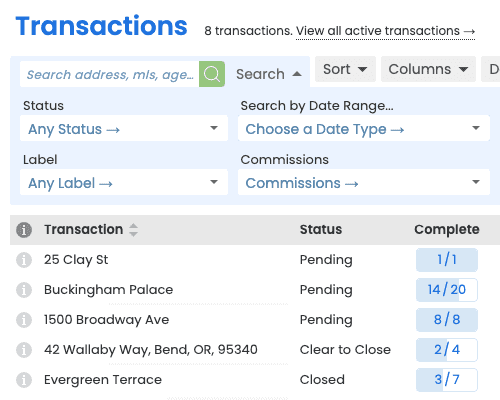
Slice your pipeline the way you actually work.
Filter by agent, office, status, price band, or any custom field. Save the view, share it with your team, and watch it update in real time. Pin a saved view to your dashboard so leadership can self-serve it any time. The Commission Module also emails agents their monthly production automatically.
- Filter on any field, including custom fields
- Save and share views with your team
- Stack filters with AND/OR logic
- Pin top views to your dashboard
Production and commission reports with the Commission Module.
Add the Commission Module to turn closed deals into financial and production reporting - agent production, company performance, and top producers.
- Agent production, volume, and units (Commission Module)
- Comparative production across months and years
- Drill from company totals down to individual deals
- Downloadable financial reports by location, type, timeframe, or agent
Export your data, your way.
Download any report as a spreadsheet or PDF, then connect Paperless Pipeline to 1,500+ apps through Zapier when a transaction's status changes.
- CSV, XLSX, and PDF exports
- Zapier integration triggered by transaction status changes
- Push status updates to CRMs, accounting tools, and notifications
- Single sign-on via the SSO API
Your account is usable on day one.
Most brokerages are fully operational in under a week, with free setup, free admin training, and free transaction import included on every plan.
Filter
Combine any field with AND / OR logic - including custom fields you defined.
Save and share
Pin the view to your dashboard and share it with the people who need it, so leadership can self-serve the latest.
Run an instant report
Closing in 30 Days, Expiring in 14 Days, or Overdue Closings in one click - no setup required.
Export anywhere
CSV, XLSX, and PDF downloads, or connect onward tools through Zapier.
Built for every role on the transaction.
Executive leadership
Real-time visibility into pipeline health.
Saved views and instant reports replace stale weekly slides - what is closing, what is expiring, and what is overdue.
Office managers
See which agents need coaching.
Per-agent production and conversion views, drill-downs included.
Finance
Trustworthy data for commission and tax.
Exports to spreadsheet, plus Zapier hand-offs to the accounting tools your team already uses.
He'll say 'How many transactions have we closed this year?' - I can give him that in two seconds off the reports menu. That is a real time saver.
How Paperless Pipeline compares.
Reporting is included on every Paperless Pipeline plan, from $69/month, priced per transaction, not per user. Unlimited users, offices, and saved views. Commission and agent production reports require the Commission Module, an add-on from $49/month.
Questions, answered.
Still curious? Our team is one message away.
What kinds of reports can I pull?
You can answer almost any pipeline question instantly, from ready-made views to fully custom ones. Paperless Pipeline ships with instant reports like Closing in 30 Days, Expiring in 14 Days, Overdue Closings, Date Range, Checklist Status, and Recent Status Change, and you can build your own by searching and filtering across any transaction field. Every result can be downloaded as a spreadsheet. See all features.
How do I build a custom report?
Use Advanced Search to combine the exact criteria you want, then save it. Open the search area on the Transactions page, stack filters across any field or stat - agent, status, label, closing date, commissions entered, and more - and run it; the matching transactions become your report. Save that search as a shortcut so the report is one click next time. See pricing.
Can I report on custom fields we created?
Yes. Any custom field you add becomes filterable, sortable, and exportable just like the built-in ones. When you turn on an optional field or create a custom date, list, or text field, it appears on transactions, shows on coversheets, and is included in your downloaded spreadsheet reports - so you can slice your pipeline by the data that matters to your brokerage.
Can I save a report and reuse it?
Yes. Save any search, filter, and sort as a shortcut and it re-runs on a single click. Shortcuts live in your personal My Shortcuts list on the Home, Transactions, Tasks, and Unreviewed pages, so the views you rely on are always one click away. You can keep as many as you need.
How do I get the data out for finance or a spreadsheet?
Download any result as a spreadsheet in seconds. After you search and sort, click Download and choose just the displayed columns or every transaction field, and Paperless Pipeline exports the list to a spreadsheet you can open in Excel or Google Sheets. Admins can download these transaction spreadsheets; individual transactions can also be downloaded on their own.
Can I connect Paperless Pipeline to my other tools?
Yes - through Zapier and Paperless Pipeline's native integrations. Zapier connects Paperless Pipeline to a wide range of apps so a change in a deal can push data to your CRM, accounting tool, or notifications, and Paperless Pipeline also offers native connections including a calendar feed and single sign-on. For numbers headed to a spreadsheet or BI tool, the simplest route is a spreadsheet download. See more features.
Where do commission and production reports come from?
Financial and production reports come from the Commission Module. Add it on and you unlock around a dozen downloadable reports covering agent production, company performance, and top producers - by location, transaction type, timeframe, or agent - plus automated monthly production emails. The core plan already includes the Commission Summary and Comparative Production views for company-wide production at a glance. See commission features.
Can I report across multiple offices?
Yes. Leadership sees the whole company and can report across every location, while each office sees only its own. Locations keep offices, teams, and departments separate day to day, but reports can roll up company-wide so you can compare performance across the whole brokerage. Explore multi-office features.
Is there a limit on how much history I can report on?
No - every transaction in your account stays queryable, with unlimited storage on every plan. There are no archive tiers and no separate fee to reach older deals; closed, expired, and canceled transactions are simply hidden from the default list to reduce clutter and surface again when you search or filter for them. See pricing.
Try Paperless Pipeline with your own deals.
Spin up your account in minutes and run your real workflow end-to-end.
14 days, full access·No credit card·Free setup with you
Closing 250+ transactions a year? Request a call