
Run every office from one account, without losing local control.
Spin up locations with their own admins, checklists, and settings. Each office sees only what it needs while leadership keeps a clean, company-wide view.
Full access for 14 days. The real product, your real deals, day one.
No credit card. No contract. We set it up with you — free.
G2 4.7/5 · Capterra 5/5 · 1,700+ brokerages
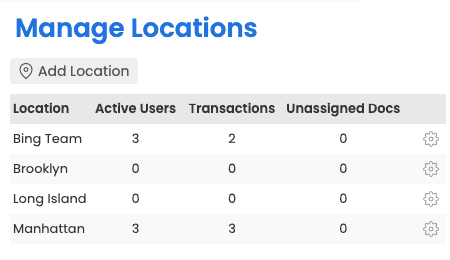
Local autonomy. Global oversight.
Office admins manage their own world. Company leadership pulls reports and reviews compliance across every location from a single dashboard.
- Per-location admins, checklists, and settings
- Company-wide reporting in one click
- Granular permissions for every role
- A primary admin per office, so agents always know who to reply to
Sales teams, ops pods, and departments, all modeled.
Group agents under any office, each with its own admin and shared transaction visibility. Grant a user access across multiple locations as your structure changes.
- Nested teams under each office
- Shared inboxes and shared transaction visibility
- Grant users permissions across multiple offices
- Per-agent commission splits, tiers, and caps in the Commission Module
Add a location in minutes.
Stand up a new office, assign its admin, apply your checklist templates - operational the same day. Brokerage groups running separate accounts can use the Enterprise Portal for centralised account creation, login-as, and combined monthly billing.
- Apply your standard checklist templates to a new office
- Bulk-import an acquired team's agents via CSV roster
- Company-wide reporting with drill-down to any office
- Unlimited offices and users on every plan
Your account is usable on day one.
Most brokerages are fully operational in under a week, with free setup, free admin training, and free transaction import included on every plan.
Add an office
Spin up a new location and assign an admin in under five minutes.
Inherit or override
Start from company defaults, or fully customize checklists and permissions per office.
Group into teams
Group agents under an office with their own admin and shared transaction visibility.
Report across
Leadership pulls company-wide rollups in one click, with drill-down to any office or team.
Built for every role on the transaction.
Multi-office brokerages
Local autonomy without losing global oversight.
Office admins own their world; the C-suite sees the whole picture.
Franchises
Consistency with local flexibility.
Company-default checklists and settings, with per-office overrides for what actually varies.
Acquirers
Onboard a new brokerage in days.
Add the office, bulk-load agents from a CSV roster, apply your checklists - operational the same day.
Eliminated one full-time admin role, saving $2,000-2,500 per month.
How Paperless Pipeline compares.
Multi-office management is included on every Paperless Pipeline plan, from $69/month, priced per transaction, not per user. Unlimited offices and unlimited users. The Commission Module is an add-on from $49/month.
Questions, answered.
Still curious? Our team is one message away.
How many offices, teams, or locations can we set up?
As many as you need - locations are unlimited on every plan. A location usually represents a physical office, but you can also use one for a team, a department, or any group that benefits from its own separate transactions, users, and permissions. Plans start at $69/month and are priced per transaction, not per user, so adding an office does not change your bill. See what is included on our pricing page.
Does adding more offices or users cost extra?
No. Plans start at $69/month and are priced per transaction, not per user. Users and locations are unlimited, so adding an office or hiring ten agents does not change your bill. Check the details on our pricing page.
Can each office have its own admin?
Yes - every location can have its own admin who manages that office. You give a user the "View all transactions" permission for a location to make them a location admin, and you can set a primary administrator per office so all daily task reminders and closing notifications come from the right person for that location.
Can offices run completely different checklists and settings?
Yes - checklists, document names, labels, and statuses are configured per location. One office can run a full residential checklist while another runs a commercial one, and each office only sees what applies to it. Explore the wider toolset on our features page.
Can leadership see across every office at once?
Yes - master admins get a company-wide view and can report across all locations. Office admins stay focused on their own location, while leadership pulls reports that roll up every office, so you keep local autonomy without losing the big picture.
How are permissions handled across multiple locations?
Permissions are granted per user, per location, so access stays tightly scoped. A user can be an admin in one office, an agent in another, and have no access to a third - all from one account. This keeps each office's transactions and documents visible only to the people who should see them.
What is the difference between a master admin and a location admin?
A master admin has every permission across the whole account; a location admin only manages the offices they are assigned to. Master admins handle account-wide actions like billing, plan changes, and setting up statuses, while location admins review documents, manage checklists, and oversee the transactions in their own offices.
Can we add agents in bulk when we open or acquire an office?
Yes - you can bulk-load agents from a spreadsheet roster instead of adding them one by one. Send us a roster with each agent's name, email, role, and office, and we upload it for you; agents do not get a welcome email until you choose to send it, so you control the timing of onboarding.
Can an agent move between offices or teams without losing their history?
Yes - you can update which locations a user belongs to without recreating their account or losing past work. Their existing transactions and activity stay intact, so reorganizing teams or moving an agent to a new office does not mean starting over.
Try Paperless Pipeline with your own deals.
Spin up your account in minutes and run your real workflow end-to-end.
14 days, full access·No credit card·Free setup with you
Closing 250+ transactions a year? Request a call