
Real Estate Transaction Management Features
Everything after the contract, in one place.
Checklists. Deadlines. Documents. Compliance. Commissions. Reporting. Paperless Pipeline is real estate transaction management software that keeps the work connected around the transaction from open to close.
Set the process once. See what’s missing. Keep every deal moving.
14 days free · No credit card · Free setup
Jump to
Also available
Feature pages: Checklists · Critical Dates · Reporting · Documents & Compliance · Offices & Teams · Integrations · Agent Experience · Audit & Backups · Commissions
Real estate transaction checklists that apply themselves.
Build checklist templates once. Paperless Pipeline applies them based on the transaction's type, side, location, and status.
- Branch by deal type, side, location, or stage
- Reusable task blocks shared across templates
- Different lists for residential, commercial, lease, and referral
- Add a pending checklist when the status changes; keep the listing checklist on the file
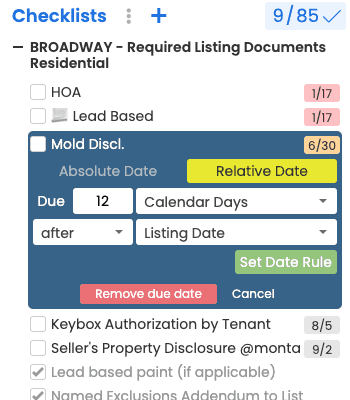
Transaction due dates that calculate themselves.
Stay on track and in compliance with due dates that calculate themselves. Anchor any task to the listing date, acceptance date, option period, contingencies, or closing, and let Paperless Pipeline do the math.
- Anchor to listing, acceptance, option, contingency, or closing
- Offset in business or calendar days
- Cascade updates across every linked task
- Skip weekends and configurable holidays
- A daily email of overdue tasks and what's due today and tomorrow
- One-way calendar sync to the calendar you already use
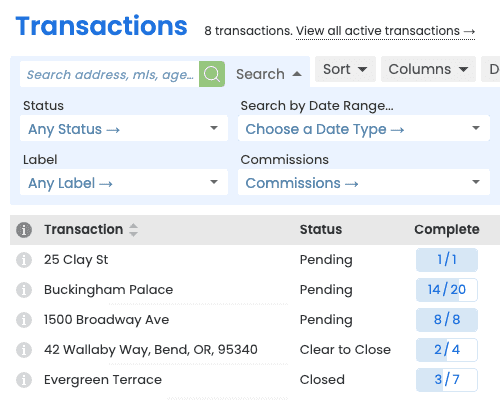
Real estate transaction reports that make your pipeline answerable.
Search and filter transactions by agent, office, status, or date. Save searches for reports you use often, and download the results as a spreadsheet.
- Filter on any field, including custom fields
- Save and share views with your team
- Stack filters with AND/OR logic
- Pin top views to your dashboard
- Comparative Production report: sales volume, average sale and transactions closed, by agent, office or company
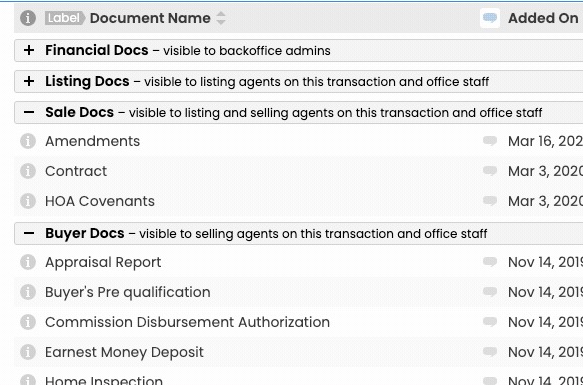
Real estate document compliance reviewed before every close.
Set the documents every deal needs. Paperless Pipeline flags what is missing, routes each file to the right reviewer for sign-off, and keeps a clean audit trail - so if the department of real estate calls, you already have the file.
- Per deal type, side, and location - required files defined once
- Missing required docs are flagged for review before sign-off
- Comment on a document, and the comment can be emailed to the agent on the deal automatically
- Every review logged, dated and attributed in the transaction history
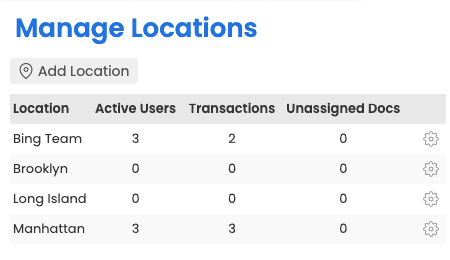
Run every office from one account, without losing local control.
Spin up locations with their own admins, checklists, and settings. Each office sees only what it needs while leadership keeps a clean, company-wide view.
- Per-location admins, checklists, and settings
- Company-wide reporting in one click
- Granular permissions for every role
- A primary admin per office, so agents always know who to reply to

Real estate software integrations connected to thousands of apps.
Move stages in your CRM when a listing goes under contract. Push closings to your accounting tool. Fire custom notifications. A status change in Paperless Pipeline is the only action you need.
- A status change in Paperless Pipeline pushes your transaction data out automatically
- Thousands of apps reachable through Zapier
- Native integrations with Follow Up Boss, DocuSign, Dropbox Sign and Dropbox file import
- Every transaction and user gets a MailDrop email address; forwarded attachments land in Unassigned Docs on the right transaction
- No-code setup in Zapier - no developers required
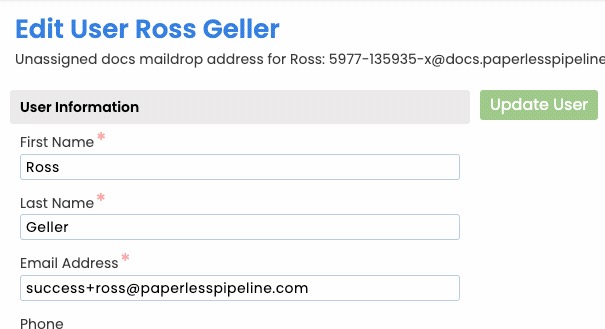
Real estate agent experience: simple enough that your least technical agent logs in.
Fine-tune every profile so the system fits your tech-forward agents and your tech-averse veterans alike. Adoption stops being a battle.
- Per-user simplification of every screen
- Role-based defaults that ship out of the box
- Hide advanced settings from agents who don't need them
- Permissions set per user, so each agent sees only what they need
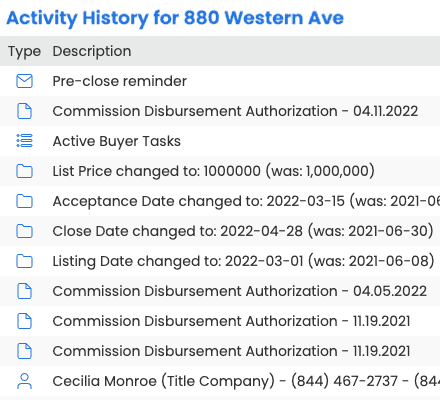
Transaction audit trail and free monthly backups that walk you into any audit prepared.
Free monthly backups, a complete activity history, and an online record you can access from anywhere. When the auditor calls, you're already done.
- Free automated monthly backups
- A complete Activity History on every transaction, with every action logged, dated and attributed
- Self-serve download of historical archives
- Vendor-neutral archives in an open format you can keep locally

Real estate commission management math that doesn't end in errors.
Tiered plans, caps, fees, referrals, team splits, escrow-to-brokerage flows. Paperless Pipeline runs the math every time, generates the CDA, and shows each agent their net - without a calculator, a hand-typed worksheet, or a Friday afternoon recalculation.
- Tiered splits with cap-based tier transitions
- Per-deal, per-month, and per-anniversary fees
- Referral fees, mentor splits, and team overrides
- Plans inherit from a template; override per agent only when you need to
Commissions run on the optional Commission Module add-on, from $58/month.
See how the Commission Module works9
core features, fully integrated
4.6M+
transactions managed since 2009
1,700+
active brokerages
Free
guided setup - account setup, admin training, and transaction import
Figures as of July 2026. Source: Paperless Pipeline account data.
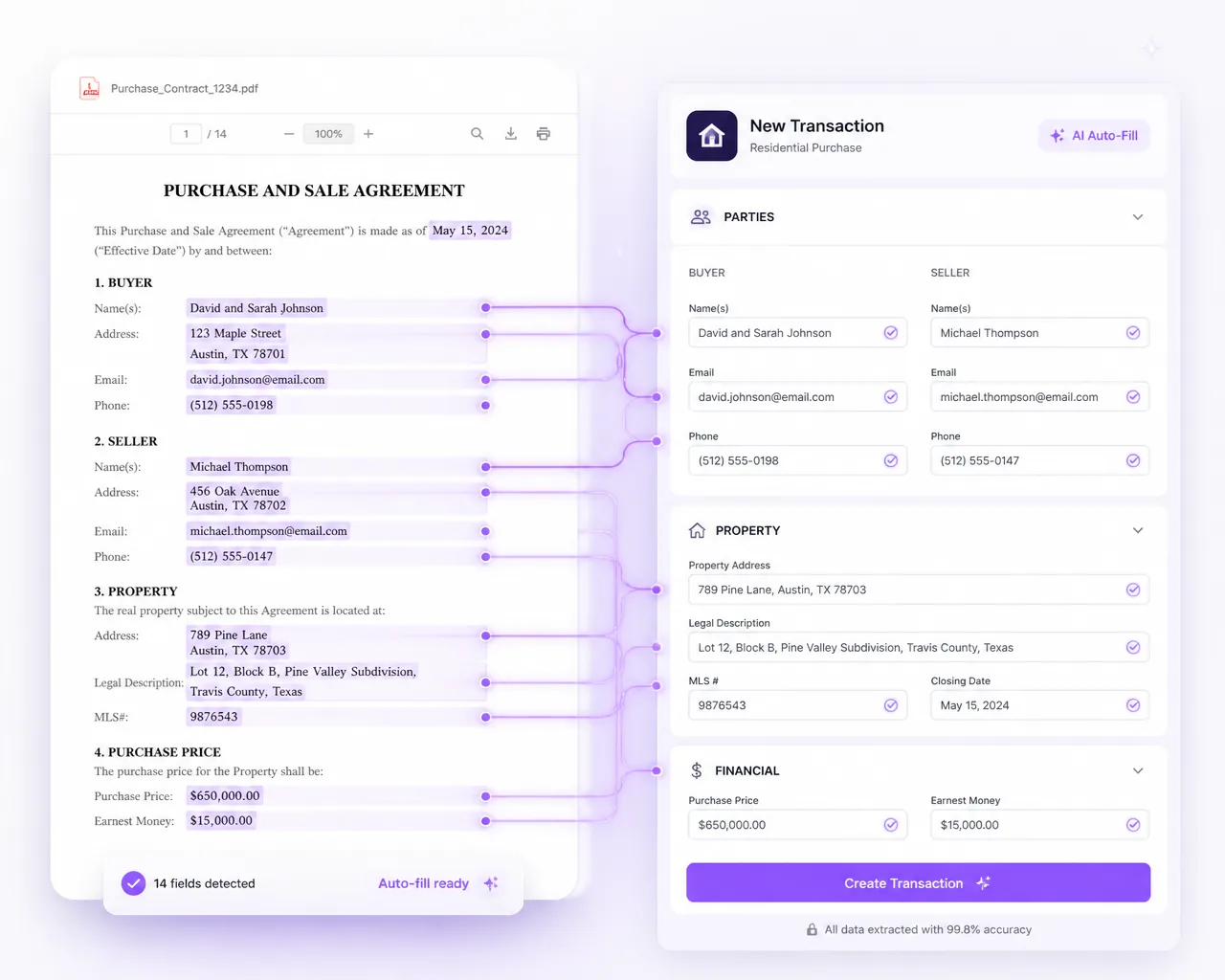
Pipeline AI reads the contract and fills in the transaction.
Upload a signed contract and Pipeline AI Create fills in the new transaction for you: the property address, parties, price and dates, with each value linked to the place in the document it came from. Dates the contract states as rules, such as 10 days from acceptance, are worked out with your company's business holidays counted. You review it and save.
When terms change, drop in the amendment and AI Update marks every change, old value against new. You decide what to apply.
Every account includes monthly Pipeline AI credits at no charge, and one credit reads one contract. A master admin turns Pipeline AI on and can set a monthly spending limit.
See how Pipeline AI works
Pipeline eSign sends from the transaction and files the signed copy.
Pipeline eSign, the built-in signing option, is a separate add-on. Send a request from the transaction and its details fill in.
- Signed copies file themselves. The signed copy returns to the right transaction, ready for review.
- No account to sign. Signers open a secure email link on any device.
- Tracked from the file. Check status, send reminders or cancel at any time.
- Billed by use. Set a monthly limit and pay in blocks of 10 requests, with no per-user fees and no contract.
Already on DocuSign or Dropbox Sign? Connect it instead.
See how Pipeline eSign worksTransaction emails that keep agents, title and lenders updated.
Every message goes out from the transaction, so it stays with the file.
- Templates. Save your regular updates as templates, with autofill tags for the deal's details.
- Anyone on the deal. Email documents and notes to agents, co-op agents, title, escrow or the closing attorney.
- Scheduled. Write an update now and schedule it to send later.
The free trial comes loaded with 50 ready-made email templates.
See how updates reach everyoneHow Paperless Pipeline compares with seat-based software.
Most differences come down to what the software charges for, and how much commitment it requires.
| Paperless Pipeline | Typical seat-based softwareExact pricing and terms vary by vendor. | |
|---|---|---|
| What drives your bill? | Transaction volume | User / seat count |
| Users | Unlimited | Often plan-dependent |
| Add an agent | $0 | May increase your bill |
| Commitment | Month-to-month | Varies by vendor |
| Setup | FreeIncludes account setup and admin training. | Varies by vendor |
| Commissions | Optional Commission ModuleSplits, caps, fees, CDA generation, statements. | Availability and pricing vary |
Your roster can grow without your software bill growing with it.
Paperless Pipeline prices around the transactions your brokerage actually manages, not how many people need access.
See pricingWhat brokers say about Paperless Pipeline.
“With my previous brokerage, I used up to five different tools to manage transactions. Now I only use Paperless Pipeline.”
“The checklists are the source of truth inside of Paperless Pipeline. We love these. These are great for compliance.”
“Even the least computer-savvy agents have grown to love it.”
G2 4.6/5 and Capterra 4.8/5 (10 reviews), as of October 2026. More from brokers.
Transaction Management FAQs
Everything brokerages ask before switching to Paperless Pipeline.
What is real estate transaction management software?
It is back-office software brokerages use to run every deal from listing to close in one place - documents, checklists, key dates, compliance and reporting. Paperless Pipeline gives each transaction a single virtual folder, so brokers, admins, transaction coordinators and agents always know what is done, what is due and what is missing.
What features should transaction management software have?
Look for checklists and key dates that apply themselves by deal type, document review with an audit trail, reporting, and integrations with your CRM and e-signature tool. Check that you can export your own records, and how the bill moves as you add agents. Paperless Pipeline covers each of these.
How do transaction checklists work in Paperless Pipeline?
Checklists apply themselves automatically based on the type of deal, the side (listing or buying), the location and the current status. You build a checklist template once and Paperless Pipeline attaches the right tasks to each new transaction, so nothing slips between listing and close.
Can due dates be calculated automatically?
Yes. Set the dates that matter once - listing date, acceptance date, option period, contingency dates, closing - and Paperless Pipeline calculates every task due date from them. You can count due dates in business days or calendar days, and agents and admins instantly see what is due today, overdue and coming up.
How does Paperless Pipeline help with compliance and audits?
It keeps a complete, time-stamped history of every document and action on a transaction. Brokers get instant in-app and email alerts when a new document is uploaded for review, and document review history gives you an auditor-friendly trail. You can let an auditor view transactions directly in Paperless Pipeline, or download them in a couple of clicks.
Can I separate different offices, teams or departments?
Yes, using Locations. Each office or team sees only its own transactions, with its own admin, agents and checklist settings, while company leadership sees everything and can pull reports across the entire company.
How many users can I add?
Every plan includes unlimited users, unlimited locations and unlimited storage. Add admins, brokers, support staff and full or part-time agents at no extra cost - you pay for the number of new transactions you start each month, not per seat. See pricing.
What can Paperless Pipeline integrate with?
Paperless Pipeline connects to thousands of apps through Zapier, triggered by a simple transaction status change - move a lead stage in your CRM when a listing goes under contract, push financials to your accounting system when a deal closes, or fire custom notifications. It also works with DocuSign and Dropbox Sign for signing, Follow Up Boss, CSV transaction import, and one-way calendar sync.
Does Paperless Pipeline include real estate forms?
No. Paperless Pipeline is not a forms company. Agents fill in contracts and disclosures in the forms tool or MLS they already use, then upload, email or e-sign the finished documents into the transaction. From there, documents are reviewed like any other file.
Is my data backed up, and can I export it?
Yes. Paperless Pipeline prepares free monthly backups automatically, and you can download and keep them locally any time. Your data stays yours in an open, vendor-neutral format, so you are never locked in.
Does it work on mobile?
Yes. Paperless Pipeline runs in any browser and works on PCs, Macs, tablets and phones, so agents and admins can review documents, check tasks and manage transactions from anywhere.
Can I run reports on my transactions?
Yes. Powerful search and filters give you instant, custom views and reports - Closing in 30 Days, Expiring in 14 Days, Overdue Closings, by date range, by checklist status or by recent status change - so the data you need is always a click away.
How much does transaction management cost?
Pricing is based on your monthly production - the number of new transactions you start in a month - not the number of users. Plans start at $69/month with a 450+ plan for high-volume brokerages, no setup fees and no annual contract. Start with a 14-day free trial, no credit card required. See pricing.
Which Paperless Pipeline features cost extra?
Two are optional add-ons. The Commission Module, from $58/month, adds splits, caps, fees, agent net statements and auto-generated CDAs. Pipeline eSign is billed in blocks of 10 signature requests, with no per-user fees. Everything else on this page comes with every plan, and every account includes monthly Pipeline AI credits at no charge.
How long does setup take, and is training included?
Getting started is free and guided. Setup includes free account setup, free admin training and free transaction import, so your locations, users, statuses, labels and checklist workflows are ready before you go live.
How is Paperless Pipeline different from a shared drive like Dropbox or Google Drive?
A shared drive stores files; it does not run deals. Paperless Pipeline adds the things a brokerage actually needs - automatic checklists, calculated due dates, a compliance review trail, reporting and commissions - purpose-built for real estate transactions. See how Paperless Pipeline compares.
Everything on this page comes with every plan except the optional Commission Module, from $58/month, and Pipeline eSign, a separate add-on billed in blocks of 10 requests. Plans start at $69/month, priced on the new transactions you start each month, not per user. Unlimited users, offices and storage. No setup fees, no contracts.
Try every feature with your own deals.
Spin up your account in minutes and run your real workflow end-to-end.
14 days, full access·No credit card·Free setup with you
Closing 250+ transactions a year? Request a call