
What Is a CDA in Real Estate?
The Commission Disbursement Authorization, explained in plain English, plus the workflow brokerages use to generate and send one in minutes.
Try it free for 14 days, full access, unlimited users, no credit card.
CDA, defined
A CDA (Commission Disbursement Authorization) is a document a real estate brokerage sends to the title company, escrow company, or closing attorney handling a transaction. It authorizes and instructs them on how to disburse the commission: who gets paid, and how much. The brokerage prepares and signs the CDA; the closing party uses it to pay out commission funds correctly at closing.
~8%
of US real-estate transactions
1,700+
brokerages
2009
in real estate back offices since
4.6 · 4.8
G2 · Capterra (as of October 2026)
Who issues a CDA, and who needs one
The brokerage issues the CDA. It is prepared on the brokerage side (typically by an admin or transaction coordinator) and carries the brokerage's authorized signer name and signature. The recipient is whoever is disbursing funds at closing: the title company, the escrow officer, or the closing attorney. They rely on the CDA as their instruction for paying out the commission on that specific transaction. To check the split figures before they go on a CDA, use the real estate commission calculator.
What's on a CDA form
Here's a real CDA generated by Paperless Pipeline, with the parts labeled.
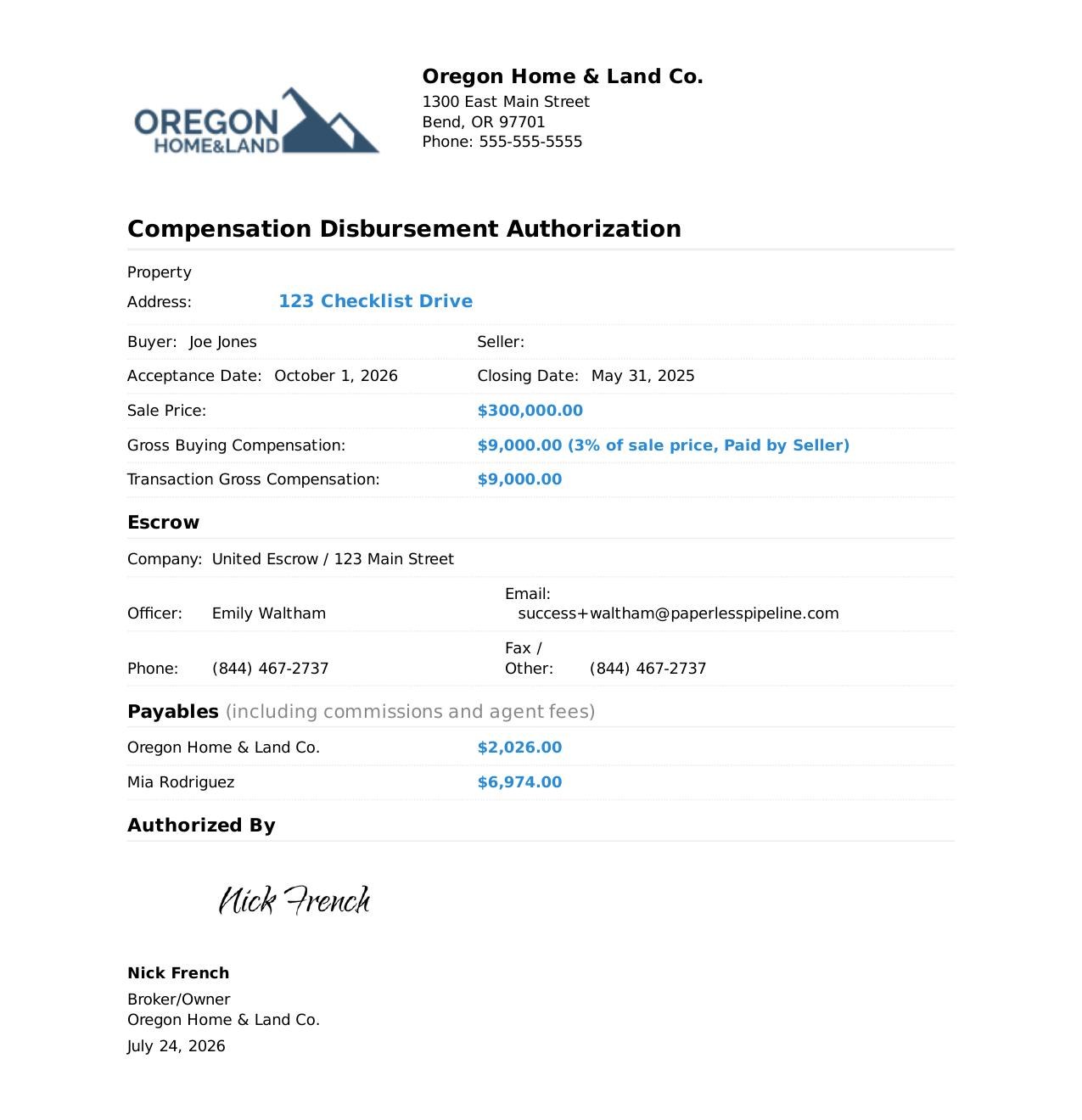
Sample document. Brokerage, agent, property, and dollar amounts shown are demo data for illustration only.
Brokerage header
logo, address, and phone for the brokerage issuing the authorization
Property and transaction details
property address, buyer and seller, acceptance and closing dates, and sale price
Gross compensation
the commission on the transaction, shown as a percent of sale price and who pays it
Escrow / title contact
company, closing officer, email, phone, and fax for the party disbursing funds
Payables
line-by-line amounts owed to the brokerage and to each agent, including agent fees
Authorized signer
the signature, name, title, and date of the person at the brokerage authorizing it
If you searched for a "CDA form," here's the honest answer: a CDA is not a standard fill-in-the-blank state form. It is generated by the brokerage from the actual commission breakdown on the transaction. That's why fillable-PDF templates fall short: the numbers live in your commission records, not in a blank form. In Paperless Pipeline, the CDA is generated automatically when you manage commissions on a transaction, so the document always matches the real disbursement.
How brokerages generate a CDA (the actual workflow)
- 1
Set up once per office.
Admin users configure CDA settings under Admin / Settings, then Manage Locations, then the gear icon next to an office and "Commission & CDA Settings." That's where you upload the signature image, set the signer name and contact details, add an optional franchise fee (percentage or flat amount), and write any custom CDA instructions. A preview shows how the customizations will appear on the document before you generate one.
- 2
Manage commissions on the transaction.
The CDA is automatically generated when you manage commissions on a transaction. No separate drafting step, no re-typing numbers into a template.
- 3
Check the agent's numbers as you go.
While disbursing, clicking in the agent box in the Broker / Agent Commission disbursement section shows the agent's year-to-date production: current commission percent, closed transactions, total sales volume, total units (sides) closed, commissions and fees paid to the brokerage, and agent gross and net commission. Totals run from the agent's start-date anniversary, or calendar year if no start date is set.
- 4
Email it to closing.
From inside the transaction, click Note/Email, add the title, escrow, or attorney contact (drag a stored contact's email into the address field, or type it), use a saved message template or write the email, select the commission disbursement authorization in the docs section, and click Send Email. The CDA goes out as an attachment.
Why this page instead of a template mill
Most results for this query are either off-topic or a thin blog post with a download link. This page answers the question, shows what's actually on a CDA, and hands you the workflow: generate it from real commission data, sign it once in settings, and email it to closing without leaving the transaction. That's the difference between a document you fill out and a document your system produces.
CDA questions, answered
What does CDA stand for in real estate?
CDA stands for Commission Disbursement Authorization. It is the document a brokerage sends to the title company, escrow company, or closing attorney instructing them how to disburse the commission on a transaction.
Who prepares and signs the CDA?
The brokerage prepares the CDA and it carries the brokerage's authorized signer name and signature. In Paperless Pipeline, admins set the signer name and signature once per office in Commission & CDA Settings, and every generated CDA includes them.
Who receives the CDA?
The party disbursing funds at closing: the title company, escrow officer, or closing attorney. They follow the CDA's instructions when paying out commission for the transaction.
What information is on a CDA?
A CDA includes the disbursement instructions for the transaction's commission, the brokerage's authorized signer name and signature, brokerage contact details, a franchise fee if applicable, and any special instructions the brokerage adds.
How do I send a CDA to the title company?
In Paperless Pipeline, open the transaction, click Note/Email, add the title, escrow, or attorney contact, select the commission disbursement authorization in the docs section, and click Send Email. The CDA is delivered as an attachment.
Does Paperless Pipeline have a free trial?
Try it free for 14 days, full access, unlimited users, no credit card. Trials include up to 9 transactions, and logging back in automatically extends your trial by 7 days. Plans start at $69/mo with unlimited users.
Stop retyping commission numbers into templates
Paperless Pipeline generates the CDA automatically when you manage commissions, and emails it to closing from inside the transaction.
Try it free for 14 days, full access, unlimited users, no credit card.
See pricing, from $69/mo with unlimited users