
Pipeline AI: An AI Transaction Coordinator for Real Estate
Say goodbye to data entry.
Pipeline AI reads contract documents and fills in transaction fields for you. You just review and save.
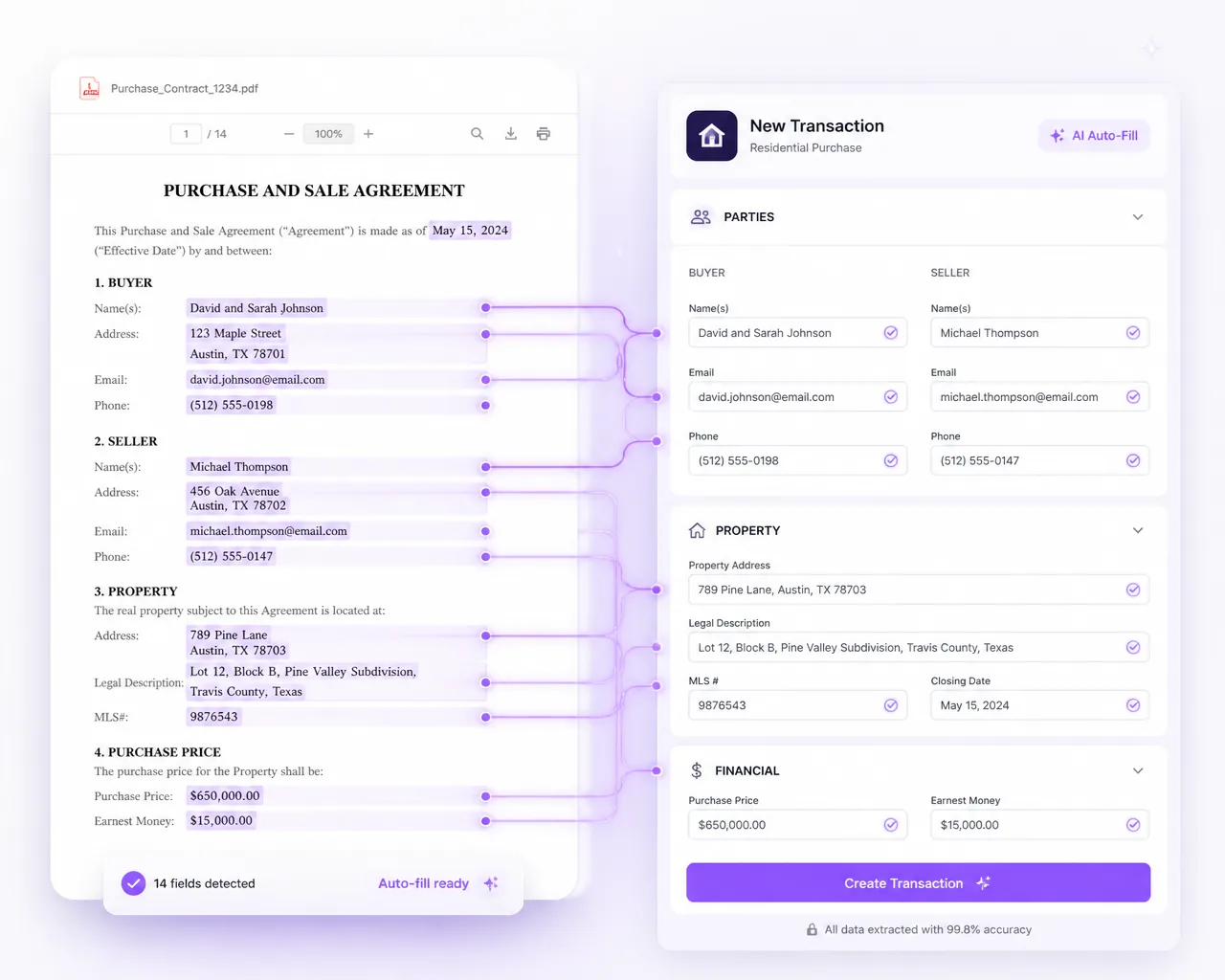
Before Pipeline AI, someone had to copy the details from each contract.
A signed contract on one screen, empty typing fields on the other. You read, you type, you calculate the dates, you hope you don't miss a zero. Then the next one lands and you start over.
Pipeline AI takes over the typing for you.
Two operations. No setup. You stay in control of every save.
New deal in hand
AI Create
Drop the contract, AI fills the new transaction, citing every value back to the source document. You review and save.
- Property address, parties, price, dates, pulled straight from the contract
- Business holidays counted; key dates calculated for you
- Every field shows its source so you can verify in one click
When an agent emails a contract in, you get notified, Pipeline AI builds the file, and once you accept it, the checklist takes over.
Terms just changed
AI Update
Drop the new doc, AI marks every change side by side. You decide what to apply.
- Amendments, addenda, and repair agreements compared with the existing transaction
- Old value vs. new value, line by line
- Apply changes selectively, nothing moves without your click
Apply a new closing date and every task due date linked to it moves too.
Drop in a doc → AI fills it in → you review and save.
How contracts and paperwork reach the file.
Paperwork reaches Paperless Pipeline the way your team already sends it, so agents never have to learn a new screen.
- Drop in the contract. A signed contract PDF goes into AI Create to start a new transaction. An amendment, addendum or repair agreement goes into AI Update.
- Agents forward it by email. Every transaction gets its own MailDrop address, so agents forward contracts straight from their inbox or phone, with no login on their side.
- Lenders and title send straight in. Lenders and title companies can email the same address. Attachments land in the transaction's Unassigned Docs, ready to name and assign.
- Signed copies come back on their own. Send for signature through DocuSign, Dropbox Sign or Pipeline eSign, and the signed copy returns to the same transaction.
- Any other tool works too. If an e-sign tool, an inbox or an office scanner can email a PDF, send it to the MailDrop address and it lands on the right file.
Five ways Pipeline AI helps with contract entry.
- 01
Save time.
Create transactions in minutes.
- 02
Less retyping.
Review fields filled from the contract instead of copying them by hand.
- 03
Save the math.
Dates calculated, business holidays counted.
- 04
Save labor.
Serve more agents without more staff. Every plan includes unlimited users, so adding an agent or coordinator never changes your price.
- 05
More time to review.
Check the contract details before you save the transaction.
What Pipeline AI does, and what stays with your team.
Pipeline AI does the typing. Your team does the checking and makes every decision, and nothing moves without your click.
| Step | What Pipeline AI does | What your team does |
|---|---|---|
| A new signed contract | Reads it and fills in the property address, parties, price and dates, citing every value back to the contract | Checks each value against its source in one click, then saves |
| Key dates | Works out dates the contract states as rules, such as 10 days from acceptance, with your business holidays counted | Confirms the dates before the transaction is saved |
| An amendment, addendum or repair agreement | Compares it with the transaction and marks every change, old value against new | Decides which changes to apply |
For example, an inspection due 10 business days after a Monday acceptance lands on the Monday two weeks later, or later still if one of your company's business holidays falls in between. Your coordinator handles exceptions, not data entry, and can serve more agents without more staff.
After you save, checklists and due dates take over.
Once you save, the transaction Pipeline AI filled in runs on the rest of Paperless Pipeline, all the way to close.
- Checklists apply themselves. The right checklist is added by deal type, side, location and status, and each task goes to the right admin, coordinator or agent.
- Due dates calculate from the key dates. Every task due date is set in business or calendar days. When a contract date moves, every linked deadline moves with it.
- Reminders go out before anything is late. A daily email lists what is overdue, due today and due tomorrow, and overdue tasks are flagged on the Home and Tasks pages.
- Missing documents are flagged. Required documents that are missing are flagged for review before sign-off, and every review is logged in the transaction history.
- Every open file in one view. The Tasks page and calendar views show what is due today, this week and this month across every transaction, filtered by office, agent or status.
- Commissions from the same record. With the Commission Module, from $58/month, splits are calculated on the same transaction, and CDAs and agent statements are made for you.
More on checklists, due dates, document review and commissions.
Keep agents, title and lenders updated from the file.
Every message goes out from the transaction, so it stays with the file, and your templates fill in the details Pipeline AI took from the contract.
- Save the updates you send on every deal as templates, with autofill tags for the deal's details and any key date you flag.
- Email documents and notes to agents, co-op agents, title, escrow or the closing attorney from your stored contacts.
- Write an update now and schedule it to send later.
- Comment on a document during review and the comment can be emailed to the agent automatically.
The free trial comes loaded with 50 ready-made email templates.
Built for coordinators, brokers and teams.
Paperless Pipeline is built for brokerages, teams and transaction coordinators with many agents or offices. Each role gets something different from a file that starts with the contract.
Transaction coordinators
Add every agent you work for as a user and start each new file from the signed contract. Pin checklist tasks to roles such as TC, agent, broker or lender, and they are routed when the transaction is created.
Brokers and compliance reviewers
Review compliance across every agent, not just one desk. Every change shows who made it and when, so the activity history is ready for any audit.
Teams
Assign contract-driven due dates and tasks to the right people, and see the paperwork status of every deal. Pull reports by pending commissions, closed deals and lead source.
Commercial brokerages
Upload a commercial contract and Pipeline AI Create builds the transaction. One dashboard shows every active deal, filtered by broker, coordinator, transaction type, office, stage or status.
Brokers already using Pipeline AI.
20, 25 minutes to create a transaction. Less than five now. It's so fast.
, A transaction coordinator in early access
I'm a happier leader because we're solving problems, not doing busy work.
, A broker in early access
Those little tedious things free up the mental space to not make the human errors. That's the value to me.
, A transaction coordinator in early access
Paperless Pipeline itself has been in live production since 2009, with 1,700+ active brokerages and 4.6M+ transactions managed.
What Pipeline AI costs.
Every Paperless Pipeline account includes monthly Pipeline AI credits at no charge. One credit reads one contract and creates or updates the transaction from it. A master admin turns Pipeline AI on and can set a monthly spending limit.
Paperless Pipeline is priced on the new transactions you start each month, not per user, and a transaction started with AI Create counts the same as one created by hand. Plans start at $69/month for up to 5 new transactions a month. At 8 new transactions a month, the Up to 10 plan is $140/month; at 20, the Up to 25 plan is $190/month.
Every plan includes unlimited storage, free setup and no contract. See full pricing.
Try Pipeline AI on a deal you already know.
The free 14-day trial gives full access with no credit card, includes Pipeline AI Create and Update, and holds up to 9 transactions.
- 1
Load a deal you know cold, so you can check the system against something you can verify.
- 2
Drag in its contract PDF. Pipeline AI builds the file, and you check every value before you accept it.
- 3
Run that one deal all the way to close. Everything after that is repetition.
- 4
Still deciding after 14 days? Log back in and the trial extends another 7 days.
Setup help is free, and the getting started guide lays out the first 30 days.
Common questions about Pipeline AI.
Still curious? Our team is one message away.
What is an AI transaction coordinator?
An AI transaction coordinator is software that does the contract data entry a transaction coordinator would otherwise type by hand. It reads the signed contract, fills in the transaction and works out the key dates, and a person reviews every value before it is saved. Pipeline AI does this inside Paperless Pipeline and shows the source of each value, so you can check it in one click.
Does Pipeline AI replace my transaction coordinator?
No. Pipeline AI takes over the typing, and your coordinator keeps the work that needs a person. Pipeline AI reads the contract, fills in the transaction and marks the changes in amendments. Your coordinator checks each value, decides which changes to apply and handles the exceptions, so one coordinator can serve more agents without more staff.
Does Pipeline AI work with my other tools?
Pipeline AI is built into Paperless Pipeline, so the transaction it fills is the same file that holds your checklist, documents and due dates. Paperless Pipeline connects natively to Follow Up Boss, DocuSign, Dropbox Sign and Dropbox, and to thousands of apps through Zapier. Through Zapier, a Closed status can create the bill in QuickBooks with the address, close date and commission fields already filled in. See all integrations.
Which deadlines can Paperless Pipeline track from the contract?
Any task can be anchored to the listing, acceptance, option, contingency or closing date, or to a custom date field, and counted in business days, calendar days, or calendar days due on a business day. Business-day counting skips weekends and your company's holidays. Flag a date as a Key Date and it shows on the transaction coversheet, syncs to your calendar and can be used in email templates.
How long does it take to start using Pipeline AI?
Pipeline AI needs no setup: drop in a contract and it fills in the transaction. A new Paperless Pipeline account is usable on day one, and most brokerages are fully running in days. Setup, admin training and transaction import are free on every plan, and your open deals can be imported by CSV.
Where is the contract data kept?
With the transaction, in your Paperless Pipeline account. Every plan includes unlimited storage, and files are kept on a rolling 10-year basis while the account is active. Every account also gets free monthly backups of every transaction, document and note, downloadable in an open format (PDFs, CSV and original file types), so the data stays yours.
Does Paperless Pipeline work on a phone?
Yes. Paperless Pipeline runs in the web browser on PCs, Macs, tablets, iPhone and Android phones, so there is nothing to install. You can pull up a deal, review documents and upload files from your phone, and new features reach every user as soon as they are released, with no updates to download.
Tomorrow morning, the next contract lands.
Stop re-typing them. Bring your team into Pipeline AI today.