
Real estate document compliance reviewed before every close.
Set the documents every deal needs. Paperless Pipeline flags what is missing, routes each file to the right reviewer for sign-off, and keeps a clean audit trail - so if the department of real estate calls, you already have the file.
Full access for 14 days. The real product, your real deals, day one.
No credit card. No contract. We set it up with you — free.
G2 4.7/5 · Capterra 5/5 · 1,700+ brokerages
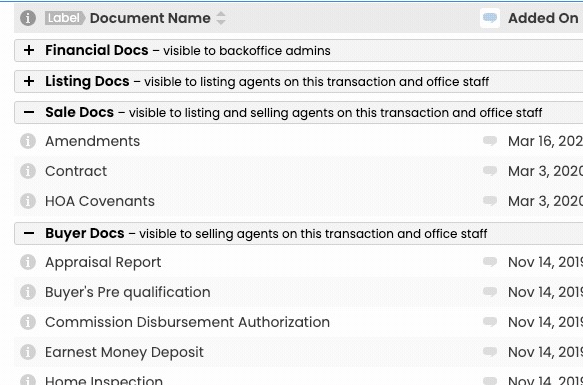
Figures current as of July 2026.
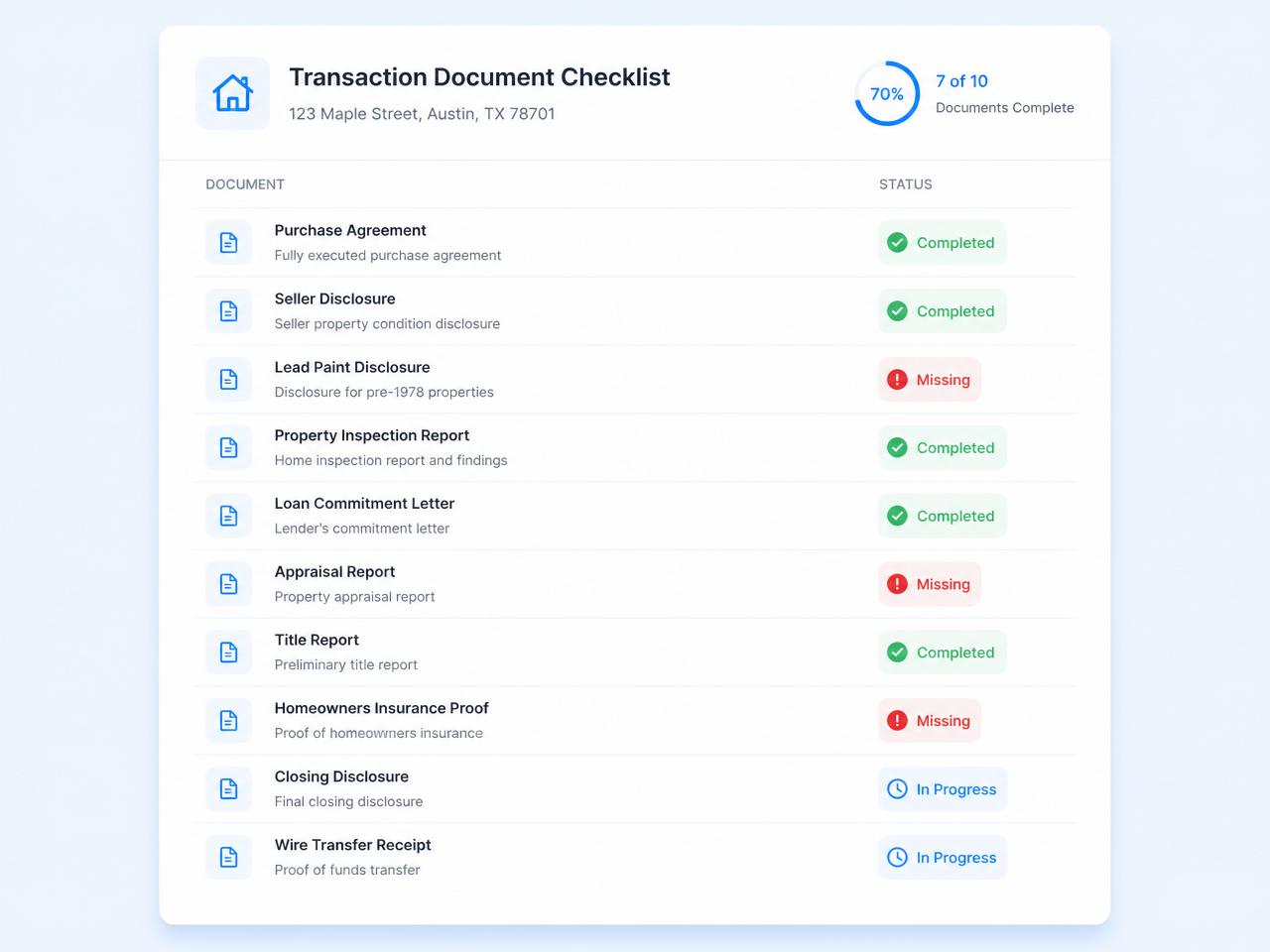
Required documents, reviewed before sign-off.
Mark which files every deal type requires. Paperless Pipeline flags any that are missing and routes them for review, so a deal does not quietly reach close with gaps.
- Per deal type, side, and location - required files defined once
- Missing required docs are flagged for review before sign-off
- Reject with a reason - the agent gets a precise re-upload prompt
- Every review logged, dated and attributed in the transaction history
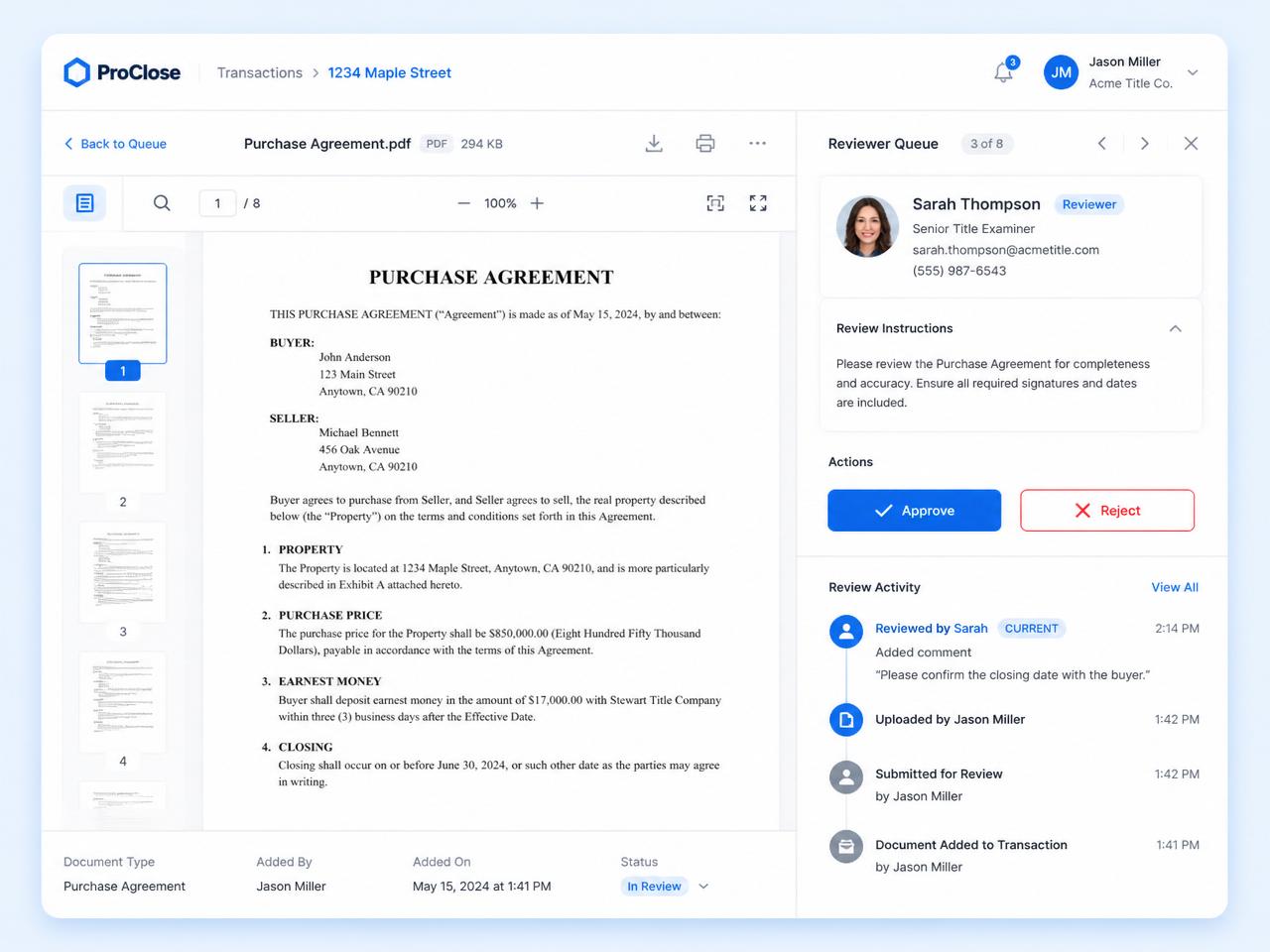
Checks and balances so you're not just clicking approved.
Reviewers open each file inline, sign off in a dedicated queue, and every decision is logged, dated, and attributed in the transaction history.
- Inline PDF preview so reviewers check each file without downloading it
- Smart Checklists line each document up against its matching task
- Per-reviewer queue so nothing sits in someone else's inbox
- Every approval, rejection, and re-upload attributed and time-stamped
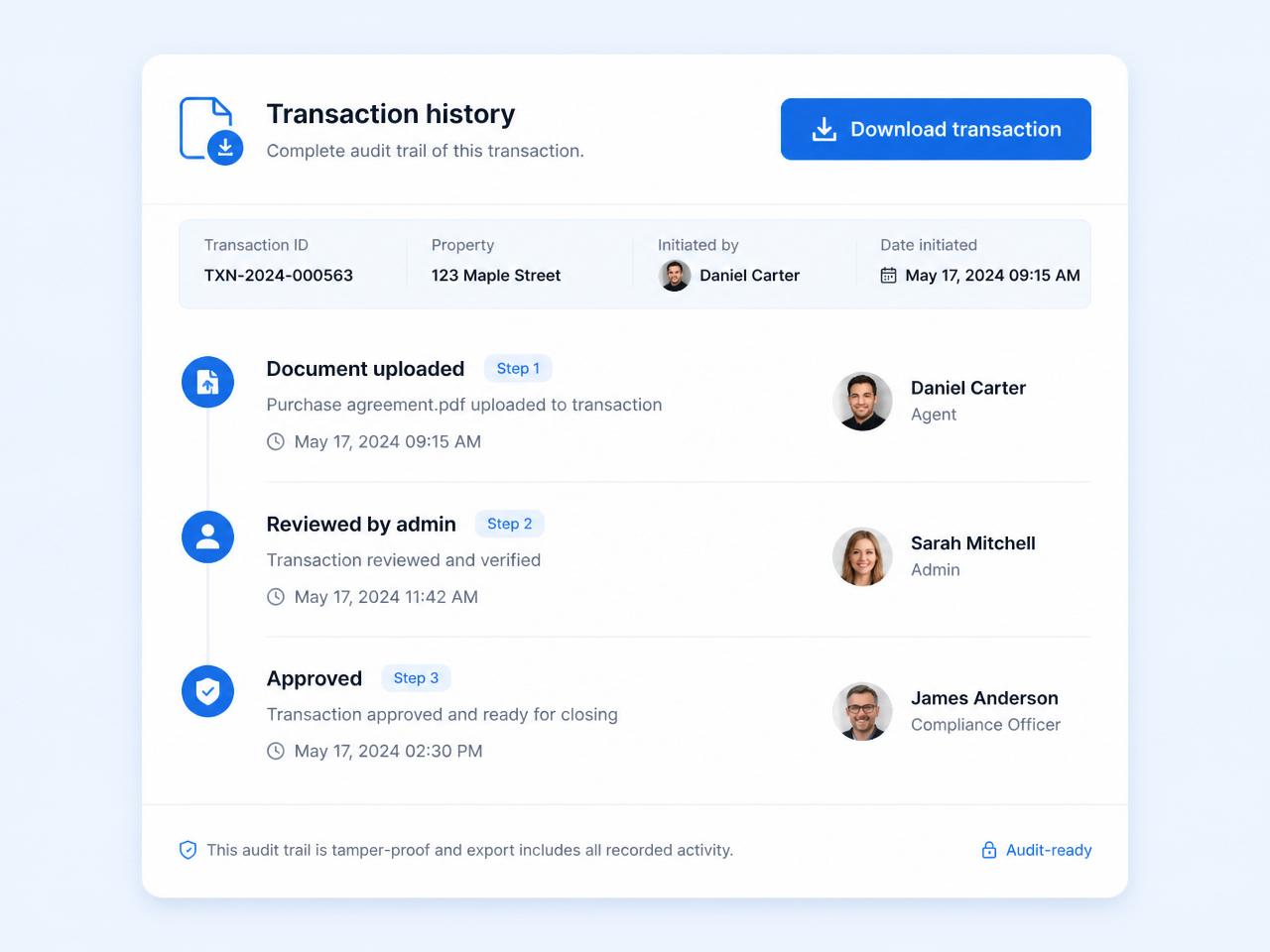
If an agent gets pulled into an investigation, the file is already complete.
Every document, version, note, and review is captured in the transaction's history. Download a single transaction to hand to a regulator, or take free monthly backups of your entire account in an open, vendor-neutral format.
- Download any transaction with its documents and history
- Document review history shows who reviewed what, and when
- Permission categories control who can see each file
- Free monthly backups in an open, vendor-neutral format you can keep
Your account is usable on day one.
Most brokerages are fully operational in under a week, with free setup, free admin training, and free transaction import included on every plan.
Upload
Agents drop in documents from web or mobile. Paperless Pipeline matches them to the expected file from your library.
Notify
The right reviewer is pinged instantly - no waiting until end of day.
Review
Annotate, approve, or reject with a reason from any device. The trail is logged automatically.
Archive
Approved documents are versioned and logged in the transaction history, ready for any future audit.
Built for every role on the transaction.
Designated brokers
Sleep at night knowing every file was reviewed.
Required-document review flags missing or out-of-date forms before a deal closes.
TCs
Stop chasing agents for re-uploads.
Reject with a reason and the agent gets a precise re-upload prompt.
Agents
Submit on the go between showings.
Mobile camera upload straight into the right transaction.
State auditors are happy with it and gave it their approval. Simple, cost effective, and it works!
How Paperless Pipeline compares.
What it costs: plans start at $69/month and are priced per transaction, not per user. Document compliance, required-document review, and free monthly backups are included on every plan. Unlimited users, offices, and storage. No setup fees, no contracts.
Questions, answered.
Still curious? Our team is one message away.
How does Paperless Pipeline keep a brokerage audit-ready?
Every transaction carries a complete history of who did what and when, so the file is ready before an auditor ever asks. Documents are reviewed and signed off inside Paperless Pipeline, the review is recorded, and the full activity trail lives on the transaction. When a regulator or auditor calls, the paperwork and its history are already in one place. See all features.
What is the document review process?
Reviewing is a deliberate sign-off step, not a rubber stamp. A broker or admin opens each document, checks it for accuracy and completeness, and marks it Reviewed - which clears it from the Unreviewed queue and records who reviewed it. The Unreviewed page lists every document still waiting across all transactions, with inline preview so a reviewer can move through them quickly.
Does Paperless Pipeline keep a record of who reviewed each document?
Yes. Every review is captured in the transaction's history, so you can always see who marked a document Reviewed and when. The Transaction History records document activity - uploads, assignments, comments, reviews - alongside checklist and note activity, and you can search or filter it by type, user, and date range. That review history is the backbone of the compliance trail. See how transactions work.
What stops an agent from skipping the upload?
Required documents are flagged as missing and routed for review, and the deal's document review history makes any gap obvious before sign-off - so the conversation happens before close, not after. See pricing.
Can different offices or deal types require different documents?
Yes. Required-document rules attach to deal type, side, and location, so a sale in one office and a lease in another can have completely different requirements - all without anyone attaching the right list by hand. See how checklists work.
Who can see each document?
Every document is assigned a permission category that controls who can open it, on top of who can already see the transaction. The built-in categories - Office, Listing, Sale, Buyer, Public, and Private - ship ready to use, and you can preset a default category on each standardized document name so it is applied automatically. That keeps sensitive files in front of only the right people.
Can a broker prioritize which files to review first?
Yes. You can apply color-coded Doc Labels - for example a "Review Needed" label - and filter the Unreviewed page down to just those. Reviewers can save that filter for one-click access, so the documents that need a broker's eyes surface first instead of getting lost in the queue. Standardized document names keep filing consistent so nothing is mislabeled.
Can documents be e-signed and flow straight into the file?
Yes. Paperless Pipeline includes its own native eSignature, and it also works with DocuSign and Dropbox Sign, so signed documents return into the transaction automatically. That means a signed form lands in the right deal, in the right place, ready for review - no downloading and re-uploading. See more features.
What happens to our records if we ever leave Paperless Pipeline?
You keep your data. Paperless Pipeline runs free automatic monthly backups in an open, vendor-neutral format that you can download and keep, and admins can download an individual transaction on demand without waiting for the monthly run. So your compliance archive is portable, not locked in. Talk to us.
Try Paperless Pipeline with your own deals.
Spin up your account in minutes and run your real workflow end-to-end.
14 days, full access·No credit card·Free setup with you
Closing 250+ transactions a year? Request a call