
Real Estate Brokerage Management Software
Every deal, document, and due date in one place
Manage transactions, track missing documents, and review commission reports with real estate brokerage software.
14 days, full access. No credit card. Free setup with you. See it first
G2 4.6/5 (21 reviews) · Capterra 4.8/5 (10 reviews), as of October 2026 · 1,700+ brokerages
The shift
From chaos to clarity, in one workspace.
See what changes when every transaction, task, and document lives in one place your whole brokerage actually uses.
Missing disclosure
123 Oak St · 6 days late
Where's the CDA?
Email thread #14
Signed addendum.pdf
Dropbox / Maybe?
Closing tomorrow
Status: unknown
Buyer file (v3 FINAL)
Local desktop
Tasks fall through the cracks. Documents scatter across email, Drive, and desktops. You don't know what's late until a client calls.
Transaction timeline
- Done
Listing agreement signed
Today · auto-filed
- Done
Disclosures sent to buyer
Reminder set · 2 days
- Done
Inspection report uploaded
By Sarah · 4:12 PM
- Done
CDA generated
Routed to accounting
Close & commission disbursed
Scheduled · Fri
One source of truth. Every task, file, and reminder lives on the transaction, so admins, agents, and accounting all see the same thing.
See Tangible Results With Simple Real Estate Broker Software
1,700+ active brokerages use Paperless Pipeline to manage transactions and commissions.
Keep your agents selling
Less time fighting back-office software. More time with buyers and sellers, no extra learning or workflow changes.
Keep your admins on track
Fewer clicks, fewer chase-downs. A clean interface that lets your transaction coordinators support every agent without burning out.
Keep your clients delighted
Keep files and due dates on the transaction. Coach your agents on the deal, not the paperwork.
Manage Transactions and Commissions in One Place
Track documents, tasks, and due dates on each transaction. Add the Commission Module to calculate splits and generate CDAs and agent statements.
Running a team inside a brokerage? See Paperless Pipeline for teams.
Unlimited users
Add every broker, agent, admin, or assistant - for free.
Always included
Flexible permissions
Easy to use agent management settings and preferences.
For Transactions
Instant statements
Download real estate commission statements instantly.
For Commissions
Unlimited storage
Records kept on a rolling 10-year basis while your account is active.
Always included
Transaction reporting
Instantly generate transaction and production reports.
For Transactions
On-demand reports
View financial info and generate detailed, custom reports.
For Commissions
Free monthly backups
Download your monthly backups and keep a separate copy of your records.
Always included
App integrations
Connect to your other favorite apps and real estate back office tools.
For Transactions
Automated CDAs
Create and send Commission Disbursement Authorizations.
For Commissions
With the optional Commission Module, from $58/month, you set per-agent splits, brokerage caps (annual or per-anniversary), transaction fees, referral fees, mentor splits and team overrides once, and Paperless Pipeline applies them to every closing. It then generates the CDA, agent commission statements and 1099 and year-to-date totals from the same transaction.
See how commission tracking works →
Want to see more features for your real estate brokerage? Take the Paperless Pipeline feature tours: Transaction Management Feature Tour and Commission Management Feature Tour.
Accounting, eSign and CRM Integrations
Paperless Pipeline sends closing and commission data to the accounting tool you already use. Integrations come with every plan at no extra cost.
| Tool | What it does with Paperless Pipeline |
|---|---|
| QuickBooks, through Zapier | A Closed status creates the bill in QuickBooks automatically, with the address, close date and commission fields already filled in. |
| DocuSign and Dropbox Sign | Send for signature from any transaction; the signed PDF comes back into the same file, named and ready for review. |
| Follow Up Boss | An app inside Follow Up Boss shows each linked lead's transaction status, key dates, price and commission breakdown. |
| Google, Outlook and Apple calendars | Task due dates arrive as a one-way live feed, next to agents' showings. |
| Thousands of other apps, through Zapier | A closing can push data into a Google Sheet, or advance the matching record in your CRM. |
See all real estate software integrations.
Multi-office
Run every office from one account.
Each office gets its own admins, checklists and settings. Agents only see the transactions they have been added to, office admins see every deal in their office, and owners get company-wide reports with a drill-down to any office or team. Offices and users are unlimited on every plan, so opening a new location never adds a seat fee.
Brokerage workflows in Paperless Pipeline
| Brokerage need | How Paperless Pipeline handles it |
|---|---|
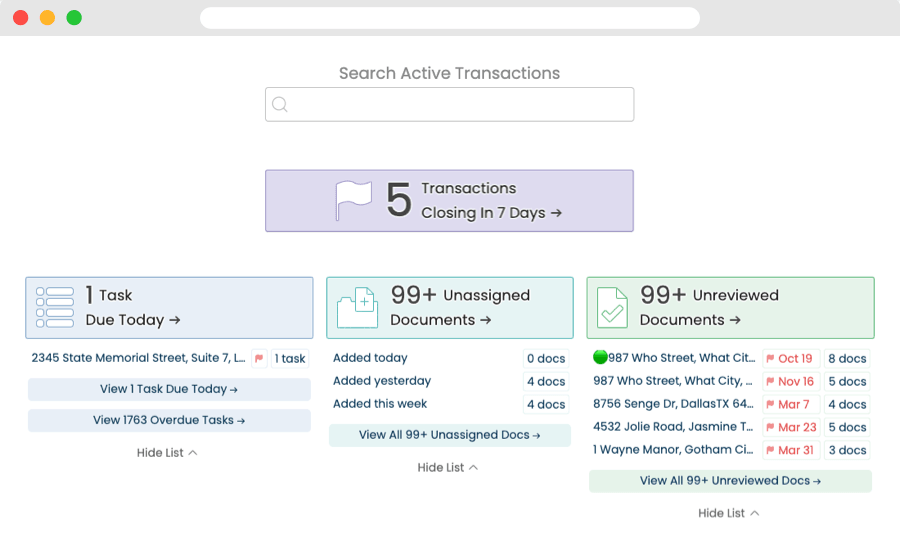
| Transaction oversight | The Home page shows the transactions closing in the next 7 days and flags overdue tasks, and the Transactions page lists every active deal. Each transaction keeps an activity history, including who reviewed documents and when. |
| Multi-office permissions | Each office gets its own admins, checklists and settings. Agents only see the transactions they have been added to, and office admins see every deal in their office. |
| Missing-document visibility | Checklists apply themselves by deal type, so admins can see what is missing and follow up with the right agent. |
| Commission reporting | Available with the optional Commission Module, an add-on from $58/month that is not part of the base plan. It runs detailed financial reports on what your company is earning from pending and closed transactions. |
Document review and broker sign-off
Set the documents each deal needs once, by deal type, side and location. Paperless Pipeline flags what is missing before a deal closes and keeps a dated record of every review for the designated broker.
- One review queue. The Unreviewed page lists every document waiting across all transactions, with an inline preview, so reviewers check each file without downloading it.
- Reviewed, or sent back with a comment. Mark a document Reviewed, or leave a comment that can be emailed to the agent on the deal automatically.
- Urgent files first. Color-coded Doc Labels, such as Review Needed, filter the queue so the files that need a broker's eyes come up first.
- A record for the regulator. Every upload, comment and review is dated and attributed in the transaction history, which you can filter by type, user and date range.
See how document compliance review works.
Big benefits for Real Estate Brokerages
Paperless Pipeline runs transactions and compliance for real estate brokerages in one system, with commissions in the optional Commission Module. Checklists apply themselves by deal type, due dates calculate from the deal's dates, and every document review is logged with who reviewed it and when. Here are nine ways that helps your brokerage:
Manage your brokerage's transactions in one place.
Keep documents, checklists, due dates, and review history attached to each transaction.
Drop in a signed contract and Pipeline AI reads it and fills in the transaction, citing the source of every value so you can check it before saving. Pipeline eSign is built in.
When an amendment, addendum or repair agreement arrives, AI Update compares it with the transaction, shows each old value next to the new one, and changes only what you choose to apply. Every account includes monthly Pipeline AI credits at no charge.
Get started with Paperless Pipeline, completely free.
Free Trial. Try Paperless Pipeline with your team before choosing a plan. Paperless Pipeline is 100% free to test with your entire team - no credit card needed.
Free Setup. We help set up your account for free, before you choose a plan. Test it with your agents and admins.
Free Training. Every plan includes free admin training. Learn how to use Paperless Pipeline and organize your office's transactions.
Reduce your company spend and overhead.
Paperless Pipeline pricing is based on the number of new transactions added each month, not the number of agents.
If production increases, upgrade. If production slows down, downgrade. If it is not a fit, cancel.
Manage agents and give them access to their own files.
Agents can open their transactions, upload documents, and check tasks from a computer or phone.
Admins can see what is missing and follow up with the right agent.
Agent permissions are set per user, so each agent sees only the transactions they are on. Every agent also gets a MailDrop email address for sending documents in, and Paperless Pipeline can upload a whole office's agents from a spreadsheet roster.
Create the reports you need - in seconds.
Customize Transaction Reports. Create reports with the information you need. Download the results or send the data to your other favorite apps.
Quick Inventory Reports. Run Pending and Listing Inventory Reports within seconds and filter by time period, property type, or side.
Built-in Reports. Closing in 30 Days, Expiring in 14 Days and Overdue Closings are ready with nothing to set up. The Comparative Production report compares sales volume, average sale and transactions closed for one agent, one office or the whole company, month by month.
Detailed Commission Reports. With Paperless Pipeline's Commission Module, you can run detailed financial reports and see exactly what your company is earning from pending and closed transactions.
Stop tasks and documents from falling through the cracks.
The Home page shows the transactions closing in the next 7 days and flags overdue tasks, and the Transactions page lists every active deal. Paperless Pipeline keeps your brokerage organized and on top of every step of the transaction process.
Each task's due date is a rule tied to a deal date, such as 10 business days after acceptance, with weekends and your company's holidays skipped. Push the closing date or extend an option period and every linked task moves with it.
Remind your agents and admins, automatically.
Each day, users will receive a digest of what's due today, what's coming up tomorrow, and what may still be overdue.
Prepare your team for closings and expiring listings with automatic reminders for important transaction milestones.
Each month, admins and agents can receive a detailed report of year to date and monthly production.
Keep records secure, compliant and ready for the next audit.
Paperless Pipeline keeps an activity history on each transaction, including who reviewed documents and when.
Keep records online and download free monthly backups for a separate copy. Set permissions so users can only access the files they are allowed to see.
Each monthly backup is a ZIP file with one folder per property address, and an admin can download any single transaction on demand.
There's no annual contract or commitment.
Paperless Pipeline is month-to-month, with no annual contract and no cancellation penalty. You can cancel by email at any time, and change your plan as your transaction volume changes.
State auditors are happy with it and gave it their approval. Simple, cost effective, and it works!
Eliminated one full-time admin role, saving $2,000-2,500 per month.
What it costs for a brokerage your size
Paperless Pipeline prices its brokerage software on the new transactions you open each month, not on how many agents you have. A transaction counts when a new file is created, by hand or with Pipeline AI. See the full brokerage management software pricing.
| New transactions a month | Plan | Per month | With Commission Module |
|---|---|---|---|
| 8 | Up to 10 | $140 | $198 |
| 20 | Up to 25 | $190 | $254 |
| 40 | Up to 40 (most popular) | $240 | $304 |
| 120 | Up to 150 | $425 | $550 |
Your first 30 days after upgrading are unlimited, so you can load every open deal and old file. See every plan.
Switching to Paperless Pipeline: day one to month one
Your account is usable on day one, and most brokerages are fully running in days.
- 01
Day one: set up your offices and people.
Add each office, its admins and its agents. Load a deal you know well to check the system against, then drop in a contract and let Pipeline AI build the next one.
- 02
Within days: make it yours.
Build checklist templates, statuses and labels around your compliance process, rename the pipeline stages to what your office already calls them, and set up commission splits, caps and fees.
- 03
Bring agents in.
Agent training is short, usually 20 minutes. Agents only see their own transactions and tasks, so there is almost nothing to learn.
- 04
Month one: run on one system.
Bring the rest of the roster on, move your open deals over, run a real CDA on an actual closing, then turn the old system off.
- 05
Support from real people.
Real human support by phone and email, plus a searchable help center and in-product guidance, with no support fee.
Follow the full 30-day getting started plan.
Getting started
Three steps. No credit card.
Set up a free trial without a credit card.
Schedule a free account setup call to add all your checklists.
Test it with 9 free real estate transactions.
Prefer a self-guided walkthrough right now? See it first
FAQ: Brokerage Management Software
Straight answers on cost, trials, setup and day-to-day use. The quickest test is a live deal: the free trial includes up to 9 transactions.
Is it free to get started?
Yes! You can sign up for a free trial anytime - without a credit card or commitment.
Do we pay extra for more agents or admins?
No. Unlike many products, Paperless Pipeline does not charge you based on how many users you add. 10 users or 10,000, the price is only based on monthly production. This adds up to significant savings as your company grows.
Will we be charged when our trial is up?
No. There is no credit card required to try Paperless Pipeline. You will only be charged when you decide you're ready to move forward and select a plan.
What if we need a longer trial?
The free trial gives you 14 days of full access to every feature, with unlimited users and up to 9 transactions. If you're still evaluating when the 14 days are up, log back in and the trial is extended another 7 days. No credit card is needed to start.
What does it cost?
Plans start at $69/month for up to 5 new transactions a month and go up to $715/month for the 450+ plan, which includes 450 transactions and then $1.65 each. Users are unlimited, so adding agents never changes the bill. The Commission Module is an optional add-on from $58/month. See all plans and pricing here →
Can we cancel at any time?
Yes! There's no annual long-term contract for Paperless Pipeline. You can cancel at any time.
What is brokerage management software?
Brokerage management software runs the back office of a real estate brokerage: every transaction file, the documents each deal needs, compliance review, agent commissions and production reports. Paperless Pipeline covers transactions and compliance on every plan, and the optional Commission Module adds splits, caps, CDAs and commission statements. It is not a CRM, and most brokerages run it alongside one.
Does Paperless Pipeline work with QuickBooks?
Yes, through Zapier. When a transaction's status changes to Closed, Zapier can create the bill in QuickBooks automatically, with the address, close date and commission fields already filled in. Connecting Paperless Pipeline to Zapier is free once a master admin authorizes it, and Zapier sets its own plan limits. Reports also download as CSV, XLSX or PDF.
Can you move our transactions over from another system?
Yes. Free transaction import is included on every plan: Paperless Pipeline's team helps move your active and historical transactions from your previous system, Dropbox, Google Drive or a spreadsheet. You can also upload transactions by CSV, up to 50 per file. Most brokerages run both systems for two weeks, then stop logging into the old one. See the getting started path.
Can offices in different states use different checklists?
Yes. Checklists, document names, labels and statuses are set per location, and Paperless Pipeline applies each checklist template by the deal's status, side, label and location. An office in one state can require its own forms while another office uses a different list. Free account setup includes adding your checklists. See how it works for Texas brokerages.
Can agents see each other's transactions?
No. By default, agents only see the transactions they are on. Admins with the 'View all transactions' permission see every deal in their location, and master admins see across every office. Document permission categories can limit sensitive files within a deal to the people who should see them, and only admins see account details and pricing.
Can we all access transactions from anywhere?
Yes. Paperless Pipeline runs in the web browser on PCs, Macs, tablets, iPhone and Android phones, so there is nothing to install. Agents can upload documents straight from their phone or email them to the transaction's MailDrop address. New features reach every user as soon as they are released, with no updates to download.
What is the difference between brokerage management software and a CRM?
A CRM manages people before there is a deal: leads, contacts and follow-up. Brokerage management software takes over once there is a listing or a contract, with the documents, checklists, due dates, review and commissions for each transaction. Paperless Pipeline works alongside your CRM: Follow Up Boss shows a linked lead's transaction status, and Zapier can advance a CRM record when a listing goes under contract.
How does e-signature work, and what does it cost?
Pipeline eSign is built in: you send a request from the transaction, its details fill in the request for you, and the signed copy returns to the same file. It is billed by use, in blocks of 10 signature requests, with no per-user fees. DocuSign and Dropbox Sign also work.
What happens to our records if we leave?
You keep them. Monthly backups open with the unzip tool built into most computers, with no Paperless Pipeline login needed: documents stay in their original format, and notes, emails, checklists and activity history come as plain text. If you cancel, download your backups first, or keep everything online, read-only, on the $35/month Archive Plan.
How long has Paperless Pipeline been around?
Paperless Pipeline was founded by Dane Maxwell in 2009 and is still independently run, not part of a larger software suite. The people who answer support calls also make the product decisions, and new upgrades ship roughly every six weeks without making you relearn how you work. Read more about Paperless Pipeline.
What if I have more questions?
Our team is here to help. Call us at (844) 467-2737 or ask a question.
Try Paperless Pipeline, free.
Set up in minutes. Run a real transaction. Decide if it fits, no card, no contract, no pressure.
14 days, full access·No credit card·Free setup with you
Closing 250+ transactions a year? Request a call