
Integration · Follow Up Boss
Transaction management inside Follow Up Boss.
Follow Up Boss runs your follow-up. Paperless Pipeline runs your closings — and with the embedded app, your team sees both on one screen.
Try it free for 14 days — full access, unlimited users, no credit card.
Does Follow Up Boss have transaction management?
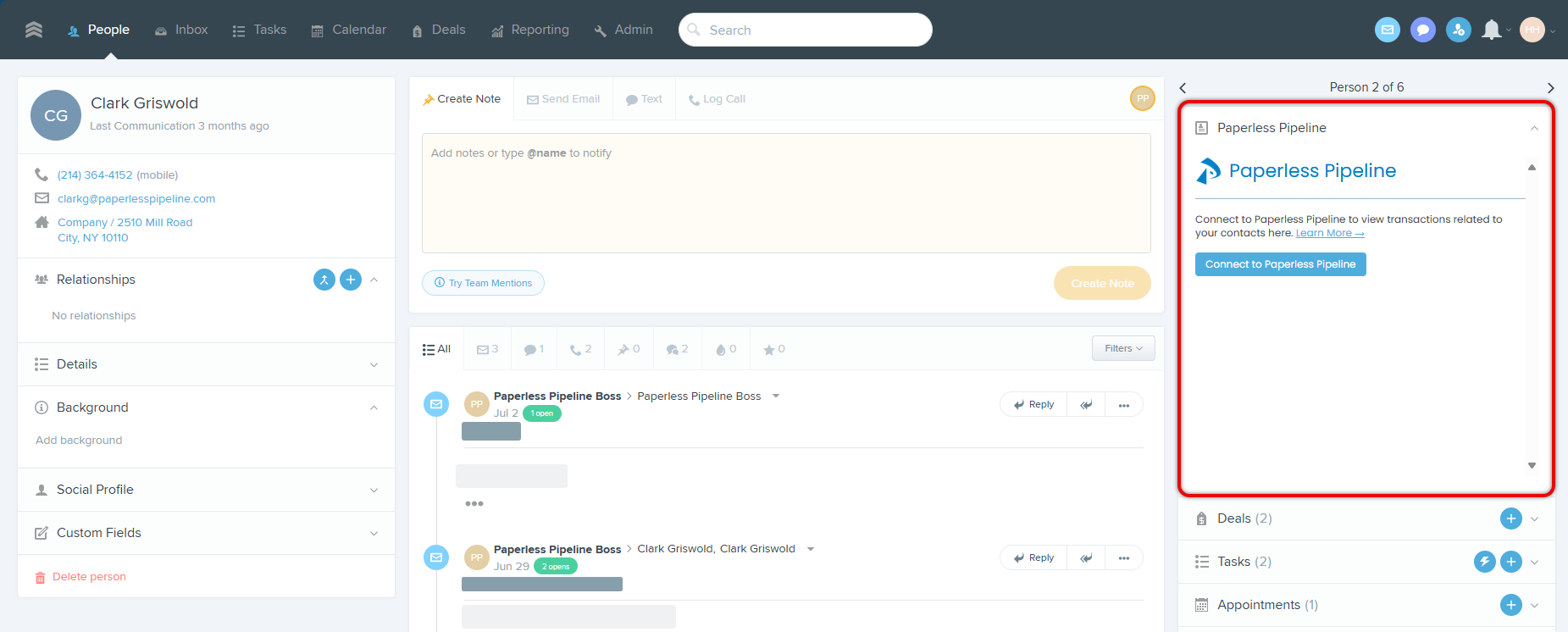
Follow Up Boss is a real-estate CRM built for lead follow-up — it doesn't include transaction management. Paperless Pipeline adds transaction management to Follow Up Boss through an embedded app: once an admin enables it under Admin → Integrations, your team can link any FUB contact to their transactions and see status, key dates, commission details, and recent documents without leaving the lead profile.
What the embedded app does
Five capabilities, live on every FUB lead profile once connected.
Link multiple transactions to a single lead
A repeat client's buy and sell files can both live on the same FUB contact.
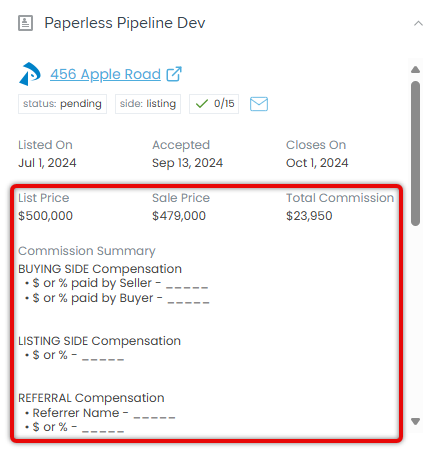
View status, dates, and commission details on the lead profile
Status, side, checklist progress, key dates (Listed, Accepted, Closes), price, and full commission breakdown — inline.
Send emails to the transaction's maildrop address
One click opens a message pre-addressed to the transaction's Pipeline maildrop, so client documents route to the right file.
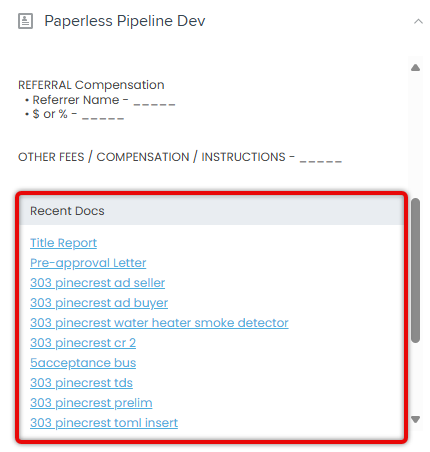
Access recent transaction documents
A Recent Docs list surfaces the most recent files — title report, pre-approval, disclosures, inspection — as direct links.
Jump into the full transaction in one click
The property address opens the full file in Paperless Pipeline for anything beyond the summary view.
Set up in three steps
One for the admin, one per teammate, one per contact.
Admin enables it (once per account)
In Follow Up Boss: Admin → Integrations → Paperless Pipeline → Enable. Only a FUB Account Owner or Admin can do this, and it only needs to happen once for the whole account.
Each teammate connects their profile
Open any FUB lead profile, find the Paperless Pipeline panel, click "Connect to Paperless Pipeline", and log in. The connection is saved from then on.
Link a contact to their transaction(s)
From the same panel, click "Link to a transaction," search by transaction name or property address, and confirm. A contact can be linked to more than one transaction.
Why brokerages pair them
Two systems, one workflow — each doing what it's actually built for.
Follow Up Boss
Lead nurture
Speed-to-lead, drip campaigns, action plans, and team-wide follow-up on every conversation.
Paperless Pipeline
Contract to close
- Checklists that run themselves
- Compliance review and audit trail
- Commission / CDA calculation
- Unlimited users on every plan
- Priced per transaction, not per seat
Roughly 8% of US real-estate transactions run through Pipeline. See pricing →
Common questions
Does Follow Up Boss have built-in transaction management?+
No. Follow Up Boss is a real-estate CRM built for lead follow-up. It doesn't include transaction management, checklists, compliance review, or commission/CDA tools. Brokerages typically pair it with a transaction management platform like Paperless Pipeline.
How does the Paperless Pipeline embedded app work in Follow Up Boss?+
Once a FUB Account Owner or Admin enables the embedded app under Admin → Integrations, a Paperless Pipeline panel appears on every lead profile. Each teammate connects their own Pipeline login once, then links any FUB contact to their transaction(s) — status, dates, commission details, and recent documents all show inline on the lead profile.
Do agents need a separate login?+
They use their existing Paperless Pipeline login. From any FUB lead profile they click "Connect to Paperless Pipeline" once and sign in — the connection is saved from then on.
What does Paperless Pipeline cost?+
Transaction-based plans start at $69/month, with unlimited users on every plan. Pricing scales with closings, not headcount. See /pricing for the full breakdown.
Is there a free trial?+
Yes — 14 days with full access, unlimited users, no credit card. Trials include up to 9 transactions, and if you're still evaluating, logging back in automatically extends your trial by another week.
Add transaction management to Follow Up Boss today
Try it free for 14 days — full access, unlimited users, no credit card.
14 days, full access·No credit card·Free setup with you
Closing 250+ transactions a year? Request a call