
Real Estate Transaction Coordinator Software
Paperless Pipeline is real estate transaction management software for transaction coordinators who run files for one agent or many. Checklists apply themselves, deadlines calculate from the contract, and missing documents are flagged before close.
14 days, full access. No credit card. Free setup with you. See it first
G2 4.6/5 (21 reviews) · Capterra 4.8/5 (10 reviews), as of October 2026 · 1,700+ brokerages

How does a new file get built from the contract?
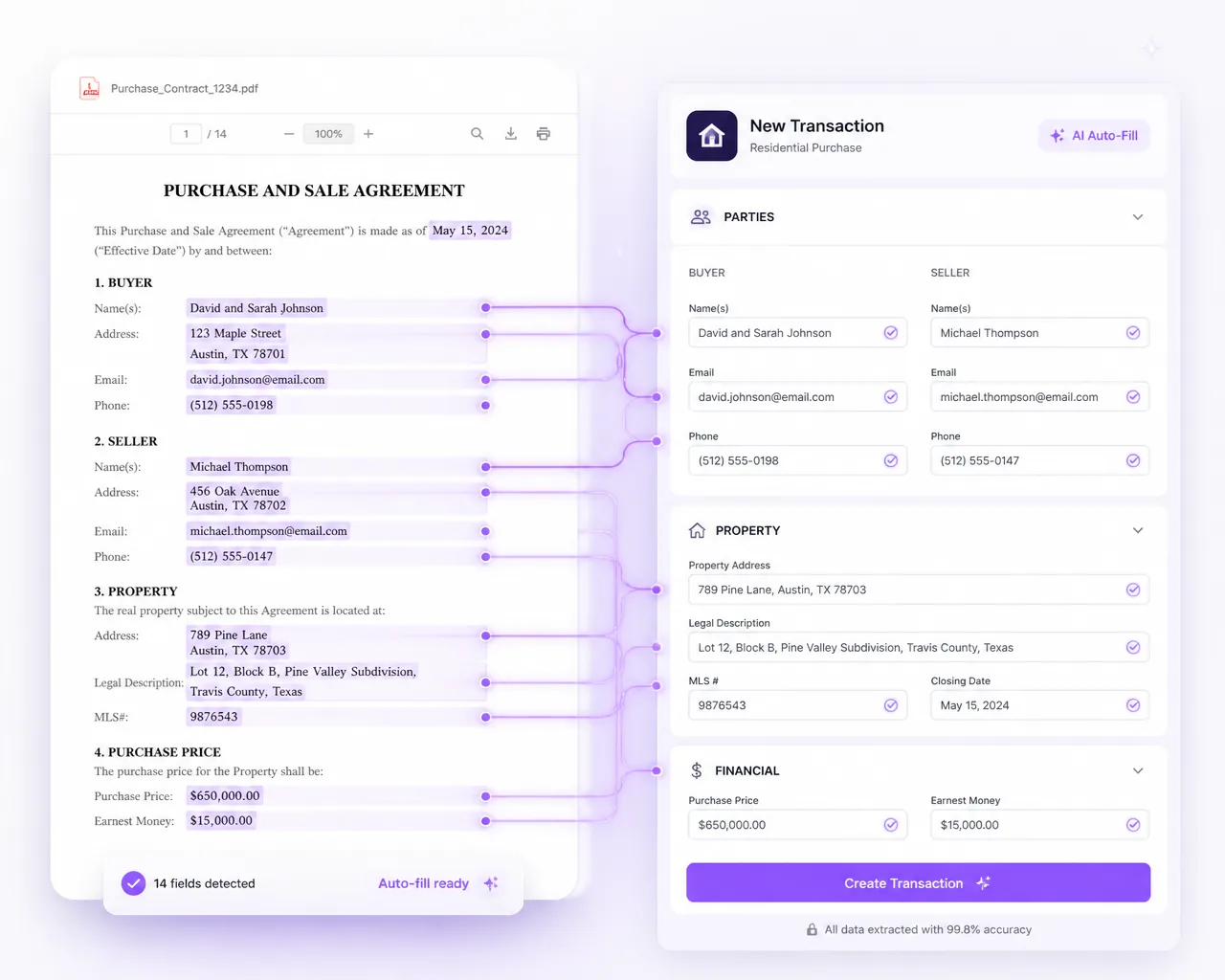
Drop in the signed contract and Pipeline AI fills in the new transaction: property address, parties, price and dates, with business holidays counted and key dates calculated. Every field shows its source in the contract, so you check it in one click before you save.
When an amendment, addendum or repair agreement arrives, AI Update lists each change side by side, old value against new, and nothing moves until you apply it. Every account includes monthly Pipeline AI credits at no charge; one credit reads one contract.
"20, 25 minutes to create a transaction. Less than five now."
How do you track deadlines across every open file?
Enter a deal's key dates once and Paperless Pipeline calculates every task due date from them, in business days, calendar days, or calendar days due business days. The Tasks page and calendar views show what is due today and what is overdue across all your files, and when a contract date moves, every linked deadline recalculates with it.
Reminders go out before anything is late. A daily reminder email lists what is overdue, due today and due tomorrow, and overdue tasks are flagged on the Home page and the Tasks page. You choose who gets the daily email, and each agent gets only their own tasks.
Anchor tasks to the Acceptance Date or Close Date, or turn on optional dates such as Inspection, Loan Approval, Appraisal, Option Period End and Earnest Money. On the Tasks page, red marks what is overdue and yellow marks what is due soon.

How do checklists get onto each file?
Automatically. Build your checklist templates once, and Paperless Pipeline adds the right one when a transaction matches its status, side and label, so a new pending listing picks up your pending-listing checklist without anyone attaching it by hand.
Required tasks stay open until you sign them off, so files that are not ready stand out. When a form changes, edit the master checklist template once; checklists added from then on use the new version.
Keep separate lists for residential, commercial, lease and referral deals, and branch them by side and office. When a listing goes pending, the pending checklist is added and the listing checklist stays on the file. Need a one-off change? Edit the checklist on that deal and the template stays as it is.

How do you stop chasing agents for documents?
Required documents are flagged when they are missing. Reject a document with a reason and the agent gets a precise re-upload prompt. Every transaction also has its own MailDrop email address, so agents can forward a signed document from their phone and it lands on the right file.
Lenders and title companies can email the same address, and the attachments land in the transaction's Unassigned Docs, ready to name and assign. Agents can also upload straight from their phone.
How do you keep agents and clients updated?
Email from the transaction, so every message and document stays attached to the file. Templates fill in the deal's details for you.
Message templates
Save the updates you send on every deal as templates. Autofill tags drop in the deal's details, including any key date you flag.
Email anyone on the deal
Send documents and notes to agents, co-op agents, title, escrow or the closing attorney. Stored contacts drop into the address field.
Send it later
Write an update now and schedule it to send later.
Comments reach the agent
Comment on a document during review and the comment can be emailed to the agent on the deal automatically.
Signatures from the file
Send documents for signature with Pipeline eSign. Signers need no account, and the signed copy returns to the transaction.
Your free trial comes loaded with 50 ready-made email templates to start from.
How do you see where every file stands?
Agents and brokers ask where a deal stands all day. Built-in reports and saved views show it in one click, across every file you run.
Ready-made reports
Closing in 30 Days, Expiring in 14 Days, Overdue Closings, Checklist Status and Recent Status Change are built in, with nothing to set up.
Saved views
Filter on any transaction field, including your own custom fields, and save the search as a shortcut that re-runs live. Share it with the people who need it.
Key dates on the coversheet
Flag a task as a Key Date and it shows in the Key Dates and Milestones section of the transaction coversheet.
Status inside Follow Up Boss
With the Follow Up Boss app, agents see status, checklist progress and key dates on the lead profile without asking you.
Lists you can send
Download any list as CSV, XLSX or PDF, ready to send to an agent or a broker.
See every transaction report.
How does broker review work?
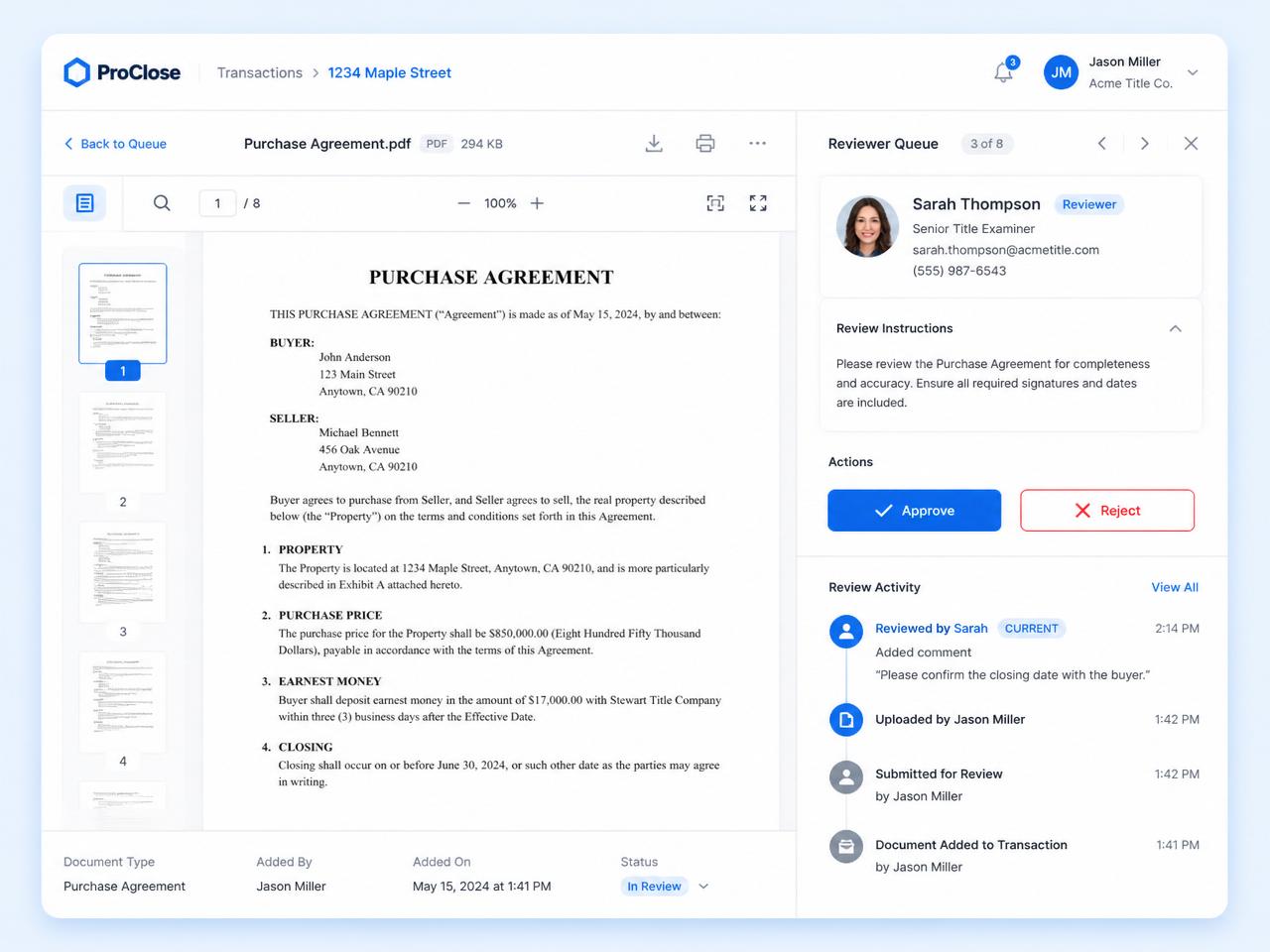
Documents are reviewed and signed off inside Paperless Pipeline, and every review is recorded with who reviewed what and when. The full activity trail stays on the transaction, so the file is ready for the designated broker and for any audit.
Tasks close in two stages: the agent checks a task off, then an admin verifies and completes it. Every document waiting for review sits on one Unreviewed page with an inline preview, and a "Review Needed" label puts urgent files first. Only users with review permission can mark a document Reviewed. See document compliance.
What happens to the file after closing?
It stays complete and easy to find. Closed, expired and canceled deals leave your default list but come back the moment you search, and every transaction stays online for 10 years from the date it was created while your account is active.
Hand over a closed file
Download any single transaction with all of its data, ready for the agent or the broker. The download link arrives by email within a few minutes.
A monthly backup you keep
Each month a free ZIP backup arrives with one folder per property address: documents in their original format, plus notes, emails, checklists and activity history as plain text.
A full history for audits
Every action on the file is logged, dated and attributed, so your broker can show who did what, and when.
Leaving one day? Download your backups, or keep everything online, read-only, on the $35/month Archive Plan. See audit trail and backups.
How do you coordinate files for several agents?
Add every agent you work for as a user. Every plan includes unlimited users, so adding an agent never changes your price.
Each agent sees only their deals
Agents see the transactions they are on. You see the files assigned to you.
Tasks go to the right person
Pin checklist tasks to roles such as TC, agent, broker or lender, and they are routed when the transaction is created.
One task list across every agent
Filter the Tasks page by agent, office, status or template to see what is due on each agent's files.
Offices and teams
Group agents into offices or teams, each with its own admin and checklists, and give a user access across several offices.
Customers range from solo TCs to multi-state operations with hundreds of agents. See what agents see and how offices and teams work.
Transaction coordinator software or transaction management software?
Both, in one account. Transaction coordinator software runs a TC's own queue of deals: checklists, deadlines and documents. Transaction management software is the brokerage's record of every deal, reviewed by the designated broker and kept for years.
In Paperless Pipeline they are the same file. You coordinate it, agents send their documents to it, and your broker reviews and signs off in the same account. The office also gets reports across every deal and an optional Commission Module, from $58/month, for splits, agent statements and CDAs. See every feature.
What does transaction coordinator software cost?
You pay for the new transactions you open each month, not for the agents you work with. Up to 5 new files a month is $69/month, and every plan includes unlimited users. As your volume grows you move up a tier, and every tier is on the pricing page. Month-to-month, no setup fee.
For example, 8 new files a month is the Up to 10 plan at $140/month, and 20 is the Up to 25 plan at $190/month. Your first 30 days after upgrading are unlimited, so you can load every open file. Busy month? Move up a tier, then back down.
What does each plan cost?
Find your monthly volume. Storage is unlimited and setup is free on every plan.
| New files a month | Monthly price |
|---|---|
| Up to 5 | $69 |
| Up to 10 | $140 |
| Up to 25 | $190 |
| Up to 40 | $240 |
| Up to 80 | $335 |
| Up to 150 | $425 |
| Up to 250 | $540 |
| Up to 350 | $645 |
| 450+ | $715, then $1.65 for each file after 450 |
In production since 2009 and used by 1,700+ active brokerages.
We'll help you get set up. Free.
Bring your current transactions. We'll help configure your account, import your transactions, and train your admins, at no extra cost.
Your trial includes up to 9 transactions, enough to run several real closings end to end. Usable on day one. Fully running in days.
Switching mid-year? Import your open deals by CSV, up to 50 per file, or we run the bulk migration for you at no charge. Pull old paperwork in from Dropbox and leave closed deals in your old system. Most brokerages run both for two weeks, then stop logging into the old one. Agents learn one thing: their MailDrop address.
- Your files
Bring what you have
Current transactions, admins, and the workflows you already run.
- Setup with Paperless Pipeline
We help set it up
Account setup, checklist configuration, and transaction import, done with you.
- Ready to go
You're ready
Free admin training included, so day one is a working account.
- $0 setup fee
- Free admin training
- Free transaction import
14 days free · No credit card · Free setup
What do transaction coordinators say about Paperless Pipeline?
"Paperless Pipeline lets me offer a very comprehensive service with minimal day-to-day effort. I've built a 160+ step checklist where almost everything is automated because of Pipeline."
"Within 30 seconds I can have answers for agents. Now that's the way it works all day long. I am more efficient and I don't have to work so hard."
"After trying multiple options, Paperless Pipeline was the only one that truly fit my workflow. It's simple, effective, and doesn't bury me in unnecessary clicks."
"Having the tasks, due dates and everything automatically calculated based on the information entered made so much sense and it was exactly what we needed. It definitely saves me time!"
Read more in what customers say.
Transaction coordinator software questions, answered.
Still curious? Our team is one message away.
What is transaction coordinator software?
Transaction coordinator software keeps every file a TC runs in one place: the documents, checklist, key dates and notes for each deal. In Paperless Pipeline, checklists apply themselves, task due dates calculate from the contract's dates, missing documents are flagged, and every review is recorded with who did it and when, so each file stays on schedule and ready for the broker.
Can the agents I work for log in too?
Yes. Every plan includes unlimited users, so each agent can upload documents to their own transactions at no extra cost. Agents only see the transactions they have been added to.
Do due dates handle weekends and holidays?
Yes. Choose business days, which skip weekends and your company holidays, calendar days, or calendar days due business days, which moves a deadline that lands on a weekend or holiday to the next business day.
Can I sync deadlines to my calendar?
Yes. Upcoming deadlines sync to your calendar, or you can download a task list.
How much does it cost?
$69/month for up to 5 new transactions a month, with unlimited users and no annual contract.
Is there a free trial?
Yes. You get 14 days of full access with no credit card, and setup is free.
Does it work for independent TCs and TC companies?
Yes. An independent TC can start at $69/month for up to 5 new files a month and move up a tier as the business grows. A TC company can add every coordinator, assistant and agent as a user at no extra cost, because every plan includes unlimited users. When you coordinate for a brokerage or team, your broker also gets compliance review in the same account.
Is there a mobile app?
There is nothing to download. Paperless Pipeline is a web app that runs in the browser on iPhone and Android phones, tablets, PCs and Macs. You can pull up a deal, review documents and upload files from your phone, and agents can email paperwork to a transaction's MailDrop address from wherever they are.
What does Paperless Pipeline connect to?
Paperless Pipeline connects directly to DocuSign, Dropbox Sign and Follow Up Boss, and imports transactions by CSV. Everything else connects through Zapier to thousands of apps: a status change on a transaction, like a deal going under contract, can update your CRM, create a bill in QuickBooks or send a Slack message. See all integrations.
Can I reach a real person when I need help?
Yes. Real people answer by email and phone, and when you contact Paperless Pipeline you reach the people who build and run the product. A searchable help center with step-by-step guides and in-product help covers everyday questions. Support costs nothing extra: there is no setup fee and no support fee on any plan.
Can transaction coordinator software replace a TC?
No. It takes the repeat work off a TC's desk, not the judgment calls. Pipeline AI reads the contract and fills in the file, checklists apply themselves and reminders go out before anything is late, but you still check each field before you save, and no amendment change is applied until you click. Your time goes on the exceptions instead of data entry.
What counts as a new transaction?
A transaction counts when a new transaction file is created, by hand or with Pipeline AI. You're billed on the new files you open this month, not on files opened in earlier months, so a deal you carry for three months counts once. Go over your tier and you move to the next one, and you can change plans any time.
Can someone else pick up my files when I'm out?
Yes. Every document, version, note and review is kept in the transaction's history, and checklist tasks can be pinned to roles rather than to one person. A colleague with access opens the file and sees what is done and what is due next. Admins with the 'View all transactions for this location' permission can see every deal in that location.
Do I have to build my checklists from scratch?
No. Your trial includes sample checklists to adapt, and during free setup the Paperless Pipeline team sets up your checklist templates with you. The free checklist generator also builds a starting list for buyer, listing or lease deals in any US state, ready to paste in. Copy any template to make a variation for another deal type.
Who can see the documents on a file?
Only the people who should. Agents see only the transactions they are on. On top of that, every document has a permission category, such as Office, Listing, Sale, Buyer, Public or Private, that controls who can open it, so a sensitive file on a shared deal stays private. You can preset a default category for each standard document name.
Try Paperless Pipeline on the files you coordinate.
Spin up your account in minutes and run your real workflow end-to-end.
14 days, full access·No credit card·Free setup with you
Closing 250+ transactions a year? Request a call