
Real estate agent experience: simple enough that your least technical agent logs in.
Fine-tune every profile so the system fits your tech-forward agents and your tech-averse veterans alike. Adoption stops being a battle.
Full access for 14 days. The real product, your real deals, day one.
No credit card. No contract. We set it up with you — free.
G2 4.7/5 · Capterra 5/5 · 1,700+ brokerages
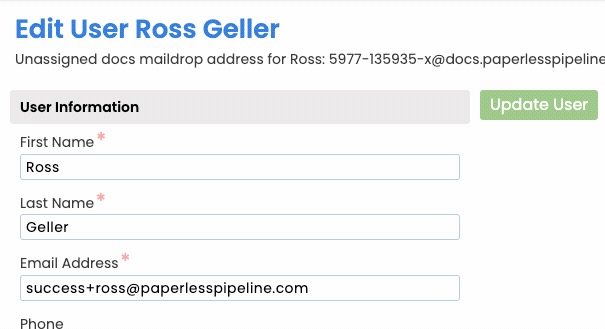
Hide every screen an agent will never use.
Show only what each user needs. Hide everything else. The result: agents who actually log in, admins who stop chasing, and a brokerage that runs on rails.
- Per-user simplification of every screen
- Role-based defaults that ship out of the box
- Hide advanced settings from agents who don't need them
- One-click view between simple and power modes
Works wherever your agents do.
A responsive web app that works on any phone, tablet, or computer - no app store download required. Upload from your phone, sign on the go, review a deal from anywhere.
- Responsive web app on every modern device - PC, Mac, tablet, phone
- Upload documents straight from your phone into a transaction
- Email-in documents from anywhere via a per-transaction maildrop address
- Email notifications when documents are added or tasks come due
Help when you need it, invisible when you don't.
A searchable help center, in-product guidance, and real human support surface answers without slowing anyone down.
- Searchable help center with step-by-step guides
- In-product guidance and help text on settings
- Real human support by email and phone
- What's New updates so teams keep up with releases
Your account is usable on day one.
Most brokerages are fully operational in under a week, with free setup, free admin training, and free transaction import included on every plan.
Set role defaults
Out-of-the-box profiles for agents, TCs, brokers, and finance - opinionated, but tunable.
Simplify per user
Hide screens an individual will never use. They see less, they use it more.
Layer in guidance
A searchable help center and in-product guidance handle the long tail of questions.
Iterate as you grow
Adjust permissions and profiles as roles change, so the system keeps fitting the team.
Built for every role on the transaction.
Tech-averse veterans
A tool that does not feel like one.
Stripped-down view with only the screens they touch each week.
Power agents
Speed and keyboard shortcuts.
Quick-add and quick-navigate shortcuts, bulk doc actions, and saved searches.
New hires
Productive on day one.
Role-based profile plus a starter checklist for their first deal.
At this point, I've tried everything. Paperless Pipeline makes the most financial sense and it was the easiest platform to onboard agents.
How Paperless Pipeline compares.
Every agent gets an account. Plans start at $69/month, priced per transaction, not per user - rolling out to all 60 agents costs the same as rolling out to six.
Questions, answered.
Still curious? Our team is one message away.
Will my agents actually use it?
Yes - Paperless Pipeline is built to be simple enough that even tech-averse agents adopt it. You can hide everything an agent does not need so each person sees a clean, focused view. Boring means predictable. Predictable means safe. Safe means your agents stay.
Can I make the system simpler for less tech-savvy agents?
Yes - permissions are granular and set per user, so you decide exactly what each person can see and do. A veteran who just needs to upload documents gets a stripped-down experience, while an admin or power agent gets the full toolset, all from the same account.
How long does it take an agent to learn Paperless Pipeline?
Most agents are productive within their first hour. The agent-facing workflow is intentionally small - find a transaction, upload a document, check off a task - so there is very little to learn before someone is doing real work.
Does Paperless Pipeline work on a phone or tablet?
Yes - Paperless Pipeline runs in your browser on a PC, Mac, tablet, or phone, with no install required. Agents can pull up a deal, review documents, and send their paperwork in from wherever they are, which is what makes it practical for people who are rarely at a desk.
Can agents send documents in from their phone or a scanner?
Yes - every agent gets a unique maildrop email address they can send documents to, and the files land in Paperless Pipeline ready to file. It works from a phone's email, a desktop, or an office scanner programmed with the address, so paperwork gets into the system without anyone learning a new app.
Do agents see each other's deals?
No - agents only see the transactions they are on, while admins with the right permission can see everything in their location. Document permission categories add another layer, so even within a single deal, sensitive files can be limited to the people who should see them.
Are there shortcuts for power users?
Yes - Paperless Pipeline has keyboard shortcuts for the actions agents and admins use most, like adding a transaction, uploading documents, or composing a note. Power users can move quickly without reaching for the mouse, while everyone else can ignore them entirely.
Is there help available inside the product?
Yes - a searchable help center and a real human support team are available when an agent has a question. Because the day-to-day workflow is so small, most people rarely need it, but help is there without leaving the deal they are working on.
Do we pay more for adding agents?
No. Users are unlimited on every plan. Pricing is based only on the new transactions you start each month, from $69/month, so every agent on your team can have an account without raising your bill. See what is included on our pricing page, or explore the full toolset on our features page.
Try Paperless Pipeline with your own deals.
Spin up your account in minutes and run your real workflow end-to-end.
14 days, full access·No credit card·Free setup with you
Closing 250+ transactions a year? Request a call