
Pipeline eSign: Real Estate E-Signature Software
Get Documents Signed Faster, Simpler, and for a Fraction of the Cost
Pipeline eSign is our built-in eSignature tool - no extra logins, no tab-switching, and no pricey third-party platforms. Just a faster, more affordable way to get documents signed.
14 days, full access. No credit card. Free setup with you. See it first
G2 4.6/5 (21 reviews) · Capterra 4.8/5 (10 reviews), as of October 2026 · 1,700+ brokerages
Watch the 90-second demo, send, sign, done.
What Makes Pipeline eSign Different?
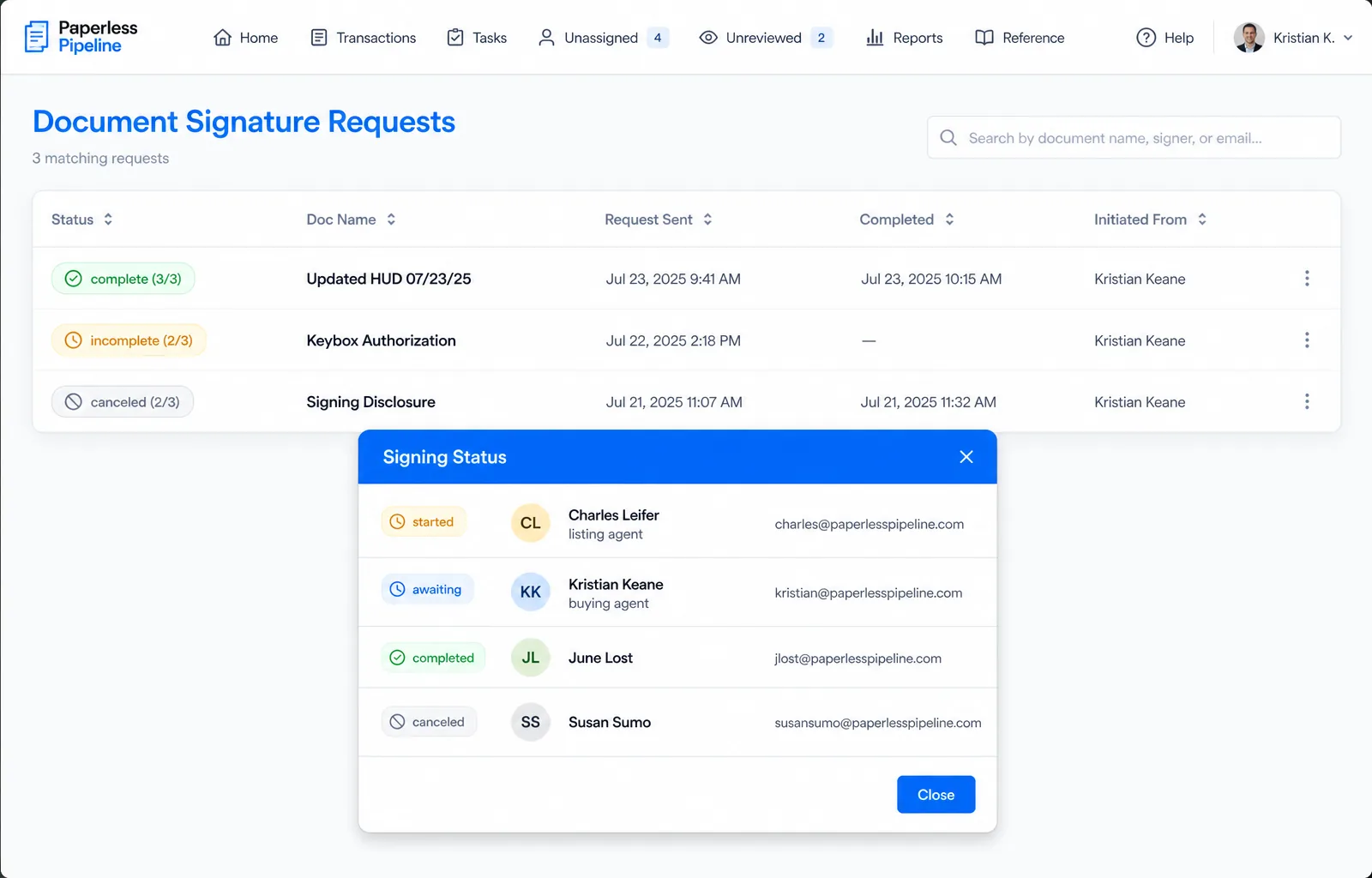
Pipeline eSign is built into Paperless Pipeline: you send a request from the transaction, the transaction details fill in the request for you, and the signed copy comes back to Paperless Pipeline already matched to that transaction.
With Pipeline eSign, you can:
Send signature requests in seconds
Straight from transactions or the Reference Library.
Use smart, reusable forms
Auto-fill signer roles and transaction details.
Track in real time
Check status, send reminders, or cancel anytime.
Get signed documents back in the file
Returned straight to your Paperless Pipeline transaction.
Stay compliant and secure
With legally binding eSignatures.
What to Check in Real Estate E-Signature Software
Seven checks to run on any real estate e-signature tool before a brokerage commits, and how Pipeline eSign answers each one.
| What to check | Why it matters | Pipeline eSign |
|---|---|---|
| Sends from the transaction | A separate tool means more logins, retyped addresses and a lost paper trail | Requests start in the transaction, and its details fill in for you |
| Signed copy files itself | Otherwise agents download signed PDFs from email and upload them again | The signed copy returns to the right transaction, ready for review |
| Tracking, not chasing | Each chased signature costs a few minutes, on every open file | Check status, send reminders or cancel from the file |
| Missing signatures flagged | If a signature or initial is missing, none of the deadlines start | Required documents stay flagged on the checklist until they arrive |
| Easy for clients | Buyers and sellers sign on whatever phone or computer they have | A secure email link on any device, with no account |
| Pricing that holds as you grow | Per-user pricing grows every time an agent joins | No per-user fees; billed in blocks of 10 requests |
| A record for audits | An auditor examines the file, not the deal | Activity history on the transaction and a dated review of each document |
For the wider buying checklist, see how to choose transaction management software.
Pay Less. Get More.
Pay for the signature requests you send, not per user.
You set a monthly limit on how many signature requests your team can send, and you are billed in blocks of 10 requests for what you actually send, with no per-user fees and no contract. For example, set a limit of 120 requests (12 blocks), send 64 (7 blocks), and you are charged for 7 blocks. Each request can include any number of documents and signers, you can change the limit at any time, and usage resets every billing cycle.
The monthly limit is a cap, not a fee. Pipeline eSign is an add-on to your Paperless Pipeline plan, and plans start at $69/month for up to 5 new transactions a month, with unlimited users. A 5-agent office and a 50-agent office that send the same number of requests pay the same.
Pipeline eSign uses transaction details you've already entered to help fill in signature requests.

Built for the Way Real Estate Works
Whether you're running the whole office or managing every detail behind the scenes, Pipeline eSign supports the way your team works - without adding complexity.
- Brokers & Admins - standardize how your office sends, tracks, and manages signature requests - all in one place
- Transaction Coordinators - stay on top of every request, send reminders in seconds, and avoid the follow-up scramble
- Agents & Teams - send documents fast, without the back-and-forth or extra tools
- Growing Offices - keep workflows lean and scalable as your business grows
Who Signs What in a Real Estate Transaction
Common documents sent for real estate e-signature, who usually signs each one, and how Pipeline eSign handles them from the transaction.
| Document | Who usually signs | How Pipeline eSign handles it |
|---|---|---|
| Listing agreement | Sellers and the listing agent | Signer roles and transaction details fill in from the file |
| Buyer representation agreement | Buyers and the buyer's agent | Each buyer signs from their own secure email link, with no account |
| Purchase agreement and counteroffers | Buyers, sellers and both agents | Set the signing order so sellers sign after the buyers |
| Seller disclosures | Sellers, then buyers to acknowledge | One request can carry every disclosure in the packet |
| Addenda and amendments | Every party to the contract | The signed copy returns to the same transaction as the contract |
| Lease agreements | Tenants and the landlord or property manager | Copy in anyone who only needs the final signed copy |
| Letter of intent (commercial) | Buyer or tenant, and the seller or landlord | Goes out from the commercial transaction with the rest of its file |
| Commercial lease | Tenant and landlord | Lands on the commercial checklist, not the residential one |
| Referral agreement | Both brokers or their authorized signers | Sent from the referral transaction like any other document |
Deeds and notarized documents follow county and state rules. See which documents still need ink.
State Forms and Disclosure Packets
Paperless Pipeline is not a forms company. Fill out your forms in your MLS or forms provider, then send the finished documents for signature from the transaction, as many as the packet needs in one request.
Texas files
Send the IABS, the One to Four Family Residential Contract (Resale), the Seller's Disclosure Notice and any amendments from the file. Standardized document names keep each one named the same way in every transaction.
California files
Send the TDS, the SPQ, the Natural Hazard Disclosure and, on homes built before 1978, the federal lead-based paint disclosure as one packet. Written contingency removals go out the same way.
See the full form maps on the Texas and California pages.
How It Works
- 1
Choose your documents and signers
Start from the transaction. One request can hold any number of documents and signers.
- 2
Drop in signer fields (or skip setup with prebuilt forms)
Reusable forms fill in signer roles and transaction details, so there is less to set up.
- 3
Send and track in real time
Set the signing order and add a personal message. Signers open a secure email link on any device, with no account. Send reminders or cancel at any time.
- 4
Get signed docs auto-returned to your Pipeline account
The signed copy files itself in the transaction, and a final copy is emailed to every recipient.
No extra steps. No confusion. Just a smoother signing process.
Signed Documents Stay on the Transaction Record
When the last signer finishes, the signed copy lands in the right transaction, ready for review, and a final copy is emailed to every recipient.
- Reviewed in the file. Admins review the signed copy on the transaction, and each review is dated and recorded in its history.
- Logged in the activity history. Every action on the transaction is logged, dated and attributed, so the broker sees who did what, and when.
- Kept for 10 years. Each transaction stays online for 10 years from the date it is created while your account is active, with free monthly backups.
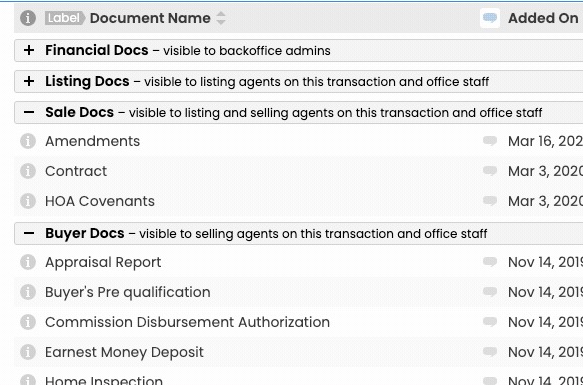
- Opened by the right people. Permission categories control who can open each document, on top of who can see the transaction.
Read more about audit trail and backups and document compliance.
After the Contract Is Signed
The executed contract is where the rest of the deal starts: if a signature or initial is missing, none of the deadlines actually start.
- Pipeline AI reads the contract. Drop in the signed contract and Pipeline AI fills in the property address, parties, price and dates, citing the source of every value. You review and save.
- Key dates fill in. Each due date is a rule on the checklist template, such as 3 business days after the Acceptance Date, so the real dates appear on the deal.
- Amendments move the deadlines. When an amendment moves the closing date, update it once and every dependent deadline recalculates.
Read more about Pipeline AI and due dates.
Keep the E-Signature Tool You Already Pay For
Pipeline eSign is the built-in option. Offices that already pay for another tool can keep it and still get every signed copy filed.
- DocuSign: connect once from Admin > Integrations and send from any transaction. The envelope subject comes from the property address, and the executed PDF returns under its standardized document name.
- Dropbox Sign: connect once and it becomes a send option on every transaction, with signers added in order. Paperless Pipeline tracks the request while it is out.
- Any other tool: forward the completed PDF to the transaction's MailDrop email address and it lands on that transaction, ready to assign with one click.
See every integration.
Getting Started With Pipeline eSign
Your Paperless Pipeline account is usable on day one, and setup help from a real person is free.
- 1
Pick a starting limit.
Set how many requests your team can send each month, then raise or lower it as volume changes.
- 2
Set up your reusable forms.
Start with the documents agents send on every deal, with signer roles filled in from the transaction.
- 3
Add signed documents to your checklists.
Make each signed form a required document, so a missing signature shows on the checklist before the file closes.
- 4
Send a test request.
Send a real document through Pipeline eSign and confirm the signed copy lands in the right transaction before agents use it live.
- 5
Agree two office rules.
One request link per signer, never a shared household email, and one standard name for each signed document.
See the full getting started plan.
What is Pipeline eSign?
Pipeline eSign is Paperless Pipeline's built-in electronic signature tool. You send, track and receive legally binding signatures straight from a transaction - no extra logins, no tab-switching and no separate third-party platform to pay for.
How is Pipeline eSign different from a separate e-signature tool?
Because it is built into Paperless Pipeline, Pipeline eSign pulls from the transaction details you have already entered, so requests go out faster and with fewer mistakes. The signed copy files itself in the transaction, there are no per-user charges and no contract, and you pay only for the requests you send.
How does Pipeline eSign pricing work?
It is usage-based. You set a monthly limit and are billed in blocks of 10 signature requests for what your team actually sends, with no per-user fees and no contract. If you set a limit of 120 requests but send 64, you pay for 7 blocks, not 12. Unused requests do not carry over to the next billing cycle. See pricing.
Are Pipeline eSign signatures legally binding?
Yes. Pipeline eSign uses secure, legally binding electronic signatures, so completed documents hold up the same as any compliant eSignature.
Do signers need a Paperless Pipeline account?
No. Recipients sign without creating an account or logging in - they open the request, sign, and the finished document returns to your transaction automatically.
Can clients sign on their phone?
Yes. Each signer gets an email with a secure link to review and sign from any device, and they only see the fields they need to fill in.
Can I set the order people sign in?
Yes. When you send a request you can set a signing order, copy in people who only need the signed document, and add a personal message. When everyone has signed, a final copy is emailed to you and to every recipient.
Where do signed documents go?
Completed documents return automatically into the right transaction in your Paperless Pipeline account. There is no downloading from one tool and re-uploading into another.
Can I still use DocuSign or Dropbox Sign?
Yes. Pipeline eSign is built in and is the simplest, lowest-cost option, but Paperless Pipeline also integrates with DocuSign and Dropbox Sign if your office already uses them.
What is real estate e-signature software?
Real estate e-signature software lets agents, brokers and transaction coordinators send listing agreements, purchase contracts, disclosures and addenda for signature online, track who has signed and keep the signed copy on file. Pipeline eSign does this inside Paperless Pipeline, so each request starts from the transaction and the signed document returns to the same file.
Can one signature request include several documents?
Yes. Each request can include any number of documents and signers, so a full disclosure packet can go to buyers and sellers as one request, in the signing order you set. Billing counts requests, in blocks of 10, not documents or signers.
Can I see who has signed and send reminders?
Yes. Each request shows its status in Paperless Pipeline, so you can check whether it is still waiting on a signer, send a reminder or cancel it at any time. When everyone has signed, the completed document returns to the transaction and a final copy is emailed to you and every recipient.
Does Pipeline eSign include real estate association forms?
No. Paperless Pipeline is not a forms company. Fill out your forms in your MLS or forms provider, then send the finished documents for signature from the transaction. Reusable forms in Pipeline eSign fill in signer roles and transaction details, so the documents you send on every deal take less setup each time.
Is there a Pipeline eSign mobile app?
There is nothing to download. Paperless Pipeline runs in the web browser on iPhone and Android phones, tablets, PCs and Macs, so agents and admins can pull up a deal and its documents from anywhere. Signers open their secure email link on any device, with no account and no app to install.
Can lease transactions use Pipeline eSign?
Yes. Leases go out from the lease transaction like any other document, and tenants sign from a secure email link with no account. Paperless Pipeline runs separate checklists for residential, commercial, lease and referral transactions, so the signed lease lands in the right file and on the right checklist.
Can a transaction coordinator send requests for the agents?
Yes. Transaction coordinators work in the same transactions as the agents, so they can send requests, send reminders and check the status of each one from the file. Every plan includes unlimited users, so adding a coordinator or an admin never changes the bill.
What happens to signed documents if we leave Paperless Pipeline?
They stay yours. Every month Paperless Pipeline prepares a free backup as a ZIP file, with one folder per property address and documents in their original format, and you can download any single transaction on demand. Download your backups before you cancel: data for cancelled accounts is removed within a few weeks.
Ready to Ditch the Overpriced Tools?
Try a faster, simpler, and more affordable way to collect signatures - right inside Paperless Pipeline.
14 days, full access·No credit card·Free setup with you
Closing 250+ transactions a year? Request a call