
Transaction Management Software for Commercial Real Estate
Keep commercial transactions organized from contract to closing. Manage documents, deadlines, checklists, contacts, and transaction progress in one simple platform, without the complexity or high cost of enterprise software.
14 days, full access. No credit card. Free setup with you. See it first
One place to manage every commercial deal
Whether you're managing acquisitions, dispositions, leasing, or investment sales, commercial transactions involve hundreds of moving pieces.
Paperless Pipeline helps your team stay organized with one place to manage every transaction from start to finish. It is the same real estate transaction management platform that 1,700+ active brokerages use, in live production since 2009, set up for the way commercial deals run.
Instead of juggling spreadsheets, shared drives, emails, and sticky notes, your entire team always knows:
- What's been completed
- What's still outstanding
- Which deadlines are approaching
- Where every document lives
- Which transactions need attention
Everything your commercial team needs
Custom Workflows
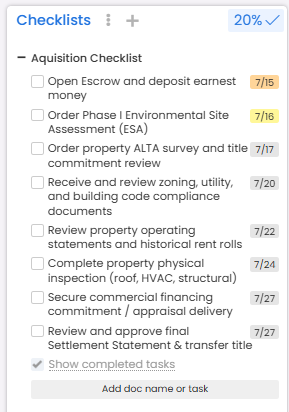
Every commercial deal is different. Create customized checklists for acquisitions, leasing, investment sales, land, retail, office, industrial, or any workflow your team follows.
Centralized Document Management
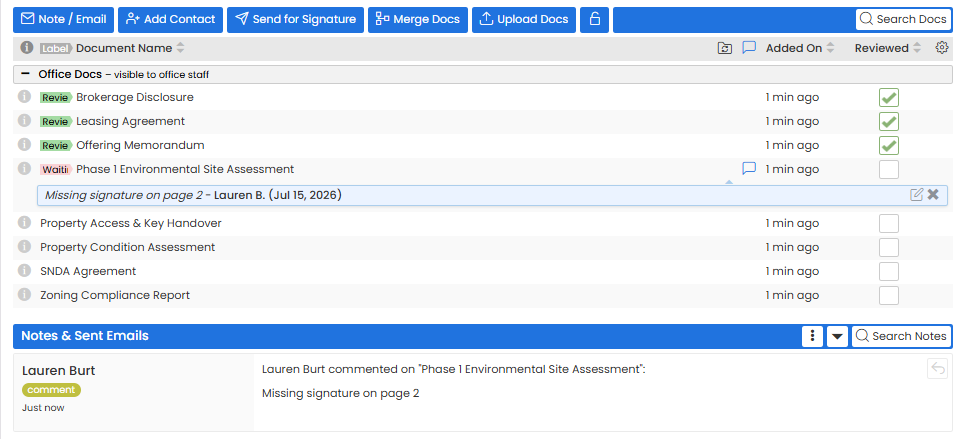
Keep contracts, LOIs, leases, surveys, environmental reports, title documents, amendments, and supporting files attached directly to each transaction. No more searching through shared folders or email chains.
Never Miss Another Deadline
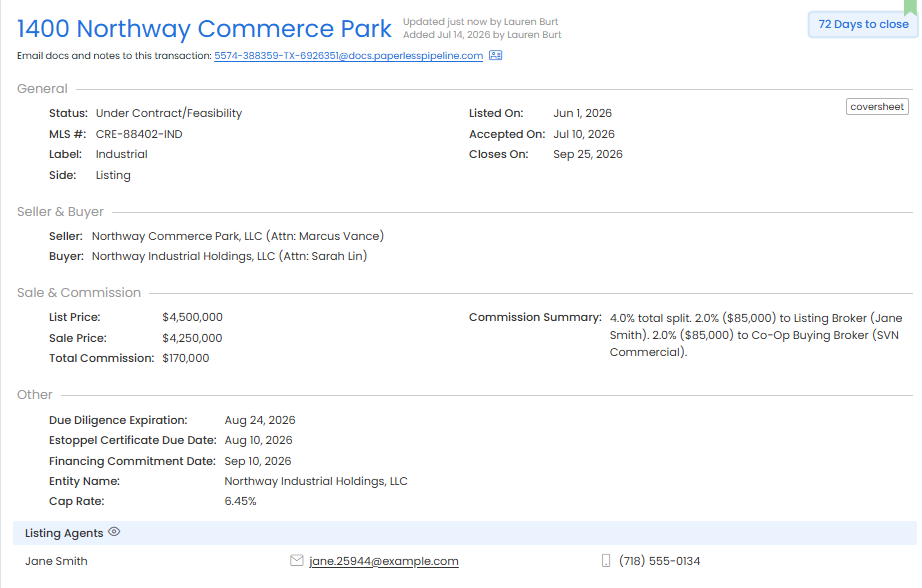
Automatically calculate important dates and keep your team ahead of inspections, financing, due diligence, lease milestones, and closing deadlines.
Anchor each due date to acceptance, a contingency or closing, in business or calendar days, skipping weekends and company holidays. When a key date moves, linked tasks move with it, and a daily email lists what's overdue, due today and due tomorrow.
Mark the tasks that can't slip, such as the end of due diligence, as Key Dates. Each gets a place in the deal's Key Dates and Milestones section, you can sync just those dates to your calendar, and they drop into emails as autofill tags.
Everyone stays on the same page.
AI-Powered Transaction Creation
Instead of entering transactions manually, simply upload a contract and let Pipeline AI Create build the transaction for you in seconds.
Every value it fills in shows its source in the contract, so you check it in one click before saving. When terms change, drop in the amendment and AI Update lists each old value next to the new one, and nothing changes until you apply it. Every account includes monthly Pipeline AI credits at no charge.
Less data entry. More time moving deals forward.

Real-Time Pipeline Visibility
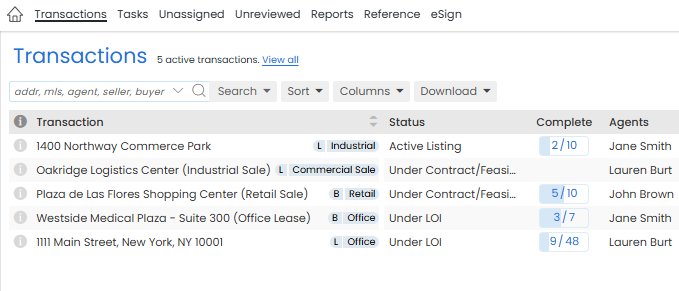
See every active transaction across your team in one dashboard. Filter by broker, coordinator, transaction type, office, stage, or status to quickly understand what's moving, and what needs attention.
Ready-made reports such as Closing in 30 Days and Overdue Closings need no setup. Save any search as a shortcut that re-runs live, report on your own custom fields, and download results as CSV, XLSX or PDF.
Built for commercial real estate teams
Whether you're managing:
Paperless Pipeline helps create consistent processes while giving every team the flexibility to customize their workflows.
Label each deal by type and the matching checklist applies itself, with separate lists for commercial, lease and referral deals. Firms with commercial and residential offices can set each up as a location with its own checklists, and each office sees only what applies to it.
The right view for every role on your team
Everyone works in one account, from the principal to the newest agent. Ready-made profiles for agents, coordinators, brokers and finance give each person a starting view you can adjust.
- Principal or managing broker. As master admin, you see every office in one company-wide view, report across all locations and handle billing and plan changes.
- Office or team admin. A location admin reviews documents, manages checklists and oversees the deals in their own office. Name a primary admin per office so reminders and closing notices come from the right person.
- Transaction coordinator. See the deals assigned to you, and work from one Tasks page that sorts every task by due date, red when overdue and yellow when due soon.
- Brokers and agents. See only the deals you're on, in a stripped-down view of the screens you actually use. An email tells you when documents are added or tasks come due.
- Finance. With the optional Commission Module, only admins can generate a CDA by default, so money moves only after someone in the office signs off.
See how it works for transaction coordinators and brokerage owners.
Keep every party to the deal in the loop
Commercial deals bring in brokers, coordinators, lenders, title companies and attorneys. Each deal's messages and files stay on its transaction.
- Email from the deal. Send documents and notes from a transaction to co-op agents, title, escrow or attorney contacts, using saved message templates.
- One inbox per deal. Each transaction has its own MailDrop email address, so a lender or title company can send files straight to the right deal.
- Deadlines in every calendar. Subscribe Google Calendar, Outlook or Apple Calendar to your task due dates; each person sees only their own tasks.
- Everyone on one account. Add every broker, coordinator and admin at no extra cost, with permissions set per user so each person sees only what they need.
- Updates on schedule. Write an update now and schedule it to send later. Template tags fill in the deal's details, including any key date you flag.
Document review and an audit trail on every deal
Set the required documents for each deal type, and Paperless Pipeline flags anything missing before sign-off. Reviewers check each file without downloading it, mark it reviewed or leave a comment that can be emailed to the agent on the deal, and one Unreviewed page lists everything still waiting.
Every upload, review and comment is logged, dated and attributed in the deal's activity history. Download any transaction with its documents and history, and records stay online on a rolling 10-year basis while your account is active.
Each month, a free backup of last month's new, closed, expired and fallen-through deals arrives as a ZIP file with one folder per property address. Documents keep their original format, notes, emails, checklists and activity history come as plain text, and the backup opens without a Paperless Pipeline login.
Send documents for signature from the deal
Pipeline eSign is built into Paperless Pipeline. Send a request from the transaction, the deal's details fill it in, and the signed copy comes back to the same transaction.
- No account to sign. Signers open a secure link from any device and see only the fields they need to fill in.
- Signing order. Set who signs first, copy in people who only need the final document and add a personal message.
- Live tracking. Check status, send reminders or cancel a request at any time.
- Legally binding. Pipeline eSign uses secure, legally binding electronic signatures.
It is billed by use: you pay only for the requests you send, in blocks of 10, with no per-user fees, and each request can hold any number of documents and signers. Prefer the tool you use today? The DocuSign and Dropbox Sign connections are below.
Connect the tools your team already uses
Paperless Pipeline connects natively to Follow Up Boss, DocuSign and Dropbox Sign, and a status change can update your CRM or thousands of other apps through Zapier. Integrations come with every plan.
| Tool | What it does with Paperless Pipeline |
|---|---|
| Follow Up Boss | An embedded app shows a linked lead's transaction status, key dates, price, commission breakdown and recent documents inside Follow Up Boss. |
| DocuSign and Dropbox Sign | Send documents for signature from a transaction. The signed PDF comes back into the same file, already named, ready for review. |
| QuickBooks, through Zapier | When a deal's status changes to Closed, Zapier creates the bill in QuickBooks with the address, close date and commission fields filled in. |
Moving from spreadsheets or another system? Import open deals by CSV, and the setup team runs a bulk migration at no charge. See all integrations.
Why commercial teams choose Paperless Pipeline
Flexible enough for your workflow
Commercial real estate doesn't follow a one-size-fits-all process. That's why Paperless Pipeline is designed to adapt to the way your team already works, not force you into someone else's workflow.
Customize:
- Transaction types
- Checklists
- Statuses
- Required documents
- User permissions
- Reports
- Workflows
Workflow customization
Simple pricing. No long-term contracts.
Pay only for what you need.
No lengthy implementation.
No expensive consulting.
No complicated onboarding.
Plans start at $69/month for up to 5 new transactions a month. Every plan includes unlimited users, unlimited storage and free setup, so adding people never changes your bill. See pricing.
Just software your team can start using in days, not months.
14 days, full access. No credit card. Free setup with you. See it first
How to choose commercial real estate transaction management software
Before you choose, ask every vendor the same questions about price, contract terms, support and what current users say. Here is how Paperless Pipeline answers them.
| Ask this | Paperless Pipeline's answer |
|---|---|
| How is the price worked out? | On the new transactions you open each month. A deal counts once, when it is created, however often its status changes later. |
| What does a busier firm pay? | $140/month for up to 10 new transactions a month, $190 for up to 25, $240 for up to 40 and $425 for up to 150. |
| What if deal flow slows? | Move your plan up or down at any time, and the new rate starts on your next billing date. There is no annual tier commitment. |
| What do current users rate it? | 4.6/5 on G2 (21 reviews) and 4.8/5 on Capterra (10 reviews), as of October 2026. |
| How proven is it? | More than 4.6 million real-estate transactions managed since 2009, and about 8% of all US real-estate transactions run through it (figures as of July 2026). |
| Who helps when someone gets stuck? | Real people, by email and phone, plus a searchable help center and help text inside the product. There is no support fee. |
| How often does it change? | New upgrades ship roughly every six weeks, without forcing your team to relearn how it works. |
For a side-by-side view, see how Paperless Pipeline compares.
Mistakes to avoid when you compare systems
The same few mistakes come up again and again when brokerages compare systems. Check each one before you sign.
- Scoring the demo, not your file. A clean sample deal tells you little. Load one of your own messy commercial deals, one with a moved date or an amendment, and watch how the system handles it.
- Leaving the pricing math until the invoice. Run your last three months of deals and your headcount through each vendor's pricing before you shortlist, then ask what happens when you add two brokers and an admin.
- Taking 'audit trail' on trust. Ask for a real export of a reviewed file, showing who reviewed each document and when, not a description of one.
- Leaving out the people who run the files. Coordinators and admins work in the system every day. Bring them into the decision, not just the brokers who log in now and then.
- Skipping the trade-offs list. Every system has one: a missing integration, a feature you won't use. Write it down before you sign so it doesn't surprise you in month three.
How your team gets started
Your account is usable on day one, and most brokerages are fully running in days, with free admin training on every plan.
- 01
Day one: add your offices and people.
Create each office or branch, add your admins and agents, and set what each role can see.
- 02
Load a deal you know well.
Start with one real deal so you can check the system against something you can verify, then let Pipeline AI build the next one from its contract.
- 03
Build your checklists, statuses and labels.
Turn your process for each deal type into checklist templates, then rename the pipeline stages to whatever your office already calls them.
- 04
Train coordinators and admins first.
The people who run files every day should be fluent before everyone else logs in, so early questions go to a trained colleague.
- 05
Bring your agents in.
Training is short, usually 20 minutes. Agents only learn one thing: the deal's MailDrop address, so they forward documents straight from their inbox with no login.
- 06
Pick a cutover date.
Start new deals in Paperless Pipeline from that date and move your open deals across, while closed deals stay in your old system. Choose a slow week, not peak season.
- 07
Switch the old system off.
Most brokerages run both for two weeks, then stop logging into the old one. From then on, the audit trail builds itself.
See the full day-by-day path, from day one to month one.
Frequently asked questions
What is commercial real estate transaction management software?
It is software that runs each commercial deal from contract to closing in one place: documents, checklists, key dates, review and reporting. Some firms call it deal management software. Paperless Pipeline is real estate transaction management software built for brokerages, teams and commercial firms, with separate checklists for commercial, lease and referral deals and every file attached to its transaction.
Can we customize workflows for different transaction types?
Yes. Create different checklists, document requirements, and workflows for acquisitions, leasing, investment sales, or any transaction your team manages.
Does Paperless Pipeline work for multi-office firms?
Yes. Organize transactions across offices while giving managers visibility into activity across the business.
Can we store all of our transaction documents?
Absolutely. Upload contracts, amendments, leases, reports, disclosures, and supporting documents directly within each transaction.
Is there a long-term contract?
No. Paperless Pipeline offers straightforward pricing with no long-term commitments.
Does Paperless Pipeline integrate with QuickBooks?
Yes. Connect via Zapier to automatically push financial and closing data to QuickBooks, no manual re-entry.
Does Paperless Pipeline track commissions?
Yes, with the optional Commission Module, from $58/month. It works out splits, caps, fees and referral fees on each deal, generates the commission disbursement authorization (CDA) for the closing company and shows each agent their net. The base plan already includes Commission Summary and Comparative Production views for company-wide production at a glance.
Does Paperless Pipeline work on phones?
Yes. Paperless Pipeline is a responsive web app that works on any phone, tablet or computer, with no app store download. Your team can upload a document with the phone camera straight into the right transaction, check tasks and review a deal from anywhere.
Do we need a CRM as well as transaction management software?
Most brokerages use both, because they do different jobs. A CRM such as Follow Up Boss handles leads and follow-up before there is a deal. Paperless Pipeline runs the deal from contract to closing: checklists, deadlines, document review and commissions. With the Follow Up Boss integration, your team sees each linked deal on the lead's profile.
Can we keep sensitive deal documents private?
Yes. On top of who can see each deal, every document has a permission category that controls who can open it. The built-in categories are Office, Listing, Sale, Buyer, Public and Private, and you can set a default on each standard document name so it applies itself. Permissions are granted per user and per location.
What happens to our records if we cancel?
Paperless Pipeline is month-to-month, so you can cancel anytime with no cancellation penalty. Download your monthly backups before you go, with no export fee, or keep every deal online, read-only, on the $35/month Archive Plan. Data for canceled accounts is removed within a few weeks of canceling, so save your copy first.
Is there a free trial?
Yes. You get 14 days of full access to every feature, with unlimited users and no credit card. The trial includes up to 9 transactions, enough to run several real closings end to end, and free setup help. If you are still deciding when the 14 days are up, log back in and the trial runs another 7 days.
Does Paperless Pipeline provide contract forms?
No. Paperless Pipeline is not a forms provider. Draft your LOIs, purchase agreements and leases in the tools you use today, then bring the finished documents into the deal: upload them, email them to the deal's MailDrop address or send them for signature with Pipeline eSign. From there, the checklist, review and audit trail take over.
Does Paperless Pipeline suit small firms as well as large groups?
Yes. Customers range from solo coordinators and 10-agent boutiques to multi-state operations with hundreds of agents across dozens of offices. Offices and users are unlimited on every plan. If each company in a group runs its own account, the Enterprise Portal manages them all from one place, with one combined monthly bill.
Does Paperless Pipeline have an open API?
No. Paperless Pipeline does not offer a public API. Instead, a status change on a deal can pass data to thousands of other apps through Zapier, such as a Slack message when a deal goes under contract, and single sign-on is available through the SSO API.
Bring more organization to your commercial transactions.
From contract to closing, Paperless Pipeline gives your team one place to manage documents, deadlines, workflows, and every moving piece of the transaction.
14 days, full access·No credit card·Free setup with you
Closing 250+ transactions a year? Request a call