
Optional Commission Module
From closed deal to everyone paid.
Paperless Pipeline calculates splits, caps, fees, referrals, and deductions from the transaction — then generates the CDA, agent statements, and the year-end earnings totals your accountant needs at 1099 time.
No separate commission spreadsheet. No re-keying the deal.
14 days free · No credit card · Free setup
Deal closes
510 Bedford Ave NE #9
Sale price
$1,455,000
Gross commission (3%)
$43,650.00
Pipeline calculates
splits · caps · referrals · fees
- Selling agent50% split, post-referral$20,733.75
- Brokerage50% split, less fees$20,338.75
- Referral out5% of gross$2,182.50
- Fees & deductionsE&O, brokerage side$395.00
Ready to pay
CDA generated · Agent statement ready
The deal and the money stay together.
Transaction → calculation → CDA → statements
Commission tracking software
Calculate real estate commissions without the spreadsheet.
The financial terms already live on the transaction. Paperless Pipeline uses them to calculate who gets what, then produces the paperwork needed to pay everyone — automatic CDA generation, agent commission statements, and production reports.
Set the split once. Let Pipeline do the math.
Percentage splits, flat fees, caps, franchise royalties, and brokerage fees—set the rules once and Paperless Pipeline calculates every deal from there.
$400,000 sale
$12,000
Gross commission · 3%
− $720
6% franchise royalty
$11,280
Distributable commission
70 / 30 split
Agent · 70%
$7,896
Brokerage · 30%
$3,384
Same rules. Every deal.
No rebuilding formulas. No checking the spreadsheet.
One calculation. Two clear statements.
Paperless Pipeline turns the completed commission calculation into financial statements for both the brokerage and the agent — without re-entering the deal or rebuilding the math.
For the brokerage
Transaction Commissions & Fees Statement
The complete financial record of the transaction.
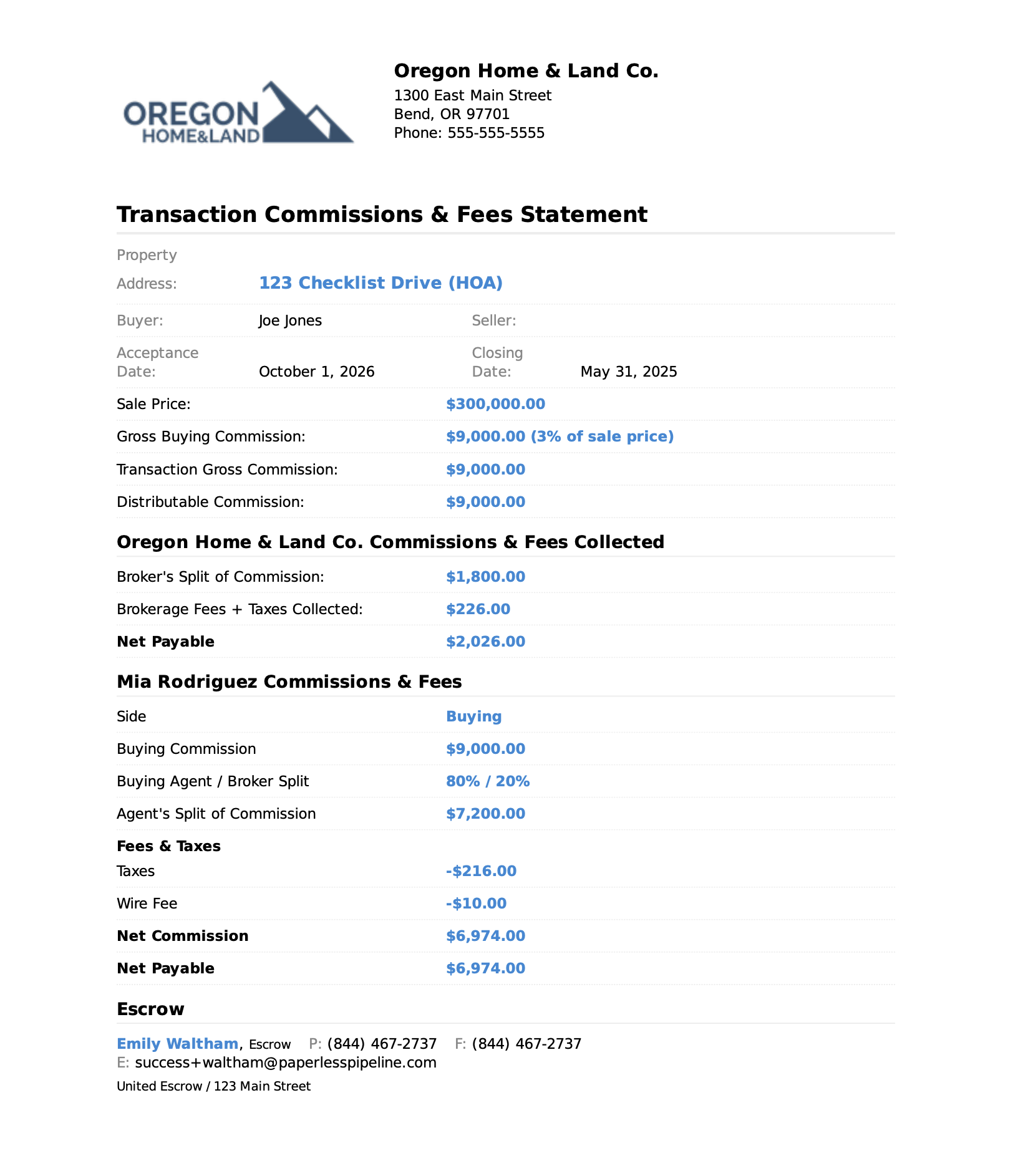
- Sale price
- $300,000
- Gross commission
- $9,000
- Broker's split
- $1,800
- Fees + taxes collected
- $226
- Net to brokerage
- $2,026
For the agent
Agent Commission Statement
This deal, plus the agent's running year-to-date picture.
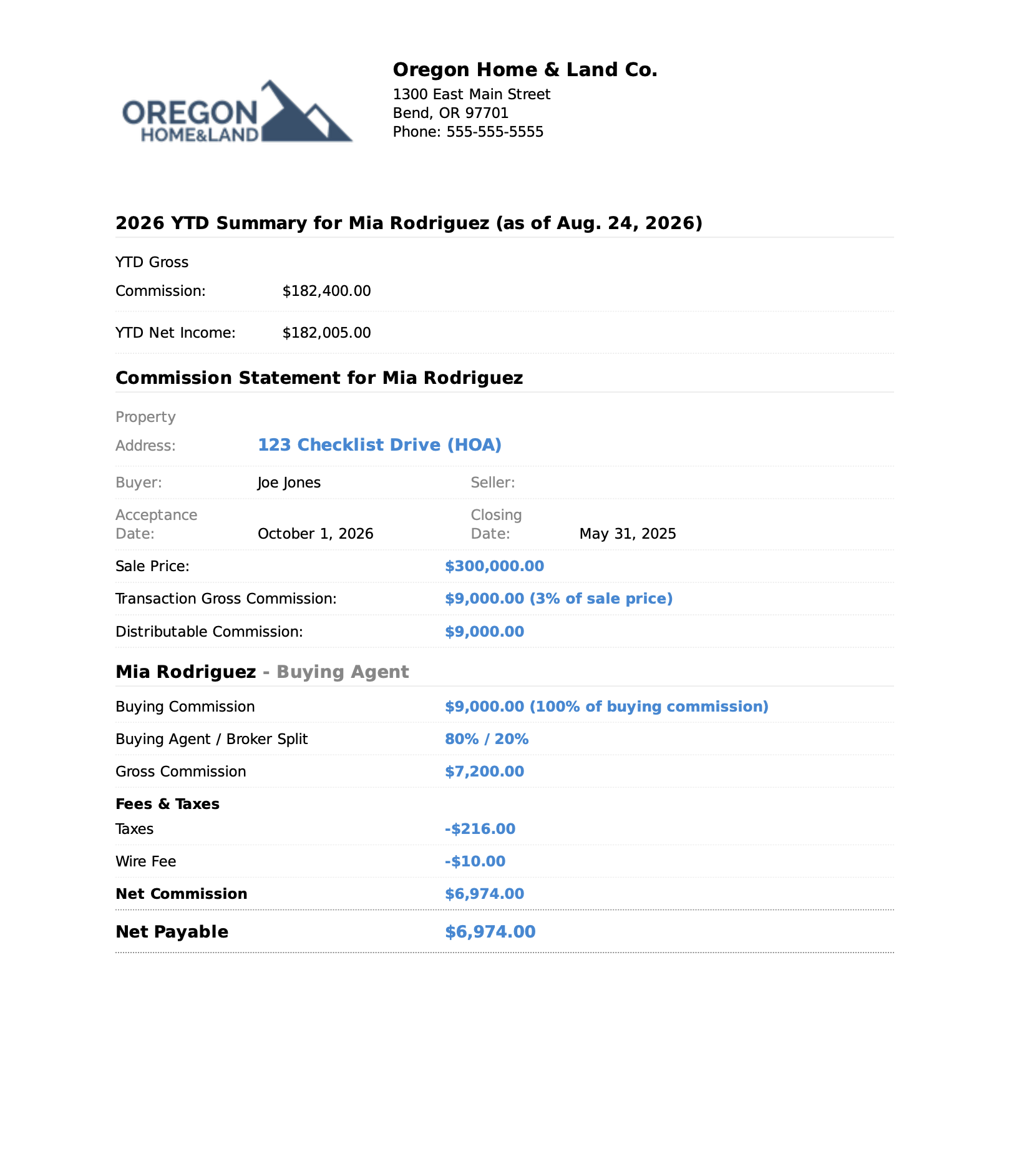
- Agent / broker split
- 80% / 20%
- Agent gross
- $7,200
- Taxes + wire fee
- − $226
- YTD net income
- $182,005
- Net to agent
- $6,974
Everyone sees the same math.
The brokerage gets the full transaction record. The agent gets their pay and year-to-date totals. Both come from the same commission calculation.
The CDA is already done.
Once the commission is calculated, Paperless Pipeline generates the Compensation Disbursement Authorization (CDA) from the same transaction — payees, amounts, brokerage details, and commission notes included.
Review it. Send it to closing. Done.
- Payees & amounts filled in
- Brokerage details included
- Ready to send from the transaction
Commission calculation
$9,000 distributable
CDA
$9,000 allocated to payees
Without Pipeline Calculate → re-key → build document → check it → send
With Pipeline Calculate → CDA generated
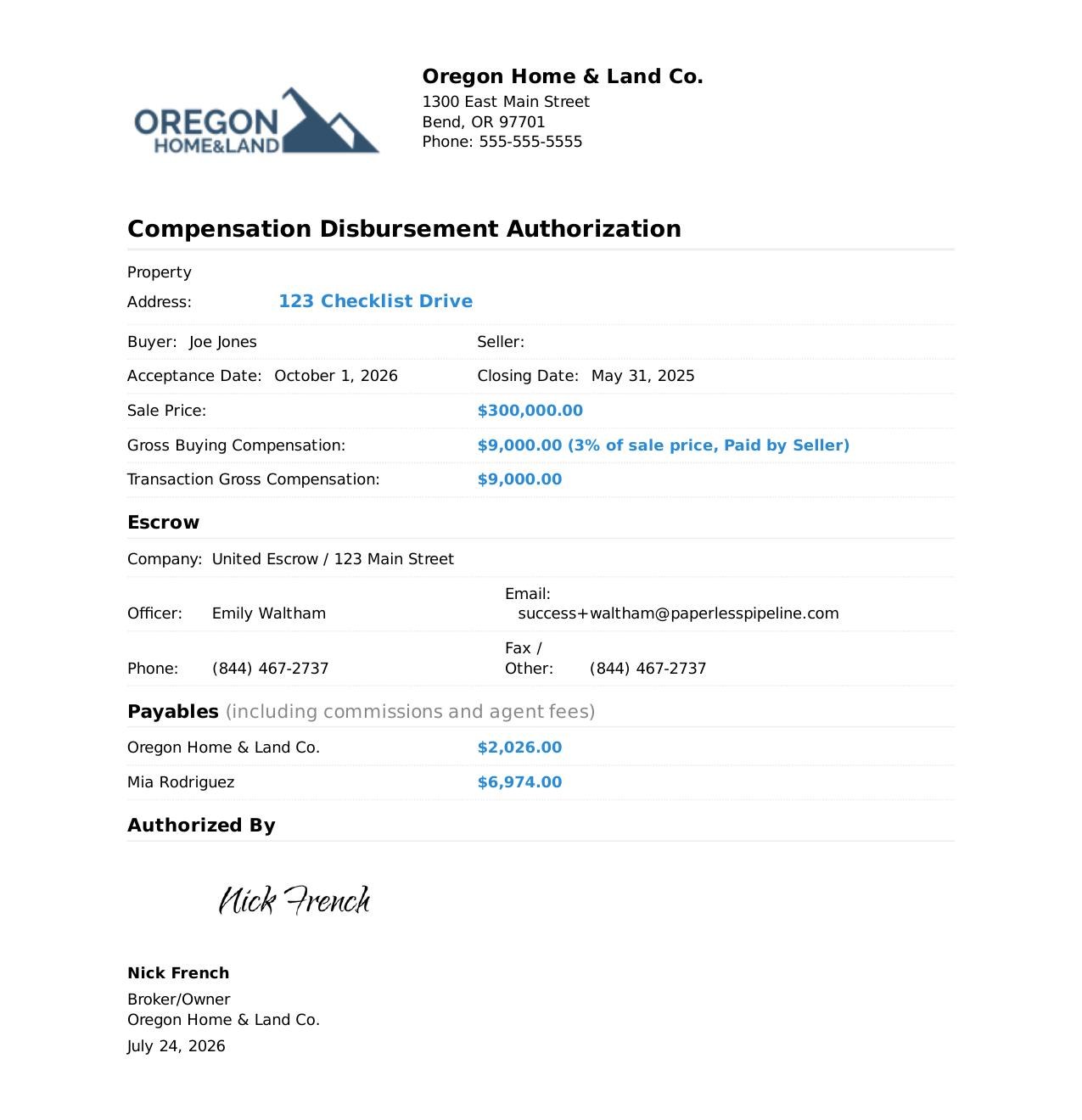
Ready to send to the closing company.
Know what your brokerage is producing.
Every completed commission rolls into brokerage reporting automatically, so you can see production, volume, commissions, and upcoming closings without maintaining another spreadsheet.
Filter by agent, office, transaction type, or timeframe when you need to dig deeper.
See it by
- Agent
- Office
- Transaction type
- Timeframe
No second spreadsheet to maintain.
The report comes from the transactions already in Pipeline.
Brokerage production
This month
$4.2M
Closed volume
$126K
Gross commission
31
Closed transactions
18
Closing next 30 days
Top producers
- Sarah Martinez$1.1M volume · 8 sides
- James Wilson$840K volume · 6 sides
- Monica Zing$720K volume · 5 sides
Closed this month: 31 transactions · $4.2M volume
Next 30 days: 18 pending commissions
Illustrative summary of what Paperless Pipeline reporting answers · Export to spreadsheet or PDF
Everyone knows where they stand.
On a schedule you choose, Paperless Pipeline sends each agent their production totals automatically — closed transactions, sales volume, gross commission, fees, and net income.
No asking admin. No separate production spreadsheet.
- Sent automatically on your schedule
- Individual production & income
- Running year-to-date totals
Automatic production update
Send Monthly ▾
John Kennedy
Year to date
3
Transactions closed
$975K
Sales volume
- Gross commission
- $23,100
- Fees & taxes
- −$650
- Net commission
- $22,450
One agent. All closed deals. Running totals.
Nobody has to ask for the numbers.
Pipeline sends each person their own production picture automatically.
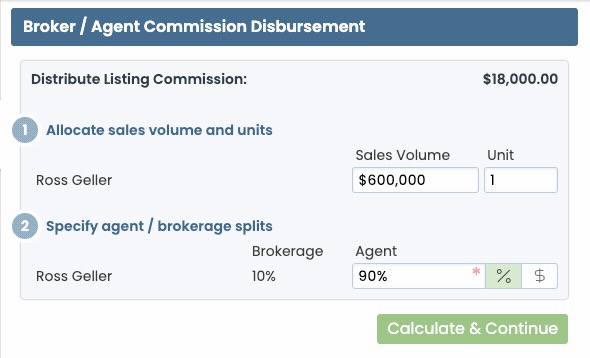
How fees, deductions and royalties are applied
You define each fee once and set the order it is applied in: franchise royalties off the top, then brokerage fees, then in-house fees, taxes, client fees, home warranties, or charitable contributions. Paperless Pipeline applies them in that order on every commission and prints each one as its own line on the statement, so an agent can see exactly what was taken and why.
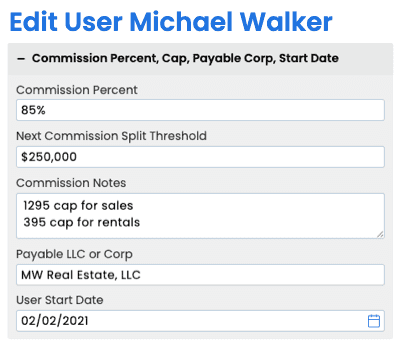
How agent commission plans are set up
Each agent gets their own commission plan: their split or flat fee, tier threshold, start date, license number and payable LLC. Change one agent's plan and it applies from their next closing; nobody else's plan moves.
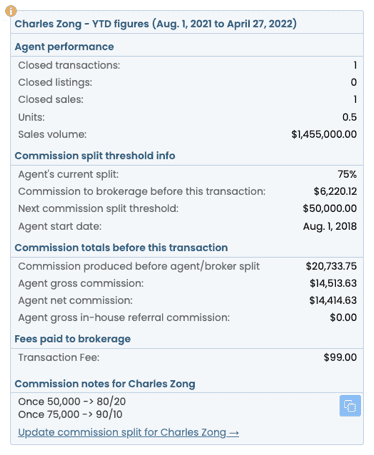
How tier and cap alerts work
Paperless Pipeline keeps running totals against each agent's Next Commission Split Threshold and tells you when they are about to cross it, so the next deal is calculated on the right tier rather than corrected after the fact. Every time you generate a commission you also see that agent's production detail: closings, total sales volume, and where they sit against their cap.
Want to see how Paperless Pipeline can improve your workflow?
Free onboarding from a real human, on a call with you.
Prefer a guided tour? Book a demo
Paperless Pipeline vs bundled commission tools.
Brokermint and SkySlope price per user. Paperless Pipeline prices on the transactions you start, so hiring ten agents does not change your bill. The Commission Module is optional — see the pricing calculator for the cost at your transaction volume.
Commission Module FAQs
What brokers and TCs ask before turning on the Commission Module.
What is the Paperless Pipeline Commission Module?+
The Commission Module is Paperless Pipeline's add-on for calculating agent commissions and producing your brokerage's deal financials - splits, statements, disbursement authorizations and reports - right inside each transaction. Pricing depends on your transaction volume.
How are commissions calculated?+
In three short, highly automated steps. Whether your agents are on splits or a flat fee, have tiers or caps, and collect a check at the table or from the brokerage, the Commission Module runs the math inside the transaction, so you are not rebuilding spreadsheets for every deal.
Can each agent have a different commission split?+
Yes. Every user can have their own commission percentage and tier threshold, plus their start date, license number, payable LLC, commission notes and running totals for sales volume and units. You set and update each agent individually instead of guessing which plan they are on.
What is a commission disbursement authorization (CDA)?+
A CDA - also called a compensation disbursement authorization since the 2024 NAR settlement - tells the closing company how to pay out commission on a deal. In Paperless Pipeline you send one straight from the transaction, with disbursement options, an authorization signature, the agent's payable LLC or corp, custom instructions, referral settings and earnest money deposit.
Can agents see their own commission statements?+
Yes. Agents and admins can view a commission statement the moment a commission is calculated, showing what they earned on the deal plus their year-to-date production and volume in the same document - so you stop fielding "how much did I make?" questions.
Does it handle fees, deductions and royalties?+
Yes. Add automatic franchise fees or royalties, brokerage fees, client fees, taxes, off-the-top deductions, and even home warranties or charitable contributions. Each step of the calculation is set up once for line-item accuracy on every deal.
Will it alert me when an agent hits a cap or tier?+
Yes. Define your commission thresholds and Paperless Pipeline alerts you when an agent reaches the next tier or cap, and shows production details - closings, total sales volume and more - each time you generate their commission.
What financial reports are included?+
Downloadable reports covering individual agent production, company performance and your top producers, customizable by location, transaction type, timeframe or agent. You can also automate monthly production emails so agents and admins receive monthly and year-to-date production, volume and income without having to ask.
Who can see financial data?+
Access is permission-controlled. Separate permissions govern who can enter financial data and who can view financial reports, and you can scope them by Location, so sensitive numbers stay with the right people.
How much does the Commission Module cost?+
The Commission Module is an add-on to your Paperless Pipeline plan, with no contract. Its price depends on your transaction volume. You can see the exact price at each production level on the pricing page.
Does the Commission Module work with the rest of Paperless Pipeline?+
Yes. It is built into the same transactions you already manage, so commissions, statements and CDAs are generated from the deal you are working on - no separate accounting tool and no double entry.
Can I try it before buying?+
Yes. Start a 14-day free trial of Paperless Pipeline with free setup, then add the Commission Module to see how commissions, statements and reports work for your splits. Schedule a demo to walk through it.
Can I calculate a commission split quickly without logging in?+
Yes - try the free real estate commission calculator for a quick estimate. Inside Paperless Pipeline, the Commission Module then automates the full calculation, statement and disbursement on every real deal.
Get started today and simplify your real estate transaction management.
No credit card required. Free setup available.
14 days, full access·No credit card·Free setup with you
Closing 250+ transactions a year? Request a call