Real Estate Automation: A Practical Guide for Modern Brokerages

Real estate transactions are notoriously complex. A single deal can involve more than 200 individual steps, dozens of documents, multiple parties, strict deadlines, and a long list of compliance requirements.
It’s no surprise that agents and brokers often find themselves buried in admin. One real estate sector analysis estimates that up to 60 percent of an agent’s working hours are spent on routine tasks that aren’t client-facing or revenue-generating.
That’s where real estate automation comes in.
Most guides discuss automation in broad terms, covering marketing emails, social posts, and property management systems.
But we know that the biggest time savings for brokers come from automating the workflow that moves a deal from contract to close: the checklists, documents, deadlines, and compliance tasks that make up a real estate transaction.
This guide explains which tasks are easiest to automate, how to build workflows that actually work, what to look for in automation software, and where AI is heading next in real estate operations.
What Is Real Estate Automation?
Real estate automation refers to the use of technology to streamline, systemize, and trigger repetitive tasks throughout the transaction lifecycle.
Instead of manually tracking deadlines, sending emails, managing documents, or updating checklists, automation uses predefined rules and workflows to handle these steps for you.
The result is a more consistent, efficient, and reliable transaction process, which is particularly valuable when a single deal involves hundreds of individual tasks.
Automation can:
- Activate tasks the moment a contract is signed.
- Assign responsibilities to the right team members.
- Move documents through eSign workflows.
- Calculate and track due dates.
- Send notifications when something needs attention.
These aren’t general productivity shortcuts; they’re actions tied directly to how real estate transactions function.
Common examples of real estate automation include:
- Workflow triggers: When a transaction status changes, the next set of tasks and documents is automatically activated.
- Automated reminders: Alerts for inspection dates, financing deadlines, missing paperwork, or upcoming expirations.
- Document routing: Sending forms to the correct parties for signatures or review without manual follow-up.
- Compliance checks: Ensuring required documents are uploaded before a file can move to the next stage.
- Assignment rules: Automatically assigning tasks based on agent, team, office, or transaction type.
This focus on the transaction process distinguishes real estate automation from general automation tools such as customer relationship management (CRM) software, project management platforms, or marketing systems.
Those tools may automate communication or lead generation, but real estate workflow automation is about managing the deal from contract to close, including every step, every document, every deadline.
For brokerages, that’s where automation systems deliver meaningful value.
Why Automation Matters More Than Ever in Real Estate
Real estate teams are under growing pressure to move faster, stay compliant, and maintain a high standard of service, even with leaner admin support.
The volume of time-consuming tasks in each transaction, combined with rising client expectations, makes manual processes increasingly unsustainable.
Automation gives brokers, agents, and transaction coordinators a way to reduce administrative strain, minimize risk, and operate with greater consistency across every deal.
Time and workload reduction
Automation reduces repetitive work that slows transactions, including:
- Manual data entry.
- Chasing signatures.
- Sending reminders.
- Updating checklists.
- Coordinating timelines across multiple parties.
Real estate industry reports show that administrative work still occupies 20 or more hours per transaction for experienced agents, making time-saving workflows essential for productivity.
With automation, tasks activate instantly, documents move through eSign routes without follow-up, and deadline reminders go out automatically, freeing teams to focus on client work instead of admin.
Compliance and risk management
Deadlines, disclosures, and audit requirements make real estate a high-risk environment for human error.
Workflow automation reduces this risk by generating audit-ready documentation, ensuring required items are completed before a file can progress, and triggering reminders for critical dates like inspection periods or financing deadlines.
These built-in safeguards help brokers maintain compliance even as transaction volume increases.
Better consistency across the team
Every agent works differently, but transactions need to follow a consistent process. Automated checklists, templates, and triggers ensure every deal follows the same structure, regardless of an agent’s experience level.
This standardization reduces rework, prevents missed steps, and creates uniform quality across the brokerage.
Stronger client experience
Clients expect quick answers and clear communication. Automation helps teams deliver both.
Instant notifications, status updates, and timely reminders prevent delays, while document workflows move faster with fewer errors.
When administrative work runs in the background, transactions become smoother and more reliable, which improves client relationships.
Scalable operations
Many real estate firms report that improving efficiency through remote tools and automation has increased overall operational capacity. 80 percent say remote work technologies have boosted efficiency.
With automated workflows, brokerages can manage more transactions without expanding administrative staff.
What Real Estate Tasks Can You Automate?
Transaction management tasks are repetitive, time-sensitive, and often spread across multiple people, which makes them ideal for automation.
Below are the core categories where automation delivers the biggest impact. Each ties directly to the everyday work of a brokerage team.
Transaction tasks you can automate
These are the workflow steps that typically consume hours of administrative time across each deal.
Automation can streamline them by triggering the next action as soon as the previous one is completed.
- Stage-based checklists: When a transaction moves to “Under Contract,” the full checklist for that stage activates automatically. For example, as soon as a signed purchase agreement is added to the system, the platform can automatically generate all tasks linked to the inspection period, without anyone having to create them manually. This includes scheduling the inspection, sending required disclosures, and setting the inspection deadline.
- Required documents: Ensure that disclosures, addenda, and compliance files are uploaded before a transaction can progress.
- Due-date calculations: Automatically calculate inspection deadlines, financing dates, appraisal windows, and contingency expirations.
- Task assignment rules: Assign tasks based on agent, team, office, or transaction type, without anyone manually distributing work.
Document workflows
Document handling is one of the most time-consuming parts of a transaction. Automation reduces manual effort and minimizes errors.
- Auto-generate forms: Create standard contracts, disclosures, and checklists from templates.
- Pre-filled fields: Pull information (names, dates, property data) from the transaction record directly into documents.
- eSign routing: Send documents to the right parties in the right order. Tools like DocSumo, for example, use AI document interpretation to accelerate form processing in real estate workflows.
- Automatic file naming and organization: Apply naming conventions and file rules automatically so documents are always stored correctly.
A good example of a document workflow is when a team using eSign routing sends a contract to buyers, then automatically routes it to the listing agent and TC without any manual intervention.
Communication and notifications
Much of the work in a transaction involves keeping people updated. Automation reduces the back-and-forth.
- Milestone reminders: Alerts for key deadlines or upcoming dates.
- “Missing items” notifications: Automatic nudges when required documents haven’t been uploaded.
- Client updates: Triggered when a file moves stages or when a document is completed.
- Vendor reminders: Notify lenders, inspectors, or attorneys of upcoming tasks or deadlines.
Let’s say an appraisal report is delayed. You could set up automated reminders that notify both the agent and lender when this happens, reducing the risk of a missed contingency deadline.
Back-office processes
Automation also streamlines administrative and financial tasks.
- Commission calculations: Automatically generate commission summaries, including splits and deductions.
- Reporting: Create transaction reports, production summaries, and compliance dashboards without manual data entry.
- Audit preparation: Organize files, verify required documents, and produce audit-ready records.
Commercial real estate firms use document-analysis tools like Prophia to automatically verify lease abstracts and prepare compliance records, reducing audit prep from days to hours.
Examples of Automated Real Estate Workflows
Below are practical, real-world examples of how a brokerage can automate the workflow from contract to close.
These workflows reflect how teams streamline transactions at scale using real estate automation tools.
When a deal becomes “Under Contract”
Automation delivers its greatest value by triggering an entire sequence of tasks the moment a deal status changes.
- Auto-assign the full checklist: As soon as the contract is uploaded or marked as accepted, the system assigns tasks to the agent, TC, buyer, or seller automatically.
- Auto-calculate due dates: Inspection, appraisal, financing, and contingency deadlines are generated instantly based on contract dates.
- Trigger disclosures and eSign workflows: Required forms are automatically sent to clients for signature in the correct order. For example, tools like Tomo, an AI-powered home-search and transaction platform, use smart routing to minimize turnaround times.
- Notify the lender, title company, and TC: Automated notifications ensure every party knows the transaction is live and what comes next.
This eliminates manual setup work, saving 30–60 minutes per file.
During the inspection period
This stage of a deal is the most deadline-sensitive. Automation can transform how your brokerage manages inspection deadlines.
- Automated reminders: If the inspection window is 7 days, reminders can be scheduled for days 3, 5, and 7 without manual effort.
- Condition-specific tasks: If an inspection report identifies issues with the roof, plumbing, or electrics, automation can trigger follow-up tasks based on keywords or categories.
- File storage rules: Inspection reports, receipts, and repair addenda are automatically saved to the correct transaction folder using predefined naming conventions.
Before closing
Automation keeps the final stages organized, reducing the risk of last-minute problems.
- Final document review: The system checks whether all required documents are present before closing.
- Trigger commission summary: Commission statements, splits, and deductions are generated automatically, ready for review.
- Archive/closeout automation: Once marked as closed, the entire file is stored, named, and archived according to brokerage rules, ready for audits or future reference.
These workflow examples show how automation reduces admin and creates a consistent, reliable process from the moment a deal is signed to the moment it closes.
How to Start Automating Your Real Estate Business in 7 Steps
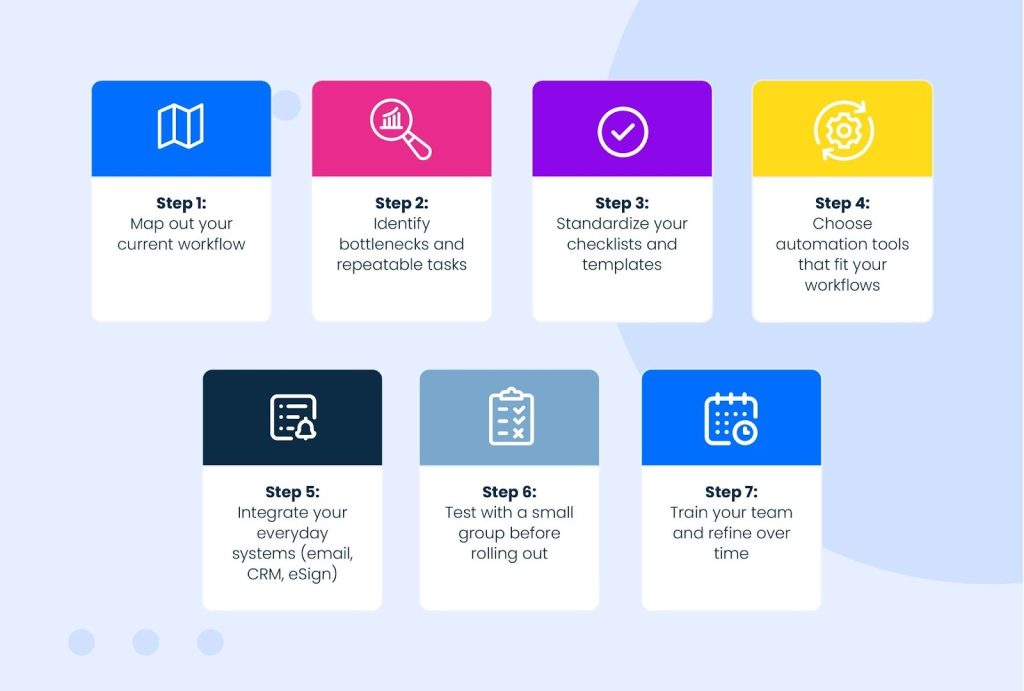
Building automation into your brokerage doesn’t require an overhaul of your entire operation.
A structured, phased approach lets you reduce admin, improve consistency, and eliminate repetitive tasks without disrupting your team. Below is a clear roadmap for getting started.
Step 1: Map out your current workflow
Document every step involved in moving a transaction from listing to closing, including who does what and when. This gives you a complete view of your process and highlights gaps or inefficiencies that aren’t obvious day to day.
Step 2: Identify bottlenecks and repeatable tasks
Look for tasks that slow deals down, such as manual data entry, chasing documents, deadline tracking, and file organization.
Many brokerages have already addressed these pain points: 43% of real estate firms report automating administrative tasks to reduce workload and improve efficiency.
Step 3: Standardize your checklists and templates
Automation works best when there’s structure behind it. Create consistent checklists, naming conventions, templates, and document requirements so every transaction follows the same foundation before automation takes over.
Step 4: Choose automation tools that fit your workflows
Choose tools that support your existing transaction processes. For instance, if your team handles a high volume of contracts or amendments, a document-processing tool like DocSumo can slot directly into your workflow by extracting key details from uploaded forms and automatically pushing that information into your transaction record.
This saves teams from manually checking names, dates, and property details each time a new document arrives.
Step 5: Integrate your everyday systems (email, CRM, eSign)
Connect the systems your team uses daily. When your CRM, email, eSign tool, and storage platform work together, information can move automatically instead of being re-entered or forwarded manually.
Step 6: Test with a small group before rolling out
Test with a pilot group of real estate agents or TCs. Use their feedback to adjust rules, refine checklists, and address workflow gaps before rolling out automation across the brokerage.
Step 7: Train your team and refine over time
Automation improves as you refine it. Provide training, encourage feedback, and adjust workflows as your real estate processes evolve. This keeps your automation aligned with how your team actually works.
What to Look for in a Real Estate Automation Platform
Choosing an automation platform is ultimately about finding a system that mirrors the way your brokerage already works.
The goal isn’t to force your team into a rigid process, it’s to support your existing workflow with tools that reduce admin, improve accuracy, and keep transactions moving smoothly.
While every brokerage has different needs, there are core capabilities you should expect from a real estate-focused automation platform.
Flexible checklist automation: Look for a system that allows you to build checklists that match your transaction stages, property types, or office structures. Checklists should update automatically as a deal progresses.
Real estate specific compliance tools: A good platform includes built-in safeguards that ensure required documents, signatures, and disclosures are completed before the file can move forward.
Easy document workflows: Document management, including upload, organization, review, and tracking, should be simple. Automated file naming, required document rules, and version control help reduce rework.
Tight eSign integration: eSign tools should fit seamlessly into your workflow so documents can route automatically to the right people in the right order.
Team visibility: Everyone involved, including agents, TCs, admins, and brokers, should be able to see transaction status, deadlines, and missing items without chasing information.
Reporting: The platform should generate production reports, pipeline overviews, and compliance summaries without manual data gathering.
Zapier integrations: Integrations let you connect your CRM, email, accounting tools, and storage systems so data moves automatically instead of being typed twice.
Simple onboarding for agents: Agents and staff should be able to use the platform without a steep learning curve. Clear checklists, intuitive navigation, and straightforward workflows support adoption and reduce training time.
These criteria ensure you choose a platform that supports your team as your brokerage grows, and strengthens your existing systems and processes.
9 Myths About Real Estate Automation
Automation can feel intimidating when you’re first adopting it, and misconceptions often make the shift seem bigger or riskier than it really is. Understanding the reality behind these myths helps teams adopt automation with confidence and clarity.
1. Automation replaces agents or TCs
Not true. Automation handles the repetitive work—deadline tracking, checklists, follow-ups, document routing—not the human judgment that clients rely on. Your team’s expertise remains central to every transaction.
2. Automation is too expensive for small real estate companies
Many automation tools are designed for small teams and scale as the brokerage grows. In many cases, the cost of missed deadlines, rework, or added admin staff is higher than the investment in a workflow tool.
3. It’s only for tech-savvy teams
Modern platforms are designed for everyday real estate professionals, not engineers. Clear checklists, automated triggers, and simple interfaces make automation accessible for teams of all experience levels.
4. It’s complicated to set up
Automation is built one workflow at a time. You don’t need to automate everything at once. Most brokerages start with a single stage or checklist and expand as the team gets comfortable.
In reality, automation isn’t about replacing people, it’s about supporting them. It gives professionals more time for clients, negotiations, and problem-solving by reducing the admin load behind every transaction.
5. My staff won’t want to change their ways of working
Some agents or staff may worry that automation will disrupt their routine. Solve this by involving them early. Ask what slows them down and build automation that directly addresses those pain points. When they see the workload lighten, resistance fades quickly.
6. My brokerage’s workflows are too complex
If your current processes are inconsistent, automation can feel overwhelming. Start small. Standardize a single checklist or transaction stage, then expand gradually as the team adjusts.
7. I won’t be able to integrate my current tools
Connecting CRMs, email, storage, and eSign tools can feel technical. Most automation platforms support integrations through Zapier or native connections. Start with one integration, such as linking your eSign tool and build from there.
8. My data accuracy doesn’t matter
Automation is only as accurate as the data it uses. Create clear rules for naming files, completing forms, and updating statuses. Encourage your team to maintain clean data so automated systems work correctly.
9. The automation tool may miss a critical step
Some brokers worry automation might overlook a required document or step. Choose a platform with built-in compliance rules, required document checks, and audit logs so nothing progresses without meeting regulatory requirements.
With each challenge approached deliberately, automation becomes easier to adopt and far more effective. For most brokerages, even a few automated workflows immediately reduce stress, save time, and improve consistency across transactions.
The Future of Real Estate Automation: Practical, Human-Centered AI
Automation already helps brokers and agents work with more clarity and fewer mistakes.
The next stage of progress will come from tools that understand context, interpret information, and support the human judgment at the heart of every real estate transaction.
That’s where artificial intelligence (AI) comes into play.
But what’s the difference between automation and AI?
Put simply:
- Automation is robotic: It handles the ‘if this, then that’ parts of a transaction.
- AI is interpretive: It can make decisions, predict risks, and highlight exceptions. Used together, they turn a transaction workflow into a more intelligent system.
At Paperless Pipeline, we’re looking at ways AI can support real estate professionals in their everyday work.
Not by taking over the work, but by making the work around you easier. This might include:
- Summarising dense documents.
- Helping you keep track of what’s missing.
- Highlighting risks early.
- Offering small nudges that keep a file on track.
In other words:
- Automation provides the structure.
- AI provides the insight.
- And the person managing the deal remains firmly in the center.
Real estate has always been a relationship-driven business, and that isn’t changing.
Buyers and sellers will continue to rely on agents and brokers for expertise, reassurance, and negotiation.
What AI can do is give professionals more space to focus on those moments by handling some of the cognitive weight behind the scenes.
Paperless Pipeline is exploring these possibilities thoughtfully and with the same principles that guide our product today: simplicity, practicality, and respect for how real estate really works.
If you’d like to be part of that conversation, or help shape what this technology should look like in the years ahead, we invite you to join our Broker AI Panel.
📖 To find out more, read our article: Our Vision for AI in Real Estate Transaction Management.
Bringing Automation Into Your Brokerage
Automation is one of the most effective ways to streamline transactions, reduce administrative errors, and save time.
By automating the parts of the process that are repetitive, time-sensitive, or prone to error, your team can work more consistently and confidently across every deal.
You don’t need to overhaul your workflows overnight. Start small; automate a single stage, a specific checklist, or one document workflow.
As your team becomes more comfortable, expand and refine your automation rules based on how you work.
The earlier you begin building these processes, the sooner your brokerage benefits from the time savings, clarity, and reliability that automation provides.
Each automated step reduces friction, strengthens compliance, and frees your team to focus on clients rather than paperwork.
Try Paperless Pipeline free for 14 days
The best way to understand the impact of automation is to see it in action. With Paperless Pipeline’s 14-day full-feature trial, you can explore automated checklists, document workflows, compliance rules, team visibility, and easy eSign processes, all within your existing transaction workflows.
There’s no credit card required and no commitment. Just a chance to see how streamlined automation can make your transactions clearer, faster, and easier to manage from contract to close.
Start your free trial today and experience what a more organized, automated brokerage feels like.