How to Generate Real Estate Leads On Facebook in 5 Steps

For many real estate agents and brokers, Facebook is the ideal platform for connecting with potential clients and generating leads.
In fact, 90% of Realtors use Facebook to promote their businesses, and the platform provides 52% of real estate professionals with high-quality leads.
This article explains how to generate leads on Facebook, including how to get started, how to develop a Facebook marketing strategy, and the types of content and posts that create engagement.
But first, let’s take a deeper look at why your brokerage should be investing in Facebook marketing.
Why Generate Real Estate Leads on Facebook?
Before you begin, it’s helpful to understand why Facebook remains one of the most powerful tools for real estate marketing and why many brokers and agents rely on it to keep their pipelines full.
- Your clients are (probably) already there: Facebook has 3+ billion monthly users, and Meta’s apps reach 3.35 billion daily. That scale gives you unmatched local reach for both buyers and sellers.
- Most agents rely on it: According to the National Association of Realtors’ 2025 Technology Survey, 75% of agents use social media channels, and prior NAR data indicate that 87%–92% specifically use Facebook in their business. In other words, it is the norm in real estate lead generation.
- Leads are cost-efficient: Independent benchmarks indicate that the cost per lead (CPL) of real estate ads on Facebook is roughly $12.43, among the lowest CPLs of any industry.
- Conversion is competitive: Targeted ads are effective across industries, with an average conversion rate of 9.21%. Real estate performs near the top compared to other verticals.
- Friction is low: Facebook lead ads pre-fill contact details on Facebook, so prospects do not need to click out to a website. That reduces drop-off and increases completion rates, especially on mobile.
- Mobile-first discovery: 98.5% of Facebook users access the platform via mobile, which aligns with how home shoppers typically browse listings and local services.
- People actively interact with business pages: Meta reports over 1 billion page visits to Facebook Pages each month, and nearly two in three people visit a business page at least weekly. That is persistent, free discovery for your brand.
- Organic community building works: Facebook Groups and local communities remain high-engagement spaces for sharing listings, answering questions, and nurturing referrals alongside paid campaigns.
How to Generate Real Estate Leads on Facebook in 5 Steps
Now you know why Facebook is a great place to generate real estate leads, let’s take a look at how to get set up and some proven strategies you can implement.
1. Set up your Facebook Business page
With Facebook, you can choose between creating personal and business pages. However, more than a billion people connect with business pages on Facebook each week.
For this reason, we recommend creating a Facebook business page for your real estate company.
A business page is a public profile specifically created for businesses, organizations, and public figures.
Creating a business page on Facebook enables you to promote properties, share success stories, and establish your business as an authority in the real estate industry.
Here are some key features and benefits you can expect when you start your Facebook real estate business page:
- Public visibility: Your page is visible to anyone on Facebook and indexed by search engines like Google. This makes it easier for potential clients to discover your business when they search for local agents or listings online.
- Customizable profile: Add your logo or professional headshot, cover photo, location, contact details, business hours, and a short bio that reflects your brand. A complete profile helps you appear more credible and easier to contact.
- Content sharing: Post property photos, videos, open house details, or market updates to keep your followers engaged. Regular posts help you stay top-of-mind with buyers and sellers who are actively researching the market.
- Audience engagement: Followers can like, comment, and share your posts, helping your content reach new audiences organically. You can also reply to comments and messages directly to build relationships and trust with potential clients.
- Advertising and promotion: Facebook’s built-in advertising tools let you run highly targeted campaigns based on location and interests. These paid advertising campaigns can promote listings, collect leads, or drive traffic to your website.
- Call-to-action (CTA) buttons: Add buttons like “Call Now,” “Send Message,” or “Contact Us” so interested users can get in touch or schedule a viewing immediately.
- Messenger integration: Facebook Messenger lets clients message you directly, helping you answer inquiries quickly and even automate simple responses through chatbots for better customer service.
- Reviews and recommendations: Clients can leave testimonials that appear publicly on your page, improving your reputation and influencing future buyers and sellers.
- Mobile-first access: Since over 98% of Facebook users access the platform from mobile devices, you can connect with clients wherever they are—ideal for agents on the go.
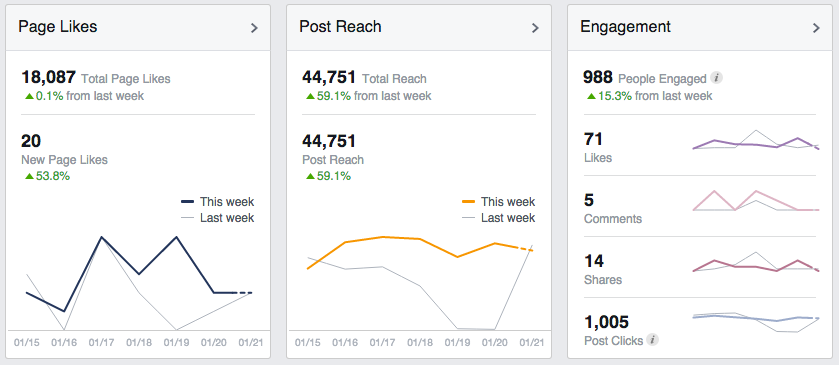
You also gain access to Facebook Insights, a feature built into your page that provides detailed analytics on how your page and posts are performing.
Brokers and agents can track metrics like page likes, post reach, engagement rates, and audience demographics to understand what content resonates with their audience and refine their strategy accordingly.
Here are just some of the analytics you’ll see with Facebook Insights:
How to Create a Facebook Business Page

Here is a step-by-step guide to creating your real estate Facebook business page:
1. Log into your Facebook account
To create a business page, you need a personal Facebook profile. If you don’t have one, you need to sign up for a free account.
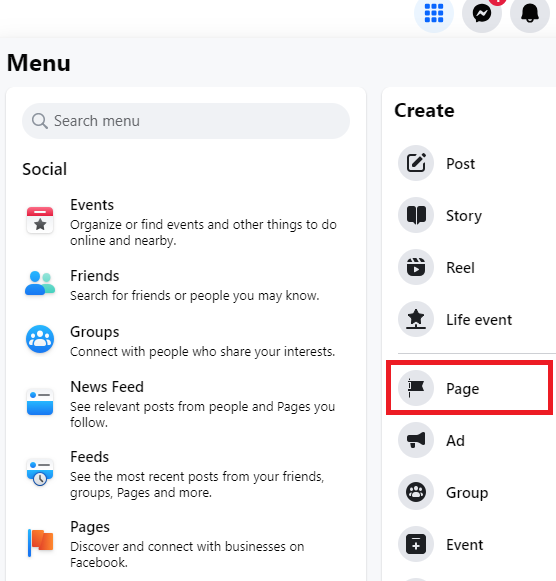
Once logged in, click on the drop-down menu in the top right corner and select “Create Page.”
2. Choose the page type
Next, you need to choose a page type, which can either be:
Business or brand: Select this option if you’re setting up a page for your real estate agency. This is ideal for showcasing your brand, service, and properties.
Community or public figure: This option could work for individual agents who want to build a separate personal brand from their real estate company.
3. Enter your business information
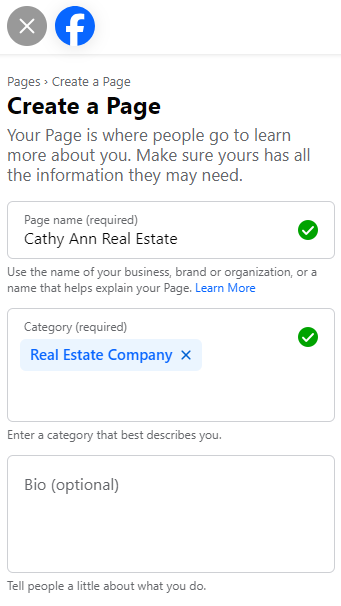
You’ll need to create a page name for your business. You could use your business name or your full name if you’re an individual agent. Ensure the name that you use is easy to search and recognize.
Next, you’ll need to select a category for your Facebook business page. Start typing “Real Estate” and select the relevant category, such as “Real Estate Agent,” “Real Estate Service,” or “Real Estate Company.”
This is also your opportunity to write a bio for your page. There is a short section where you tell people about your business and services. A good bio for your real estate Facebook page should be concise, informative, and engaging while reflecting your business’s personality and expertise.
4. Complete your business details
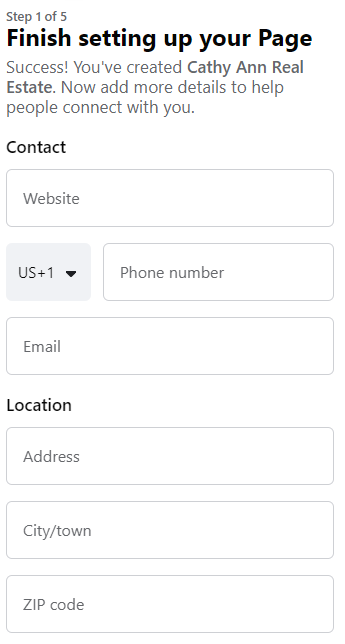
The next step is to complete your business details, including your:
About section: Write a concise yet informative description of your real estate business, including your services, the areas you serve, and what makes your business unique in the real estate market.
Contact information: Include your phone number, email address, and location so clients can learn more about your business and contact you.
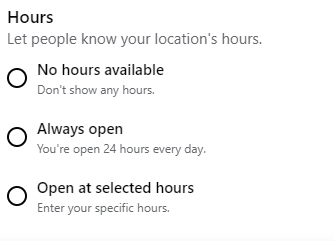
Additional details: You can add more information, such as your business hours, company story, or even a mission statement.
5. Add a profile picture
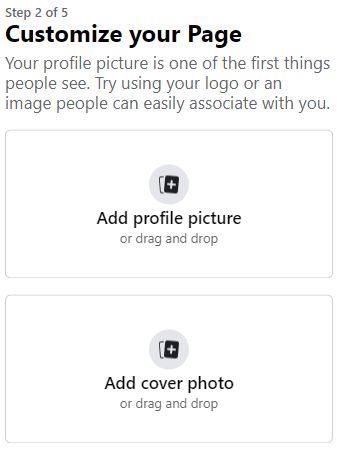
Your next step is to add a profile picture to your business page, which is usually a company logo. However, you may want to use a professional headshot if you’re an individual agent.
Ensure the image is high-quality and easily recognizable, as it will appear as a small thumbnail on Facebook.
6. Add a cover photo
This larger banner image should represent your brand visually, use a high-quality photo of a property, your team, or a local landmark.
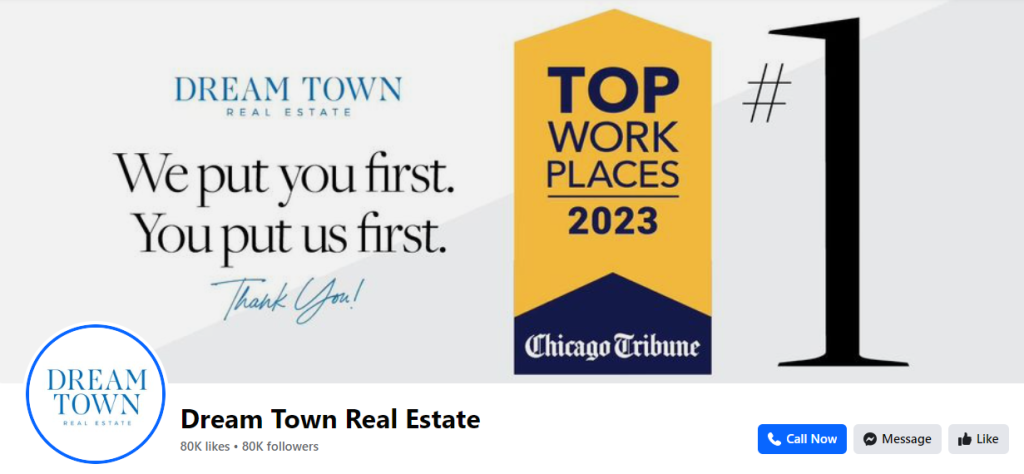
Dream Town Real Estate uses a clear image of their business logo as their profile picture and a high-resolution cover photo promoting their brand’s mission and an award they’ve won:
7. Create a username for your page
The username you select for your Facebook business page is your URL. It should be short, memorable, and consistent with your other online branding.
Here’s the username Dream Town Real Estate has selected for their page:

8. Set up a call-to-action (CTA) button
As mentioned earlier, Facebook allows you to add a CTA button like “Contact Us,” “Call Now,” or “Send Message.” Choose one that best fits your business goals.

Depending on the button you choose, you may need to provide a link, such as one for your booking system, contact form, or phone number.

9. Publish your page
Double-check all the information, images, and settings for your new business page to ensure everything looks professional and accurate. Once you’re satisfied with the setup, click “Publish” to make your page go live.
10. Invite friends and followers
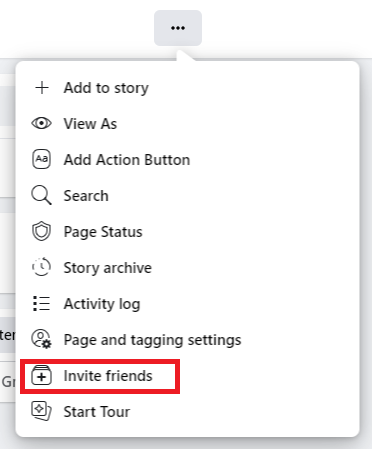
You can use the “Invite Friends” feature to ask your existing Facebook friends to like your new business page.
To increase exposure, you can also post the link to your business page on your personal profile and other social media platforms or include it in your email signature.
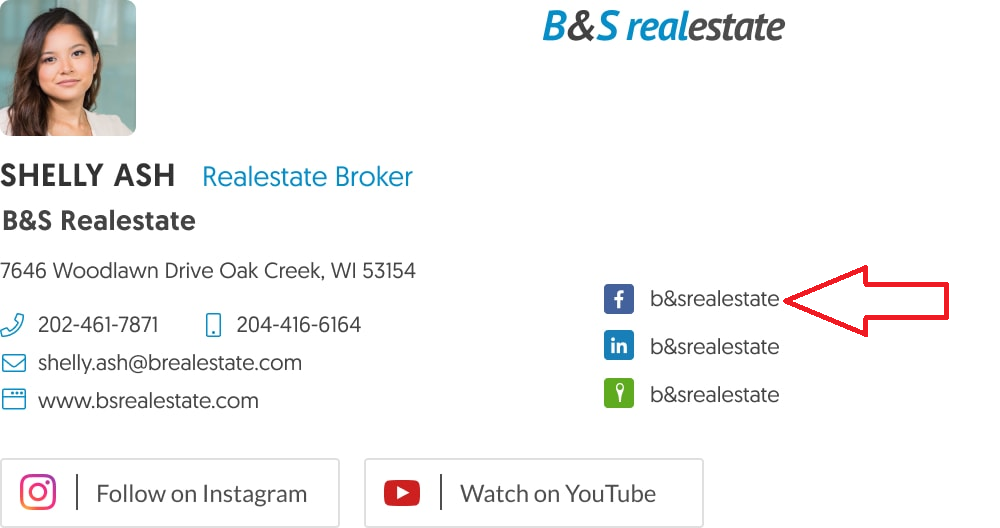
Here’s how Shelly Ash from B&S Real Estate showcases the brokerage’s Facebook page in her email signature:
2. Develop a marketing strategy for your Facebook Business page

Now that you’ve created a business page, you need a solid marketing strategy if you want to get results. Here are some aspects you’ll need to include in your Facebook marketing strategy:
Define your goals
Start by setting clear, measurable goals for your Facebook marketing efforts. These could include:
- Increasing brand awareness.
- Generating real estate leads.
- Promoting your property listings.
- Driving traffic to your website.
You may also want to set certain key performance indicators (KPIs) to measure your success, such as:
- Page likes.
- Post engagement.
- Leads generated.
- Website clicks.
Know your audience
Define your target audience based on demographics such as age, location, and income. You should also consider their behaviors and interests.
For example, you might target first-time home buyers, investors, or individuals looking to relocate to your area.
Consider segmenting your target audience into different groups, such as buyers, sellers, or renters. This will allow you to tailor your marketing content and real estate Facebook ads to each group’s specific needs.
Businesses that segment their audiences see a 90% increase in knowledge about their customers. And 82% of companies using segmentation are able to improve their value proposition.
Create a posting schedule
You need to establish a consistent posting schedule to engage your followers and generate leads regularly. The Facebook algorithm also prioritizes pages that post fresh content.
Your posting schedule could be daily or several times per week, depending on how much time you have available to create and share posts. Consistency helps maintain engagement and keeps your audience informed.
Define your content mix
You need to decide on the types of content you’ll be posting to your business page. This means you must provide your followers with the kinds of content they want to see. For example, if you’re targeting first-time home buyers, you should create a mix of content that educates and informs buyers about their first purchase.
We’ll discuss the types of content you can share later in this article, but for your strategy, you should consider establishing content pillars. Some content pillars you could center your posts around include:
- Inspirational.
- Educational.
- Informative.
- Engaging.
- Promotional.
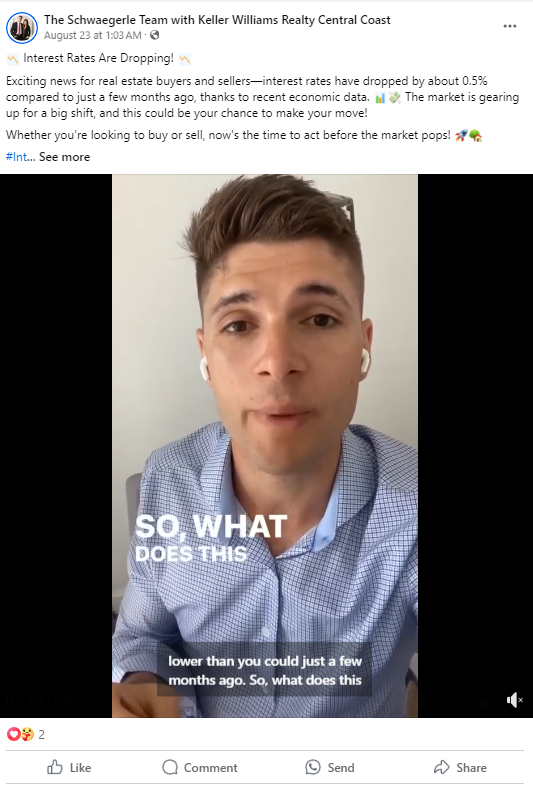
Here is a post from The Schwaegerle Team with Keller Williams Realty Central Coast is an educational video that targets both buyers and sellers with helpful information about interest rates:
Determine your engagement tactics
Determine how you’ll generate engagement on your Facebook page. You could engage your audience by posting polls and quizzes or hosting Q&A sessions.
Plan for real estate lead generation and nurturing
Finally, you need to determine how you’ll generate leads and nurture them until they become paying clients.
You can use Facebook’s lead forms to collect contact information from potential clients and offer incentives in exchange for their information, such as a free home valuation, market report, or consultation.
A Facebook lead form is an advertising feature that allows you to collect information and other details from potential clients directly within the platform.
The form is easy to set up and gives you a range of options to customize it:
Source: Privyr
This is what a Facebook lead form looks like to a user once you’ve created it:
Source: LeadSquared
You can use a customer relationship management (CRM) platform to track leads and maintain communication. Then, develop a plan to promptly follow up with new leads through phone calls, emails, or direct messages.
You could also integrate your Facebook leads with your email marketing strategy by sending targeted emails based on their interests and behavior. Lead nurturing emails get up to ten times the response rate compared to standalone email blasts.
3. Create engaging Facebook content

There are several factors that make real estate Facebook content excellent. When creating content, you should:
Create audience-centered content: Develop content that speaks directly to your target audience and focus on topics that matter most to buyers and sellers. This could be market trends, home-buying tips, or advice on preparing a home for sale.
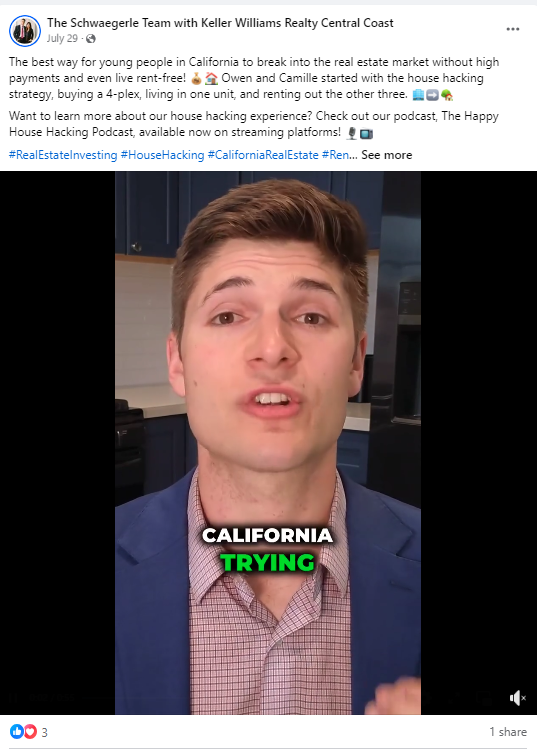
In the example below from The Schwaegerle Team with Keller Williams Realty Central Coast, the brokerage uses a video to speak directly to a younger audience in California about a strategy called house hacking:
Ensure timeliness: Align your posts with current market conditions and local events. For example, as the cold season approaches, you could share tips on preparing a home for winter.
Provide educational and informative content: Provide valuable content that helps your audience make informed decisions. This could include how-to guides, tips, or real estate industry insights.
Provide entertainment value: Real estate doesn’t have to be all business. Share content that entertains your audience, such as video tours of unique properties, fun facts about your area, or lighthearted posts about the home-buying experience.
Use high-quality visuals: Showcase your properties using professional-grade photos and videos. High-quality visuals are crucial for capturing the attention of potential buyers and sellers.
Include a clear CTA: Encourage your audience to engage with your posts by including CTAs like “Schedule a viewing,” “Contact us for a free market analysis,” or “Share this post if you love this home.”
Use interactive elements: Engage your audience with polls or questions related to real estate, such as “Which home feature is a must-have for you?” or “What’s your favorite local attraction?”
Aim for authenticity: Be authentic in your posts by sharing real stories, challenges, and successes from your day-to-day work in real estate. Authenticity builds trust and sets you apart from competitors who may rely on generic, impersonal content.
Display transparency: Be transparent about the real estate process, including potential challenges or common pitfalls. This honesty can help build credibility and a stronger connection with your audience.
Use emotional connections: Real estate decisions are often emotional. Create content that taps into these emotions—the excitement of buying a first home, the nostalgia of selling a family home, or the relief of finding the perfect rental.
Enhance sharability: Post content your audience will want to share, such as stunning property photos, interesting market insights, or posts highlighting local community events. This can increase your reach and attract new followers.
What to post on your Facebook Page

Now that you know what makes good Facebook content, let’s look at the types of content you should be posting to your business page:
Property listings
Highlight new properties on the market with high-quality photos, videos, and a brief description. Include details like the:
- Location.
- Price.
- Number of bedrooms and bathrooms.
- Any special or unique features.
You could also share 360-degree virtual tours or walkthrough videos of properties to give potential buyers an immersive experience.
Additionally, you can use your business page to promote upcoming open houses with specific dates, times, and property details. This is another type of Facebook post where eye-catching visuals are crucial for drawing attention.
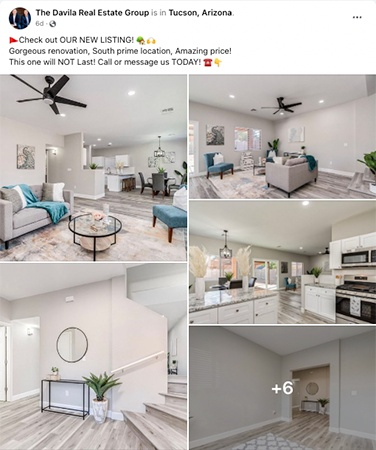
The Davila Real Estate Group regularly shares property listings on its business page using eye-catching photos as well as a clear call to action:
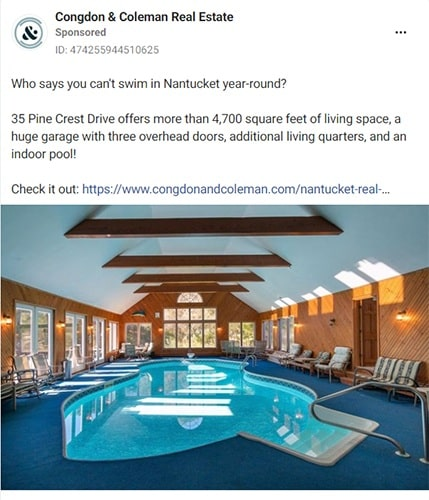
In the post below, Congdon & Coleman Real Estate highlights some great features of a unique property and directs interested buyers to their website for more information:
Client testimonials and success stories
It’s a good idea to post short videos of satisfied clients sharing their positive experiences with your real estate services.
However, you don’t only have to post video testimonials; you can also share visuals that include client reviews and testimonials.
You could also showcase how you helped a client through the buying or selling process, perhaps including a before-and-after image of the property.
In the post below, a real estate agent named Hayley Westhoff uses Facebook to share a success story about a property she sold that went under contract after only seven days:
Chris and Kristen Real Estate often share client testimonials to their business page, which they call “Client Love”:

Educational content
Create Facebook posts that share practical advice for first-time buyers, tips on staging a home for sale, or steps to getting a mortgage approved.
You could also provide updates on the local real estate market, including trends, average home prices, and economic factors influencing the market.
Use your Facebook page to address common questions about buying, selling, or investing in real estate. This can include posts like:
- What to look for in a home inspection.
- How to determine the right asking price.
- How to work with a real estate agent.
- How to find the right broker for your needs.
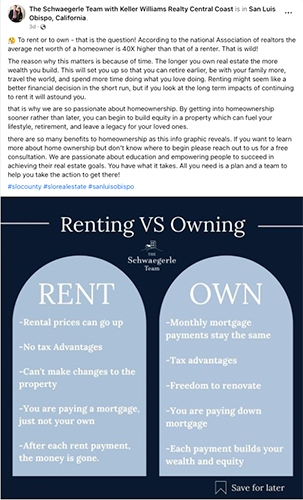
The Schwaegerle Team with Keller Williams Realty Central Coast regularly shares educational content on their Facebook page. The post below educates their followers about the pros and cons of renting versus owning a home:
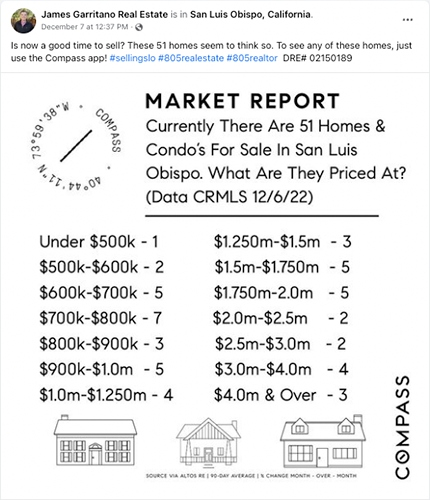
In the post below, James Garritano Real Estate shares a market report for San Luis Obispo that educates its followers about the current sellers’ market:
Community involvement
Promote local events or activities in your area, such as community fairs, charity runs, or school events. This demonstrates your involvement in the community and helps you connect with local residents who may need your services.
Collaborate with local businesses by featuring them in your Facebook posts. You could do a “Local Business of the Week” post highlighting a restaurant, shop, or service provider in your area.
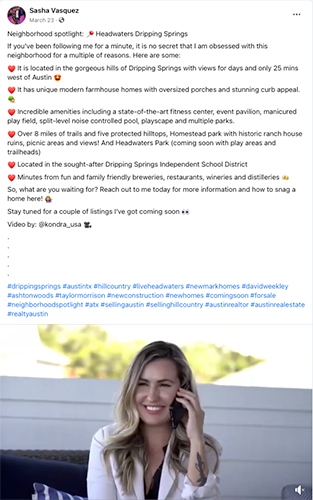
In the Facebook post below, Sasha Vasquez shares some information about an attraction in her local neighborhood:
Behind-the-scenes content
Share what a typical day looks like for you as a real estate agent or broker, including property visits, meetings with clients, and other tasks.
You can also use your business page to introduce your team members with short bios and fun facts to build a personal connection with your audience.
Additionally, if you’re involved in any property development projects, post updates on progress, including photos or videos of the construction or renovation process.
In the post below, Andrew Weber from 6035 Real Estate Group shares a behind-the-scenes moment at his real estate office:

Engagement posts
As mentioned earlier, you can create interactive posts where your followers can vote on their favorite type of home, guess home prices, or test their knowledge about real estate.
You can also host Q&A sessions where followers can ask questions about the real estate market, the buying or selling process, or other related topics.
Another idea is to run a contest where followers can win a gift card or a local experience, encouraging likes, shares, and comments.
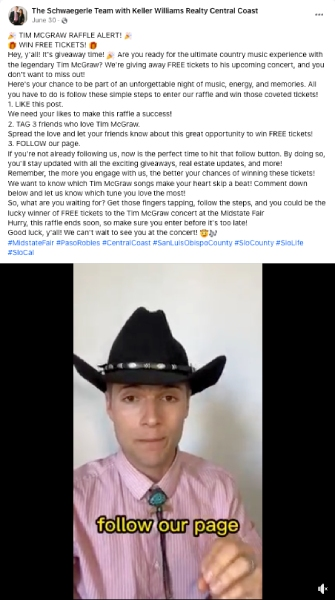
Below is another post from the Schwaegerle Team with Keller Williams Realty Central Coast about a contest to win free tickets to a live concert. They encourage engagement by having their followers like the post, tag three friends in the comments, and follow their page to enter the competition:
User-generated content (UG)
User-generated content (UGC) is content created by your clients that you didn’t develop yourself. Millennials find user-generated content (UGC) 35% more memorable and 50% more trustworthy than other content.
Encourage clients to share photos of their new homes and tag your business in them. You can then repost these images on your Facebook business page to showcase happy homeowners.
Invite clients to share their home buying or selling experiences using your services and feature these stories on your page.
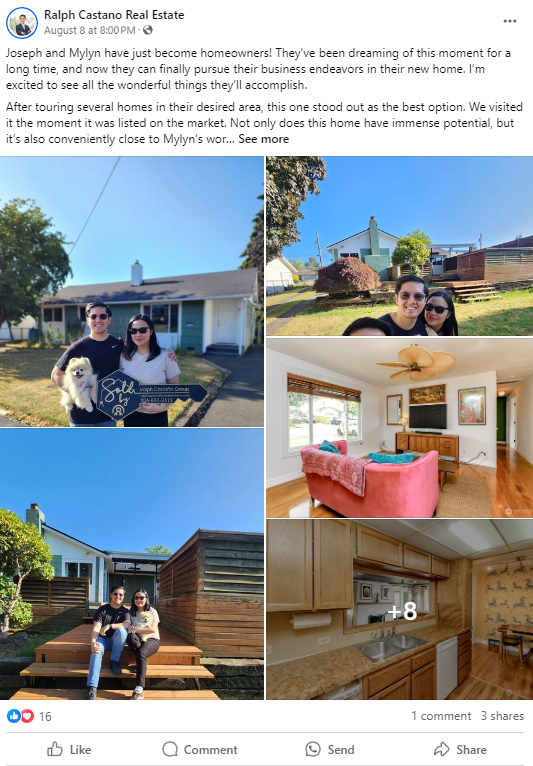
Here’s a post from Ralph Castano Real Estate, where he shares photos taken by new homeowners celebrating their purchase:
Seasonal and holiday posts
You can post festive greetings and seasonal messages to engage with your audience during special holidays.
As mentioned above, you could also offer tips on preparing a home for winter, summer, or specific holidays.
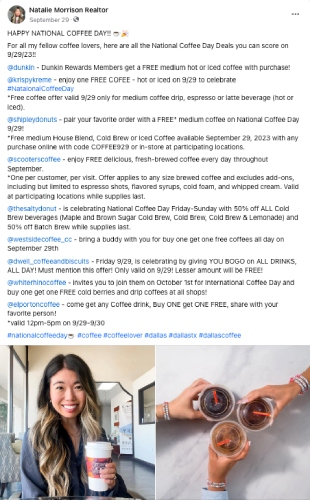
In the post below, Realtor Natalie Morrison celebrates National Coffee Day by sharing all her favorite local coffee spots:
Success metrics
Celebrate successful sales by posting about properties you’ve recently sold. Mention how quickly the property sold or if it fetched more than the asking price.
You may also want to share milestones, such as reaching a certain number of followers, years in business, or awards you’ve won.
Promotions and offers
Post about any promotions you’re running, such as discounted commission rates or free home staging services for a limited time.
Additionally, you may want to promote any referral programs that you have where clients can earn rewards for referring new customers to you.
Inspirational and motivational content
Real estate Facebook content doesn’t have to be solely business-related. You can shake things up by sharing motivational quotes about home ownership, investing in real estate, or achieving dreams.
Jake Sherbinin Real Estate regularly shares motivational content on his Facebook page, like the post below:

Facebook Live broadcasts
You can use the Facebook Live feature to broadcast a live session that your followers can watch in real time.
You could use this feature to host virtual open houses, answer your followers’ questions, and give them a property tour.
You can also use Facebook Live for the Q&A sessions we’ve mentioned above. You can discuss common real estate questions or market updates. This not only positions you as an expert but also helps engage your audience in a more interactive way.
4. Check out successful Facebook Pages for Inspiration
Here are some real estate business pages to follow to inspire your own posts:
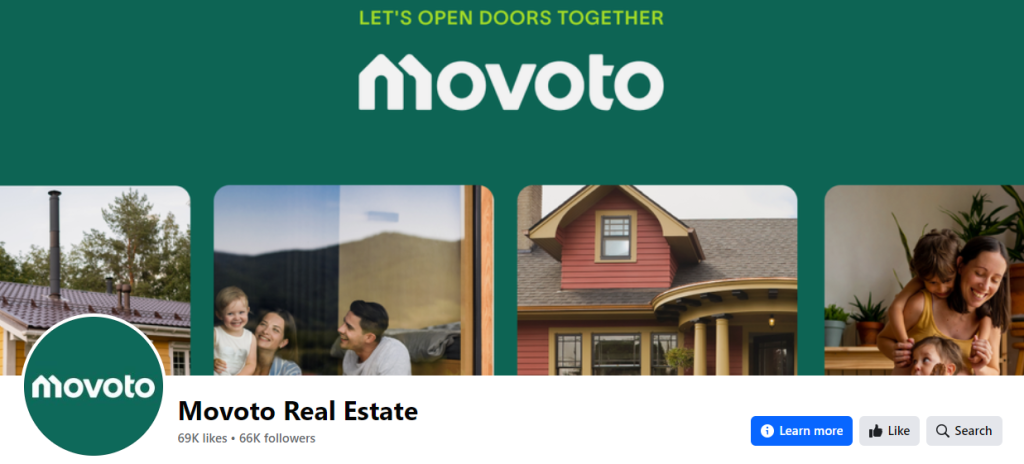
Motovo is a national real estate business that takes a local approach to its content. On their business page, you’ll find a mix of free content that appeals to homeowners, buyers, and investors, as well as people in specific locations:
The Joe Taylor Group Facebook page focuses on introducing their followers to their team. This makes a great impression from the start. In fact, their profile image is of their team:

The Lanier Property Group uses a selection of videos to introduce their company and give prospective buyers tours of their featured listings:

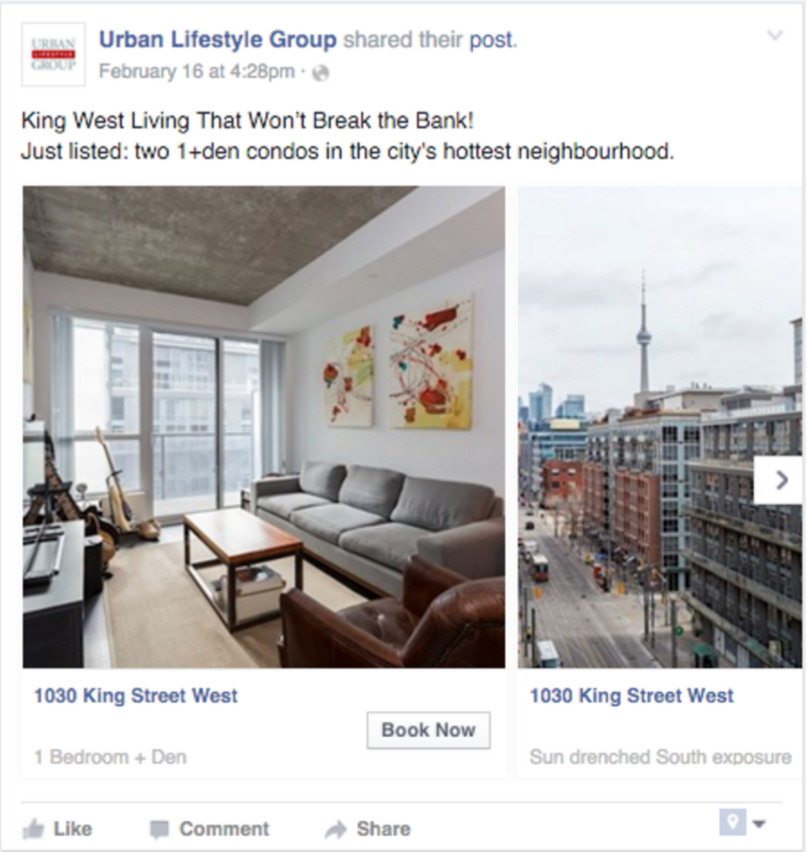
The Urban Lifestyle Group uses its business page to share carousel posts—a type of post that allows you to share multiple photos and links—to link to various landing pages so that people can view numerous listings at once:
DIGGS takes a more personal approach in some of their Facebook posts by using a cover photo that shows a happy family who has just moved into their new home; consulting with a real estate agent:

5. Generate Real Estate Leads with Facebook Ads
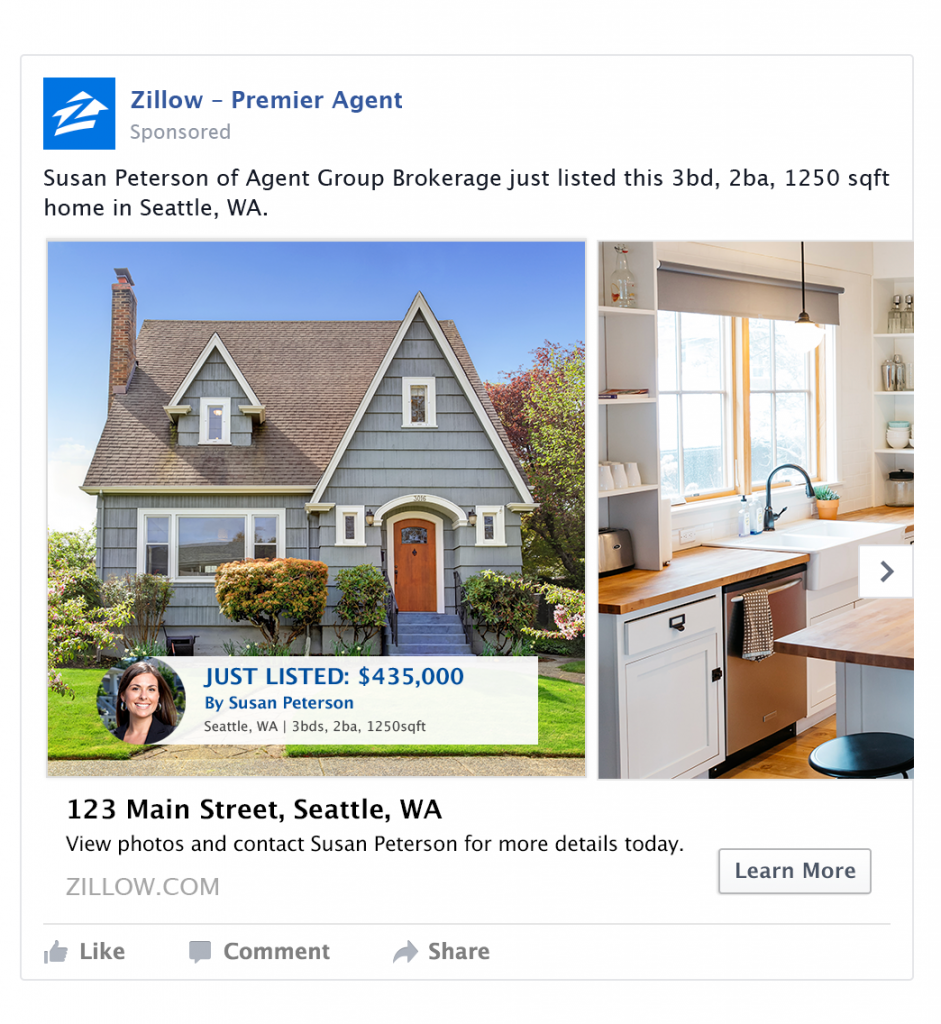
Facebook Ads are one of the most effective tools for generating consistent, high-quality real estate leads.
They allow you to reach your ideal audience, promote listings, and capture contact details, all within the same platform.
Unlike organic posts, which depend on timing and visibility, paid ads give you full control over who sees your content and how much you spend.
Before you begin, you’ll need to:
- Consider your goal: Do you want to collect contact details through Facebook or send users to a landing page?
- Know your target audience: Where are they located? What services are they interested in?
- Have compelling ad copy and visuals ready to upload.
Now, let’s set up your first campaign.
1. Open Meta Ads Manager

Go to Facebook.com/adsmanager and click “Create”. You’ll be asked to choose a campaign objective.
- Select “Leads” if you want people to submit their details without leaving Facebook.
- Select “Traffic” if you want to drive visitors to your website or listing page.
- Click “Continue” to name your campaign.
2. Enable the Special Ad Category

Image source: Redshift Media
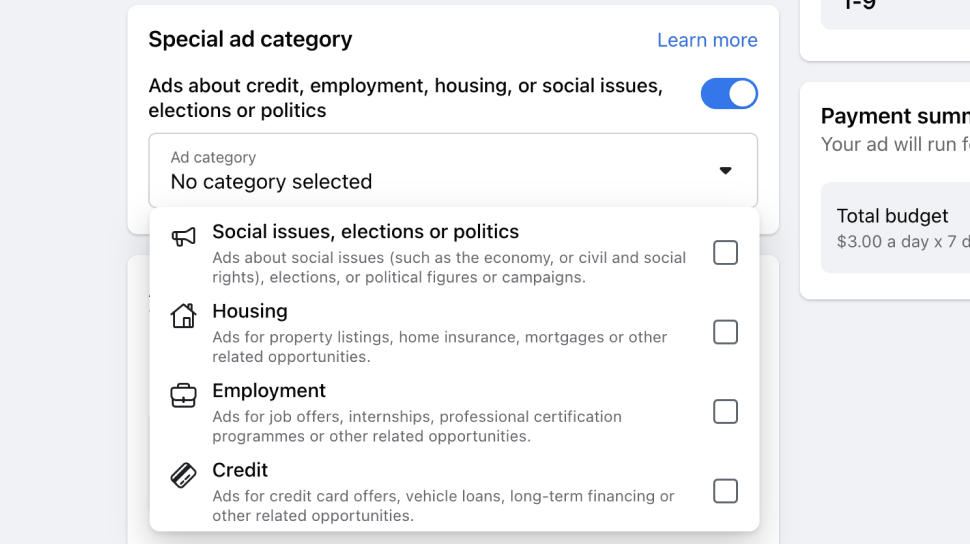
When creating your campaign, toggle “Special Ad Categories” and select “Housing.” This automatically locks “Age” to 18–65+ and “Gender” to “All”. It also restricts certain targeting options to ensure compliance with Meta’s Fair Housing Policy.
3. Set up your audience

Under “Ad Set”, scroll to “Audience” and choose who should see your ad.
- Click “Edit” next to “Location” and choose a city, address, or drop a pin. Your ad will be seen within a minimum 15-mile radius.
- You cannot use audience exclusions, demographics (like income), or behavioral targeting.
4. Create your ad
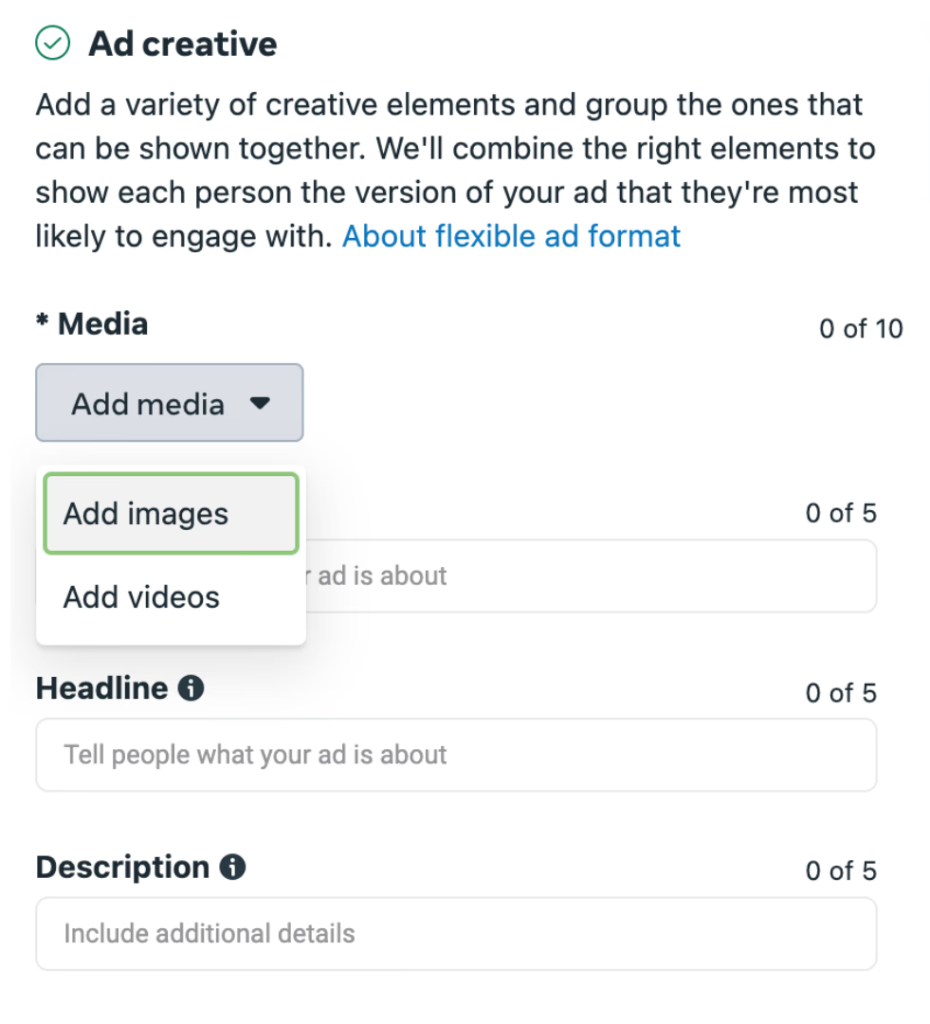
Under “Ad Setup”, choose your ad format, either “Single Image”, “Video”, or “Carousel”, and click “Add Media” to upload your visuals.
Use high-quality property photos or short walk-through videos that highlight key selling points.
Then complete the following fields:
- Primary Text: Short, clear copy like “See homes under $500K in Tampa.”
- Headline: Keep it under 40 characters, e.g., “Book a Free Viewing.”
- Call to Action: Choose options like “Contact Us”, “Learn More”, or “Sign Up”.
If you selected Leads as your campaign objective, you’ll also need to set up your Instant Form:
- Under “Lead Method”, select “Instant Form” and click “Create Form”.
- Choose “More Volume” for a simpler form that maximizes submissions, or “Higher Intent” if you want users to confirm their details before sending.
- In “Questions”, add the fields you need, typically name, email, and phone number.
- In “Completion”, write a short thank-you message, such as:
- “Thanks for your interest! We’ll contact you shortly to schedule a viewing.”
- If you want to, add a button linking to your website or a featured property page.
When your ad preview looks good, click Next to continue to the budget and publishing setup.
5. Set your budget and publish

Under “Budget & Schedule”, choose a daily spend; we recommend starting with $10–$20/day.
- Click “Review” and choose “Publish”.
- Once live, open “Ads Manager”, click “Columns”, and choose “Performance” to monitor CPL and click-through rate (CTR).
- Pause any ad with a high CPL, duplicate those performing well, and keep testing new visuals or headlines weekly.
Free up your day to focus on Facebook with Paperless Pipeline
Creating a business page for your real estate business is crucial if you want to increase your visibility online, build trust and credibility with potential clients, and stay top-of-mind.
But how do you find time to create posts and run a business profile when you have to manage the entire transaction management process manually?
The good news is that there are tools to automate your transaction management process. This allows you to take a hands-off approach and focus on Facebook marketing.
Paperless Pipeline is powerful transaction management software designed to automate, streamline, and simplify your transaction management process. This means brokers and real estate agents don’t have to worry about manually managing transactions.
Visit our website to learn more about Paperless Pipeline and to claim your 14-day free trial. We’ll show you how much time you can save so that you can focus on your Facebook marketing efforts.

Ready to simplify your process and delight your agents?
In less than a minute you can start testing the newest features built to help your entire office close more deals. It’s simple, powerful, and 100% free to try without a credit card.
Try it free →